



































































CRM Software: Key Things to Know + Best CRM Tools for 2026

Improve Business Operations with Creatio's Agentic CRM

CRM software has become an essential tool for effectively managing customer relationships. Widely adopted across business functions, it helps organisations centralise data, streamline processes, and enable seamless cross-team collaboration to deliver better customer experiences.
Key takeaways
- The main drivers of CRM software adoption include inefficiencies in current processes (40%), limited functionality in existing tools (31%), and the need to capture new business opportunities (11%) (Capterra).
- Most CRM platforms provide core capabilities such as contact management, sales and marketing automation, customer service tools, analytics, and third-party integrations.
- To maximise their value, modern CRM platforms use AI to deliver predictive insights, automate routine tasks, personalise customer interactions, and improve decision-making in real time.
- The best CRM platforms in 2026 are: Creatio, HubSpot, Microsoft Dynamics 365, Freshworks, Zoho CRM, Zendesk, Pipedrive, Monday CRM, Keap CRM, and Insightly CRM.
- The next evolution of CRM is Agentic CRM: platforms such as Creatio CRM are powered by role-specific AI agents that go beyond automation to act proactively on behalf of teams, helping businesses scale workflows more efficiently and deliver smarter, more personalised customer experiences.
What is CRM Software?
Customer Relationship Management (CRM) software is a platform that helps businesses centralise customer information, track customer interactions, and automate workflows across the entire customer lifecycle. With CRM, organisations can manage leads and opportunities, analyse customer behaviour, run personalised marketing campaigns, streamline sales processes, and deliver more responsive customer support. As a result, CRM software helps teams build stronger relationships, improve productivity, and drive revenue growth.
7 business issues that CRM software addresses
According to Gartner, nearly half of organisations still rely on third-party tools (49%), spreadsheets (18%), or have no system at all (21%) to manage customer relationships. Beyond these limitations, businesses face a range of challenges that CRM software is specifically designed to address. Below are some of the most common examples:
1. Customer information silos across departments
When customer information is spread across multiple databases and teams, employees valuable time searching for details and risk delivering inconsistent experiences. For example, if sales teams need to contact marketing every time they want to understand how a customer first engaged with the business, communication with prospects becomes slower and the customer experience can feel disconnected.
A CRM system consolidates customer information into a single, intuitive dashboard, enabling faster response times, more personalised interactions, and a seamless customer experience.
2. Data silos and outdated customer information
Poor data management can significantly impact customer relationships. If your sales, marketing, and customer service teams are working with outdated, duplicate, or irrelevant data, it becomes more difficult to effectively engage customers and prospects.
CRM software automates the capture, updating, and organisation of customer data while eliminating data silos by centralising all information in one place. For example, a CRM integrated with your email system can automatically capture key customer information and add it directly to your database.
3. Poor Customer Experience
Slow response times, fragmented communication, and the frustration of having to repeat the same information to multiple team members all lead to a poor customer experience. CRM solutions can directly address these issues through automation, data management, and collaboration tools, enabling teams to engage with customers quickly and in a more personalised way.
4. Misalignment between marketing and sales teams
Disconnected strategies and ineffective handovers between marketing and sales teams can create a fragmented customer journey. Poorly coordinated handoffs and limited communication may result in lost opportunities, unqualified leads, and inconsistent customer messaging. CRM software helps bridge this gap by centralising data, connecting processes through workflow automation, and providing a shared platform that enables both teams to collaborate effectively.
5. Inefficient sales processes and lost leads
CRM software helps prevent leads from slipping through the cracks due to inefficient processes and systems, such as poor lead tracking, delayed or missed responses, disconnected email and data management systems, and human error. CRM can positively impact lead generation and customer retention through better data management, personalised engagement, and faster customer support.
6. High workloads caused by routine tasks
Customer-facing teams often lose valuable time on repetitive activities such as account research, quote generation, meeting preparation, follow-ups, and other administrative tasks. These manual processes not only reduce productivity but can also distract employees from higher-value work. With CRM automation, businesses can streamline routine activities and free teams to focus on strategic initiatives that directly contribute to revenue growth. For example, Nucleus Research found that Creatio CRM customers reduced manual data entry for sales teams by 17%, saving reps more time for customer interactions.
7. Limited visibility into business performance
Without the right insights, it can be difficult to measure success or identify areas for improvement. CRM software provides advanced, data-driven analytics to track marketing and sales performance, helping business quickly link outcomes to specific actions. For example, customer relationship management software can highlight key points where leads convert into customers, identify opportunities to refine campaigns, or provide valuable insights to strengthen CRM strategy.
Core CRM features to look for in 2026
The core features of a CRM are designed to provide a 360-degree view of the customer, streamline workflows, and strengthen collaboration across teams and business functions. Here are the key capabilities to evaluate in 2026:
Contact and lead management
This core CRM feature enables businesses to capture, organise, and track customer data and interactions in one place. It typically includes information such as contact details, communication history across channels, customer satisfaction, and lead scoring to help sales teams focus on the most promising opportunities. With complete customer profiles and activity history, teams can nurture leads more effectively and deliver more personalised experiences.
Sales, marketing, and customer service automation
Another essential CRM capability is reducing repetitive manual work and simplifying complex, multi-step processes across teams. By streamlining these activities, CRM automation can help businesses strengthen pipelines, improve conversions, and scale outreach without requiring additional resources.
For example, sales teams often benefit from automated lead scoring, pipeline updates, follow-up reminders, and deal tracking. Marketing teams benefit from features such as automated email campaigns, customer segmentation, and lead nurturing workflows. Service teams can use CRM software automation for ticket routing, case updates, and proactive notifications.
AI-powered tools and autonomous CRM agents
AI has become an essential capability of modern CRM platforms. Today’s systems use AI to support data-driven processes such as predictive lead scoring, next-best action recommendations, sentiment analysis, and content personalisation. This enables businesses to turn large volumes of CRM data into clear, actionable insights that help teams prioritise high-value leads, improve win rates, and deliver faster, more proactive customer service.
A major shift in CRM functionality is the rise of autonomous CRM agents — specialised digital co-workers that extend the capabilities of human teams by executing repetitive tasks and complex workflows. For example:
- Marketing AI agents can design and launch campaign workflows, generate tailored content for different audience segments, test subject lines, and optimise ad spend in real time.
- Sales AI agents can automatically update CRM records after phone calls, generate proposals or quotes, identify cross-sell and upsell opportunities, and even draft follow-up emails.
- Service AI agents can manage knowledge bases, classify tickets, generate personalised responses, summarise customer histories to support reps, and escalate issues when needed.
By embedding these role-specific agents, agentic CRMs significantly reduce workloads and help teams focus on strategy, relationship-building, and closing deals.
Analytics and reporting
Comprehensive dashboards and real-time reporting give managers full visibility into sales, marketing, and customer service performance. CRM analytics typically include capabilities such as pipeline tracking, lead source analysis, and service response monitoring, along with forecasting, KPI tracking, and AI-powered reporting that highlights patterns and recommends improvements. These insights reveal not only what’s happening but also why, enabling leaders to make more informed decisions, refine strategy, and predict outcomes with greater accuracy.
Customisation, scalability, and integrations
Every business has unique goals and processes, so a CRM needs to be flexible enough to support those requirements. The right platform should be customisable to your workflows, scale as a business grows, and integrate seamlessly with other tools and systems such as email, collaboration platforms, and accounting software. As a result, it helps create a connected business ecosystem that eliminates data silos and keeps teams aligned.
Organisations that prioritise flexibility are increasingly turning to no-code CRMs, which allow business users to design custom solutions through intuitive drag-and-drop interfaces. According to Nucleus Research, no-code CRMs can reduce implementation timelines by up to 70%, making it faster and easier to align technology with business needs.
10 best CRM software solutions for 2026
Having explored the opportunities and capabilities that CRM systems provide, the next step is to review the leading platforms helping businesses succeed in 2026 and beyond. Below is a comparison of 10 CRM providers, including their strengths and limitations, to help you identify the right solution for your business needs.
CRM Software | Best for | Pricing |
| Creatio | Businesses looking for a fully customisable CRM with Agentic AI capabilities that adapts to unique processes and workflows. | Composable pricing model: core AI-native platform costs 34 AUD per user/month; each CRM product (Marketing, Sales, and Service) with integrated role-specific AI agents costs 20 AUD per user/month. |
| HubSpot | Companies prioritising marketing automation with core CRM capabilities that integrates marketing and sales within a single platform. | Starts at 20 AUD per user/month for limited capabilities, with from comprehensive functionality available from 1824 AUD per month for 5 users. |
| Microsoft Dynamics 365 | Organisations already using the Microsoft ecosystem (Office 365, Outlook, Azure) for integration and cross-team collaboration. | Pricing is structured across multiple products, ranging from 70 AUD to 270+ AUD per user/month. |
| Freshworks | Small and growing businesses prioritising ease of use, affordability, and core CRM tools without unnecessary complexity. | Starts at approx. 13 AUD for sales and marketing, and 50 AUD for customer service per user/month |
| Zoho CRM | Small to mid-sized businesses looking for a flexible and cost-effective CRM. | Starts at 28 to 90 AUD per user/month. |
| Zendesk | Companies that prioritise customer service and require robust support ticketing alongside CRM functionality. | Starts at 35 AUD per agent/month |
| Pipedrive | Sales-focused teams looking for a simple, pipeline-driven CRM that improves deal tracking and conversion rates. | Starts at 27 AUD per user/month |
| Monday CRM | Teams seeking greater collaboration within their CRM platform and relying heavily on data visualisations. | Ranging from 17 to 35 AUD per user/month |
| Keap CRM | Small businesses looking for an all-in-one solution with CRM, sales, and marketing automation. | Starts at 419 AUD per month for 2 users, supporting up to 1500 contacts. |
| Insightly CRM | Service-based or project-oriented businesses that need CRM combined with project management capabilities. | Starts at 40 AUD per user/month. |
1. Creatio
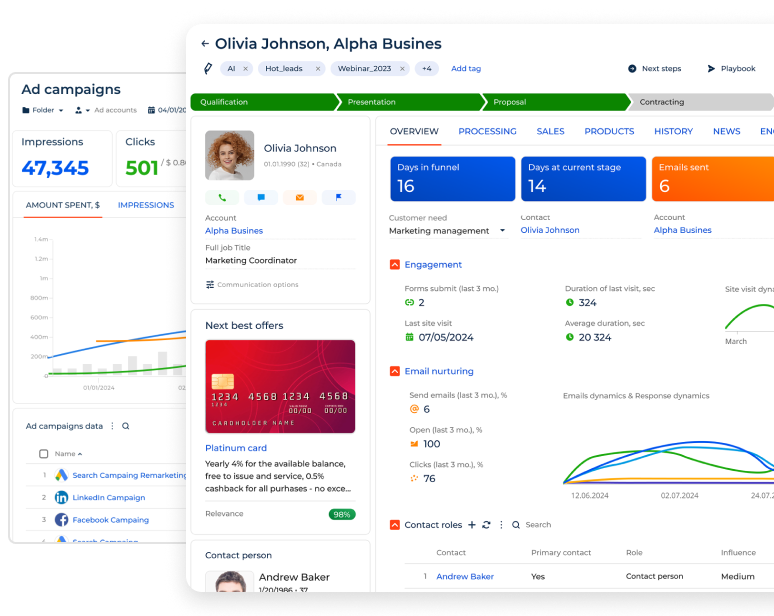
Creatio CRM is a next-generation CRM platform designed to manage customer and operational workflows with AI and no-code at its core. It enables business users to manage the entire customer journey, improve team productivity, and streamline even complex business processes with ease.

Creatio offers a full-featured CRM suite for marketing, service and sales automation, all integrated within a single agentic platform. The system can be deployed as a complete CRM suite or as standalone solutions tailored to an organisation’s specific requirements:
- Creatio Marketing: a new era marketing platform designed to accelerate the lead-to-revenue cycle with AI and no-code at its core.
- Creatio Sales: a new-generation sales platform designed to manage the end-to-end sales cycle with AI and no-code capabilities at its core.
- Creatio Service: a new era service platform designed to enhance customer experiences and drive service excellence, with AI and no-code at its core.
- Creatio Studio: a no-code agentic platform for building powerful business applications and AI agents using natural language and visual designers.
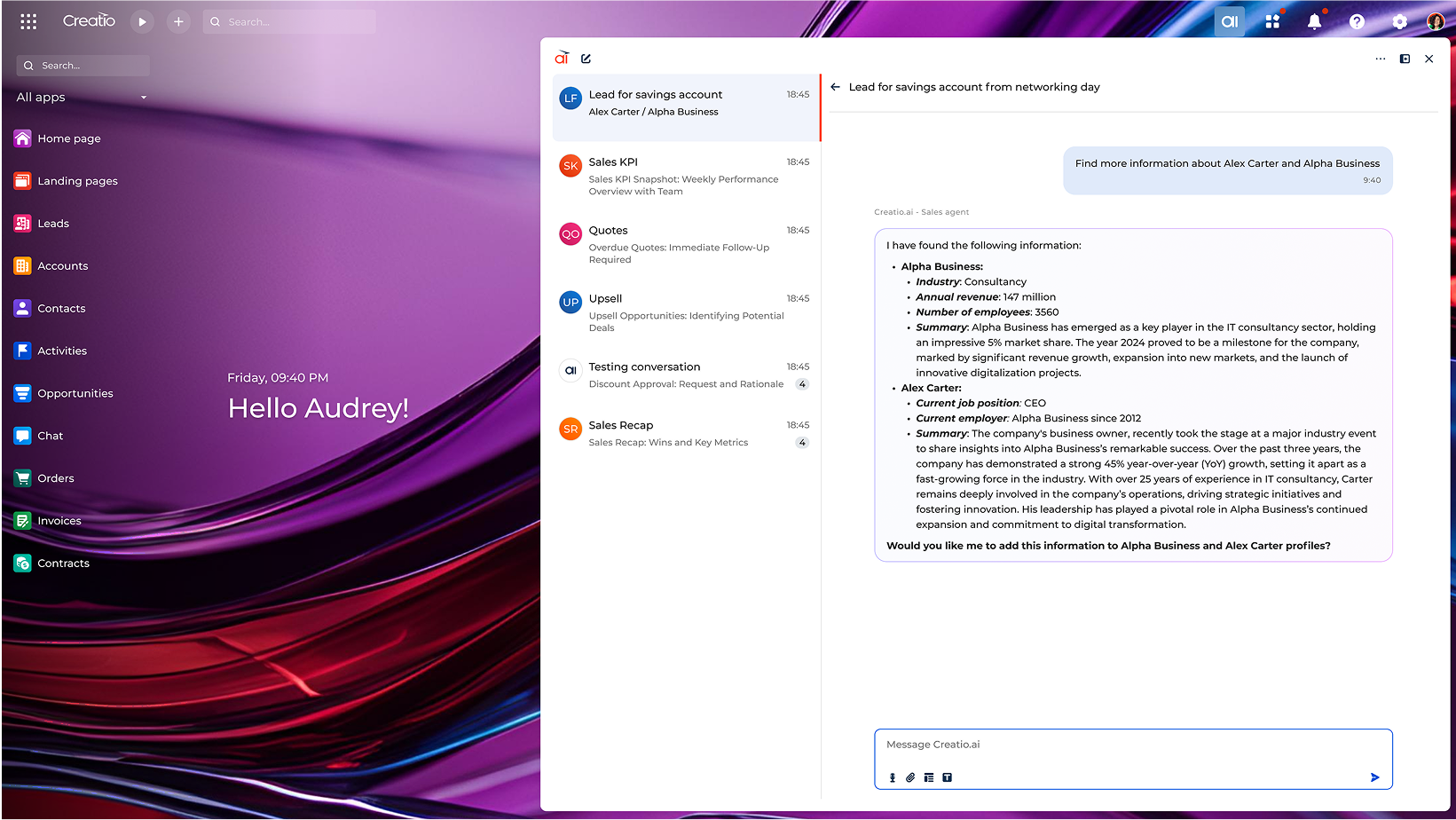
At Creatio CRM, AI is embedded directly into the platform’s core, with full awareness of CRM objects, including data, relationships, workflows, and processes. Its modern conversational AI workspace enables users to perform CRM action using natural language commands or trigger role-based agent execution directly within chat. Unlike many other CRM platforms, Creatio’s AI capabilities are fully integrated and available at no additional cost.
To help organisations get more value from the combination of people and technology, Creatio also offers ready-to-use AI-powered agents for sales, marketing, and service operations. These agents take over repetitive tasks, streamline workflows, and scale operations efficiently, giving employees more time to engage with customers and focus on higher-value, creative work.
Creatio is well suited to medium and large organisations seeking an adaptable, efficient, and cost-effective CRM platform with an agentic architecture. The company was recognised as a Visionary in the 2025 Gartner® Magic Quadrant™ for Sales Force Automation Platforms based on its ability to execute and completeness of vision, further reinforcing its market position and capabilities.
Key features:
- A 360-degree customer view to provide a complete understanding of each customer, from first interaction to long-term relationship.
- Agentic platform for CRM and workflow automation across marketing, sales, and Service operations.
- Sales Agents, including Account Research Agent, Meeting Agent, and Quote Generation Agent designed to improve sales reps performance and accelerate deal cycles.
- Marketing Agents, including Lead Conversion Agent, Marketing Content Agent, and Email Generation Agent, help marketers nurture prospects, create personalised campaigns, and increase engagement at scale.
- Service Agents, including Customer Support Agent and Knowledge Base Agent, automate ticket resolution, provide instant answers, and improve customer satisfaction.
- No-Code Agent Builder enables users to create fully functional AI agents by visually composing skills, workflows, and knowledge without requiring technical expertise.
- AI-assisted no-code and composable architecture enables business users to customise the CRM platform to their unique workflows and scale operations efficiently.
- More than 700 applications and integrations available at Creatio Marketplace
- More than 20 industry-specific CRM workflows with pre-built features and tools designed to support optimised performance.
Pros:
- One agentic platform to automate CRM and workflows across sales, marketing, and service
- AI-driven automation and analytics that support teams across the entire customer lifecycle, providing actionable insights and enabling confident, data-driven decision-making.
- Ability to create a fully tailored all-in-one CRM aligned with unique business requirements.
- Highly customisable workflows and industry-specific processes that extend core CRM capabilities into broader business operations.
- Transparent, composable pricing model with AI capabilities included at no additional cost.
- Scalable architecture suitable for businesses of all sizes, from startups to enterprises managing high volumes of customer interactions
Cons:
- May involve an initial learning curve due to the platform’s extensive customisation options.
Customer reviews:
- G2: 4.7
- Capterra: 4.7
- Gartner: 4.9
2. Hubspot
HubSpot is a leading CRM platform known for its strong inbound marketing capabilities and user-friendly interface. It offers a comprehensive set of tools for lead management, personalised marketing automation, and data-driven insights designed to strengthen customer relationships.

Key features:
- Contact management centralises customer data, allowing users to manage contacts, segment them into lists, and track interactions across the customer journey.
- Marketing automation tools support personalised email campaigns, lead nurturing, and automated marketing workflows through an intuitive visual workflow editor.
- Sales automation features such as lead scoring, deal tracking, and pipeline management help sales teams move opportunities through the pipeline more efficiently.
- Inbound marketing tools including landing page builders, SEO, and forms help attract and convert leads.
- Reporting and analytics powered by AI.
- Customer support tools including ticketing, customer feedback, and knowledge base capabilities to enhance customer service and manage support requests.
- Integration library with key integrations such as Salesforce, Google Workspace, and social media platforms.
Pros:
- Intuitive and easy-to-navigate interface enables teams to quickly become familiar with the platform, supporting fast adoption and reducing training time.
- Advanced marketing automation designed specifically for marketers.
- In-depth reporting tools that help users analyse key marketing and sales metrics, providing actionable insights to optimise strategies and improve performance.
- As a pioneer in inbound marketing, HubSpot offers powerful tools such as SEO optimisation, blogging, and content creation capabilities to help businesses attract, engage, and convert leads.
- Free CRM plan includes a strong range of features, from contact management to core marketing and sales tools, making it a valuable option for small businesses and startups.
Cons:
- Limited integration options.
- Limited customisation options for CRM workflows.
Customer reviews:
- G2: 4.4
- Capterra: 4.5
- Gartner: 4.5
3. Microsoft Dynamics 365
Microsoft Dynamics 365 is a widely recognised CRM platform that offers a comprehensive suite of business automation tools, enabling organisations to implement an effective CRM strategy. Its extensive capabilities and integrations help streamline workflows and improve productivity across business functions.

Key features:
- Sales automation tools for managing the entire sales process, including lead tracking, pipeline management, and forecasting.
- Customer service capabilities such as case management, knowledge base, and AI-powered virtual agents to enhance customer support.
- Marketing automation and customer segmentation tools.
- Built-in AI features and real-time analytics that provide actionable insights into customer behaviour, sales trends, and business performance.
- Seamless integration with other Microsoft products.
- No-code/low-code tools for automating business processes and customising workflows to suit unique business requirements.
Pros:
- Integration with the Office ecosystem enables seamless data flow through features such as Dataverse.
- With low-code tooling, Microsoft Dynamics 365 enables citizen developers to extend the CRM functionality, create analytics, and build new automation with ease.
- Microsoft Dynamics combines its Sales and Service solutions into a unified CRM suite alongside other applications, providing consistent data and insight across the entire organisation.
- Leveraging advanced AI capabilities, Microsoft Dynamics 365 offers predictive insights, sales forecasting, and AI-driven recommendations. AI tools such as Dynamics 365 Copilot help users automate repetitive tasks and generate valuable customer insights.
Cons:
- Limited integration capabilities with tools outside of Microsoft ecosystem.
- Complex pricing structure that does not provide unbundled CRM options.
Customer reviews:
- G2: 3.8
- Capterra: 4.4
- Gartner: 4.4
4. Freshworks
Freshworks is an AI-powered, user-friendly CRM platform designed to streamline sales, marketing, and customer service processes while driving revenue growth. The CRM includes Freddy AI, which delivers predictive insights, automates workflows, and provides intelligent recommendations.

Key features:
- Marketing automation capabilities, including email marketing, customer engagement management, and personalised communication through targeted messaging.
- Customer support capabilities such as ticket management, live chat, and help desk integrations.
- Sales pipeline management that enables users to track and optimise sales processes through intuitive pipeline management.
- Workflow automation for routine tasks such as sending follow-up emails, creating tasks, or assigning leads, enabling teams to focus on strategic activities.
- Freddy AI, Freshworks' AI assistant, provides predictive insights, lead scoring, and automated recommendations to improve sales and customer support effectiveness.
- Customisable dashboards and reporting to provide insights into sales performance, customer behaviour, and campaign effectiveness.
- Integrations with a range of third-party applications such as Slack, Mailchimp, and Google Workspace, creating a flexible and connected ecosystem.
Pros:
- Freshworks places a strong emphasis on ease of use, helping teams adopt the CRM platform quickly and efficiently with minimal training.
- The platform offers deep integrations with Gsuite and other essential tools, delivering a level of connectivity that compares strongly with many competing CRM platforms.
- AI-powered features are integrated across the platform, helping automate repetitive tasks, streamline workflows, and optimise customer relationship management processes, saving valuable time and improving productivity.
- Competitive pricing.
Cons:
- Customisation options are relatively limited. While reports and dashboards can be personalised, support for more advanced custom workflow automation is more limited compared with some other platforms.
- Integration capabilities are modest, with fewer connections with business automation tools than some larger CRM platforms.
- While Freshworks' analytics and reporting capabilities are strong, they may not provide the same depth and level of details as some more comprehensive CRM platforms.
Customer reviews:
- G2: 4.5
- Capterra: 4.5
- Gartner: 4.3
5. Zoho CRM
Zoho CRM is a feature-rich and customisable customer relationship management platform that helps businesses automate their sales, marketing, and support processes. It is designed for organisations of all sizes, offering scalability and a range of tools to improve customer engagement, lead management, and workflow efficiency.

Key features:
- Sales pipeline management enables users to easily track leads through each stage of the sales funnel, from initial contact to deal closure, with intuitive pipeline views and drag-and-drop functionality.
- Workflow automation for routine tasks such as follow-up emails, lead assignment, and task creation, helping teams free up time for more strategic work.
- Zoho’s AI assistant, Zia, predicts the likelihood of leads converting, automates routine tasks, and provides intelligent insights such as anomaly detection and sentiment analysis to support better decision-making.
- Reporting and dashboards to monitor key metrics such as sales performance, customer behaviour, and campaign effectiveness.
- Integration with more than 500 third-party applications.
Pros:
- Zoho CRM offers extensive customisation options, enabling businesses to tailor the platform to fit their specific workflows and processes.
- With flexible pricing plans, Zoho CRM provides cost-effective options for small businesses while offering advanced capabilities for larger organisations.
- Zia’s AI capabilities help teams optimise workflows through lead scoring, automation, and predictive analytics, improving overall efficiency.
- A free plan with core CRM features such as contact management and sales automation.
Cons:
- Due to its broad feature set and customisation capabilities, Zoho CRM may require additional training for users to fully realise its potential.
Customer reviews:
- G2: 4.1
- Capterra: 4.4
- Gartner: 4.3
6. Zendesk
Zendesk is a customer service-focused CRM platform that combines advanced capabilities, such as ticketing system and omnichannel support, with robust sales automation.

Key features:
- Advanced ticketing capabilities, including features such as automated ticket routing and SLAs (Service Level Agreements).
- Self-service portals that enable businesses to create help centres where customers can find answers to common questions, reducing the workload for support teams.
- AI-driven bots that automate routine tasks, such as responding to FAQs and directing customers to relevant support content.
- Analytics, reporting, and customisable dashboards that provide actionable insights.
- Integrations with third-party tools, including Salesforce, Shopify, and Slack.
Pros:
- Focus on customer service.
- Extensive automation capabilities for ticket categorisation and routing.
Cons:
- Zendesk’s pricing can become expensive as businesses add more advanced features and customisation options.
- Ticketing workflow customisation can be limited compared to some other CRM platforms.
Customer reviews:
- G2: 4.3
- Capterra: 4.4
- Gartner: 4.2
7. Pipedrive
Pipedrive is a sales-focused CRM designed to help small to medium-sized businesses streamline sales processes and drive revenue growth. The platform is built with a strong focus on visual pipeline management and ease of use.

Key features:
- Visual sales pipeline that provides a clear, customisable view of deals across different stages.
- Sales automation.
- Lead and deal management.
- Sales forecasting and reporting.
- Integrations with more than 250 third-party applications, including Slack, Trello, and Google Workspace.
Pros:
- User-friendly interface that is easy to learn and use.
- Users can customise pipelines, reports, and workflows to align with their specific sales processes.
- Unlike broader CRM platforms, Pipedrive is strongly focused on optimising sales processes, making it a strong choice for businesses where sales is the primary focus.
- Pipedrive offers affordable plans for small and growing businesses.
Cons:
- Limited marketing capabilities.
- Basic customer support tools.
Customer reviews:
- G2: 4.3
- Capterra: 4.5
- Gartner: 4.3
8. Monday.com CRM
Monday.com offers a highly visual and customisable CRM platform known for its intuitive interface. It enables teams to manage sales pipelines, track customer interactions, and automate workflows within a collaborative environment.

Key features:
- Customisable pipelines.
- Automation of routine tasks such as follow-up reminders, status updates, or email notifications.
- Reporting and analytics that provide insights into sales performance, customer engagement, and team productivity.
- Third-party integrations, including Slack, Google Workspace, and Mailchimp.
- Project management capabilities.
Pros:
- Visual interface makes it easy to track tasks and monitor progress.
- A free version of the platform is available.
Cons:
- More limited CRM functionality compared to some other platforms.
Customer reviews:
- G2: 4.6
- Capterra: 4.6
- Gartner: 4.5
9. Keap CRM
Keap is a CRM designed for small businesses, with a strong focus on sales automation and email marketing. Its user-friendly platform helps businesses streamline customer relationship management, sales, and marketing processes.

Key features:
- Sales and marketing automation.
- Lead scoring.
- Email marketing.
- Contact management.
Pros:
- All-in-one solution for sales and marketing automation, well suited to small businesses.
- Simple email marketing tools that support lead nurturing and customer retention.
Cons:
- May be less suitable for larger businesses or organisations with more complex requirements due to limited advanced functionality.
Customer reviews:
- G2: 4.2
- Capterra: 4.1
- Gartner: 4.4
10. Insightly CRM
Insightly is a versatile CRM platform focused on ease of use and an affordable pricing model, making it well suited to growing businesses looking for a scalable CRM solution.

Key features:
- Contact management.
- Advanced audience segmentation.
- Email marketing.
- Workflow automation.
- Integrations with more than 2,000 applications.
Pros:
- Affordable pricing model for an all-in-one CRM solution.
- Comprehensive contact management and customer relationship tracking.
Cons:
- Limited automation capabilities compared with advanced CRM platforms.
Customer reviews:
- G2: 4.2
- Capterra: 4.0
- Gartner: 4.2
5 steps to choosing the right CRM for your business
There are numerous CRM solutions available on the market, far too many to cover in this article, which can make choosing the right one a challenge.
These five steps are designed to help you make an informed, strategic decision and identify the CRM platform best suited to business needs.
Step 1: Define goals and requirements
The first step in selecting a CRM is to clearly define business goals. What should the CRM platform help achieve? Are the priorities improving sales, strengthening marketing outcomes, enhancing customer support, or a combination of all three? What specific outcomes matter most?
For example, when Novaturas was looking for a CRM solution, the primary focus was improving sales management and gaining greater visibility across sales processes. Within a year of implementing Creatio, the business recorded a 25% increase in sales team efficiency.
Step 2: Define the list of must-have features
Based on business requirements, create a comprehensive list of the key capabilities needed in a CRM platform. This can include CRM-specific functionality such as pipeline management, lead scoring, or case routing, as well as broader tools that improve workflows and efficiency such as generative AI capabilities or no-code tools for extensive customisation.
At this stage, it is also important to consider the following key questions:
- Is an on-premise CRM or a cloud-based solution more suitable? Consider where customer data should be stored, and how this aligns with organisational security and compliance requirements.
- What does the current technology stack look like? Identify which CRM integrations are essential to ensure seamless connection with existing tools and systems.
- What are your customisation requirements? Consider whether there is a need to create custom data fields, build personalised dashboards, or automate workflows and business applications tailored to specific processes.
- Are there any requirements for pre-built industry-specific CRM capabilities? If so, it may be worth exploring industry-specific CRM solutions or identifying integrations and automations that support specialised operational needs.
Step 3: Consider budget and pricing structure
Evaluate the availability budget and choose a pricing model that aligns with financial requirements. CRM pricing typically follows one of two approaches: per-user pricing or a fixed fee for multiple users. For businesses expecting rapid growth, a fixed-fee model may provide greater cost predictability, while per-user pricing can become more expensive as teams scale.
It’s also important to look beyond entry-level pricing. Some CRM platforms may appear cost-effective initially but place essential capabilities, such as advanced reporting, AI tools, or automation, within higher-priced plans or offer them as add-ons. These additional costs can significantly affect overall investment, so consider any required features, integrations, or support services beyond the base subscription.
Step 4: Shortlist options and gather feedback
The next step is to research the CRM market and identify several solutions that align with business requirements. To gain reliable insights into CRM platforms, avoid relying solely on vendor websites and use multiple sources to build a more balanced review:
- Seek input from businesses and professionals within your network who have first-hand experience with different CRM platforms.
- Consult industry experts or analysts for tailored guidance on CRM solutions that best fit business requirements. For example, reports from Forrester and Gartner can help identify leading CRM platforms.
- Review user feedback and comparisons on trusted platforms such as G2 and Capterra, where users share detailed experiences, strength, and limitation across different CRM options.
Step 5: Test shortlisted options and make a decision
Many CRM providers offer free trials or live demos that allow business to explore platform capabilities firsthand. Start by testing the core functionalities that matter most, such as ease of use, integrations, automation, or reporting. Consider the following practical tips:
- Test different use cases: simulate real business scenarios, such as creating sales pipelines, tracking leads, or automating customer service tasks, to assess how the CRM performs under real-world conditions.
- Evaluate support and training: use this opportunity to assess customer support responsiveness and the availability of training resources, both of which are critical for a smooth onboarding process.
- Make sure the users are involved: engage front-office teams in the evaluation process to ensure the people using the system day to day, such sales representatives and customer support agents, are comfortable with the platform.
Ultimately, select the CRM that best aligns with workflows, budget requirements, and business goals after thoroughly assessing how well it performs in practice.
Why consider Creatio CRM software?
In a crowded CRM market, Creatio stands apart as the only agentic platform for CRM and workflows with no-code and AI at its core. The platform helps midsize and large organisations automate customer and operational workflows by natively combining applications and AI agents within a single environment.
Here's why Creatio is worth considering:
1. True no-code
With Creatio CRM, business users can build and deploy applications and AI agents using natural language and visual no-code designers without requiring advanced coding skills. Creatio’s no-code approach enables organisations to achieve faster time-to-value, even for highly sophisticated workflows. According to an independent study by Nucleus Research, Creatio’s no-code capabilities reduce total cost of ownership (TCO) by 37%, resulting in lower implementation expenses, faster adoption, and greater long-term ROI.
2. New era CRM, workflow agents and applications
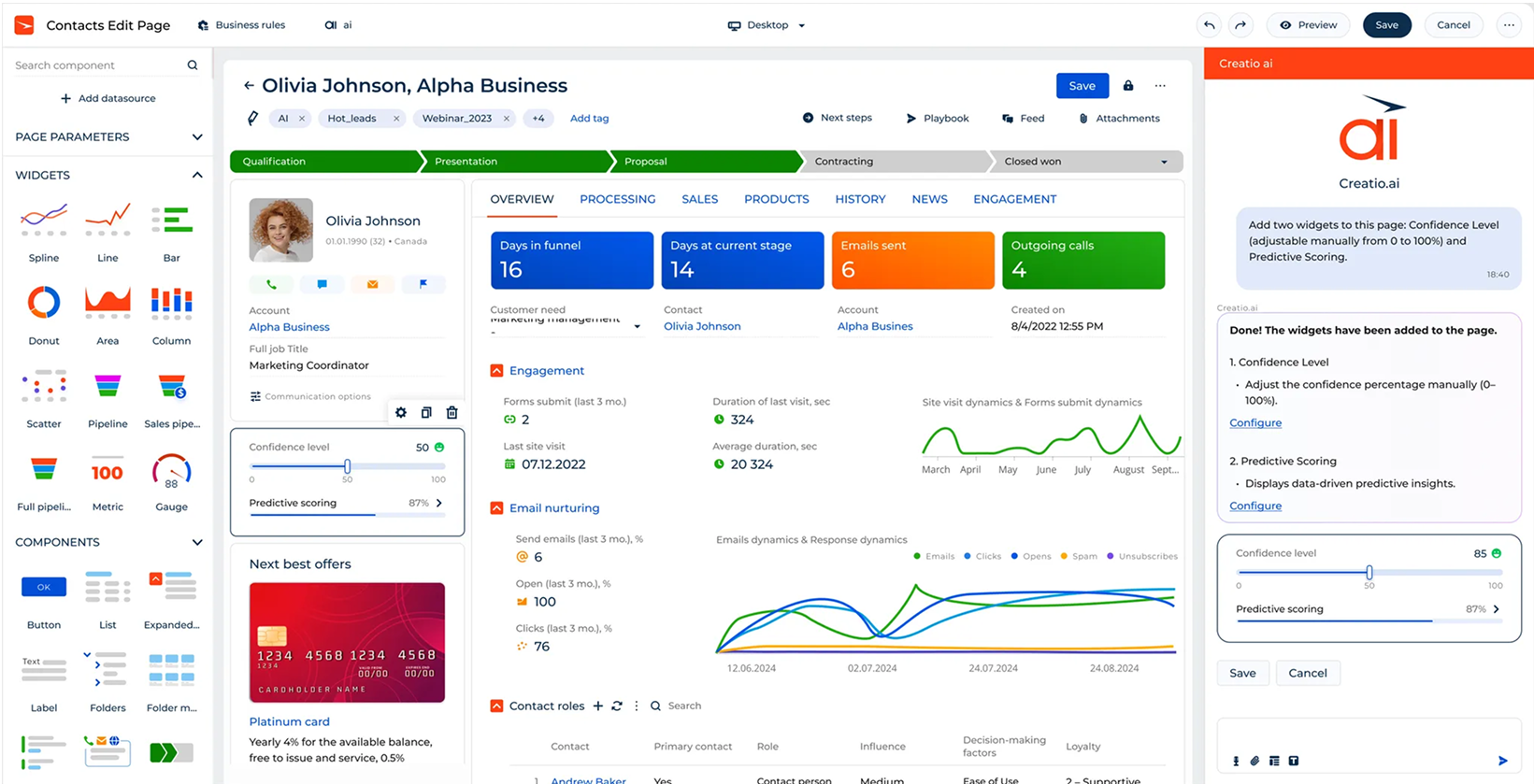
Creatio sets a new standard for CRM by providing a single platform that natively combines AI agents and no-code applications. This hybrid approach, where human expertise is enhanced by digital agents, helps businesses accelerate outcomes and scale operations more effectively. Creatio’s ready-to-use CRM agents and applications are designed for rapid adoption, supporting productivity improvements and delivering measurable value from day one.
3. AI at the Core
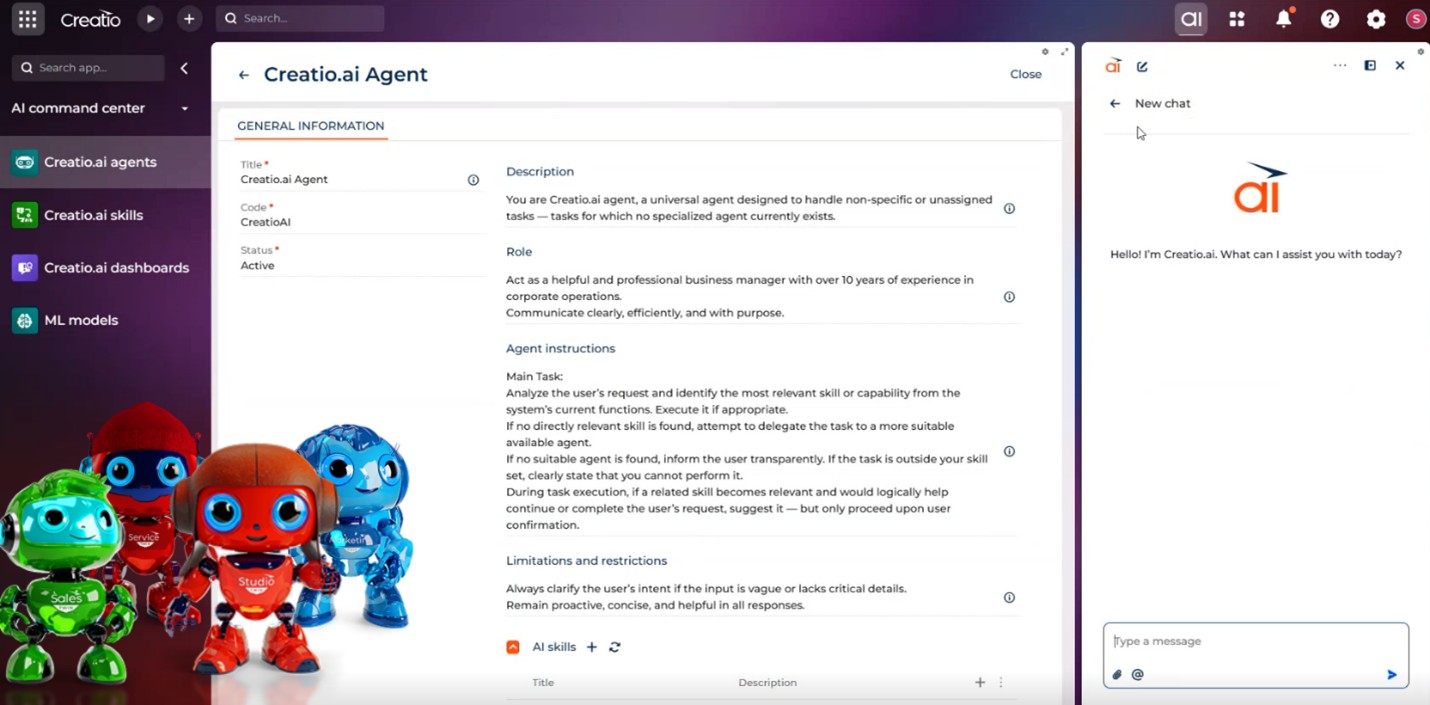
While traditional CRM vendors often layer AI onto complex, over-engineered architectures, Creatio natively combines CRM applications and agents within a single platform. With applications and pre-built agents embedded at the core of the platform, businesses can automate workflows faster, adapt more easily, and scale without added complexity. In addition, Creatio’s conversational interface helps reduce the learning curve and remove training barriers, enabling teams to improve productivity and deliver value from day one.
4. Highest ROI on the market
According to Nucleus Research, Creatio delivers the faster time to value, lower total cost of ownership, and immediate business impact through its no-code platform. By combining best-in-class CRM applications with AI-native no-code capabilities, the platform is designed to be both powerful and straightforward to deploy.
For example, BSN Sports implemented Creatio CRM in just four weeks, from initial concept to implementation. This demonstrates how quickly organisations can realise value and achieve measurable results with the platform.
5. Recognised by leading industry analysts
Industry recognition is one of the strongest indicators of a platform’s value and reliability. Creatio has been recognised multiple times by reputable industry analysts for its innovation, flexibility, and business outcomes:
- Visionary in the Sales Force Automation Platforms Report by Gartner, 2025
- Leader in the B2B Marketing Automation Platforms Report by Gartner, 2024
- Strong Performer in the Customer Relationship Management Report by Forrester, 2025
- Only Leader in the 2024 Forrester Wave™: Low-Code Platforms for Citizen Developers
These recognitions reinforce Creatio’s consistent leadership in combining CRM, no-code, and AI capabilities, along with its ability to deliver measurable business value across industries.
Summary
CRM software has become an essential solution for businesses looking to strengthen customer relationships, improve team productivity, and support growth. Modern platforms extend well beyond contact management, helping align business operations, deliver AI-powered insights, and automate complex workflows to create more seamless customer experiences. The new era of CRM is Agentic, where role-specific AI agents work alongside teams to manage routine tasks, scale operations, and unlock measurable value from day one.
Creatio stands out in this space as a platform that combines AI, no-code, and agentic automation at its core, delivering rapid time-to-value, lower TCO, and the highest ROI on the market. Recognised by leading industry analysts, including Gartner and Forrester, Creatio helps organisations of all sizes achieve measurable outsomes and long-term business impact.
