



































































No-Code CRM: What It Is + 10 Best No-Code CRM Software in 2026

Enhance Business Ops with Creatio’s No-code CRM

For years, customizing a CRM meant choosing between two imperfect options: adapting your business processes to fit rigid software or relying on IT teams and developers to modify the system. Adding a new workflow, changing a customer-facing process, or building a custom application could require technical expertise, lengthy development cycles, and ongoing maintenance.
No-code CRM is changing this dynamic by giving business users the tools to adapt CRM systems to their processes through visual interfaces and drag-and-drop tools, without relying on developers for every customization and new process.
In this guide, we’ll explain what no-code CRM is, how it works, and its key benefits, and compare 10 top no-code CRM software options in 2026 to help you choose the right platform for your business.
Key Takeaways:
- No-code CRM software enables users to customize CRM applications, workflows, interfaces, and data models through visual tools without traditional coding
- The main benefits of no-code CRM include faster implementation, lower development costs, greater business-user independence, and the flexibility to continuously adapt workflows
- The best CRM solutions with no-code combine visual customization with robust workflow automation, AI capabilities, integrations, governance, security, and enterprise scalability
- Choosing the right CRM requires considering not only ease of use and current functionality but also scalability, AI and automation depth, industry fit, integrations, governance, and total cost of ownership
- Creatio is the best no-code CRM on the market because it combines ready-to-use CRM with advanced no-code and AI capabilities, enabling organizations to manage sales, marketing, and service while building custom applications and automate workflows on the same platform
What Is a No-Code CRM?
A no-code CRM is customer relationship management software that allows non-technical users to build, customize, and automate processes through visual tools. Using drag-and-drop interfaces and visual workflow builders, teams can configure customer data, sales pipelines, dashboards, forms, and automations without needing to write code.
No-code CRM platforms combine ready-to-use CRM functionality with no-code development capabilities, allowing companies to start with established sales, marketing, and service processes and customize or extend them. They also provide the integration, governance, and scalability needed to support more complex requirements as the organization grows.
Key Features of the Best No-Code CRM Software
No-code CRM platforms can vary in their capabilities. Some focus primarily on simple visual customization, while others offer more advanced tools for workflow automation, AI, integrations, governance, and enterprise-scale use cases.
The right feature set depends on your business needs, but the best solutions typically offer a combination of the following capabilities:
Visual and drag-and-drop customization
Visual customization is at the core of no-code CRMs. Business users can configure workflows, fields, dashboards, data models, and applications using intuitive drag-and-drop tools rather than writing code. This allows non-technical teams to tailor the CRM to their needs and make changes as business requirements evolve without waiting on IT resources.
No-code workflow automation
A strong no-code CRM should let users automate both simple tasks and complex business processes. This can include lead routing, approvals, follow-ups, notifications, data updates, and multi-step sales or service workflows. Visual workflow designers make it easier to build and modify these automations with pre-built components.
AI-assisted configuration and AI agents
AI is increasingly extending what users can accomplish without code. Modern platforms, such as Creatio AI CRM, use AI to help create applications, workflows, fields, and other CRM components from natural-language instructions instead of assembling everything manually.
The same approach can be used to create AI agents designed to support individual employees. These AI agents can perform tasks, surface actionable insights, and automate sales, marketing, and service processes with greater autonomy.
Integrations and APIs
No-code CRM needs to connect with the rest of the technology stack to support entire business processes. Prebuilt connectors and no-code integration tools make it easy to connect to common business applications, alongside APIs that provide greater flexibility for custom integrations. This combination helps organizations avoid creating isolated CRM processes or data silos.
Governance and security controls
Making CRM customization accessible to more users should not mean sacrificing control. The best no-code CRM solutions provide role-based access, permissions, authentication, audit capabilities, and tools for managing application changes and environments. Platforms offering AI capabilities should also provide controls for agent permissions, human oversight, activity monitoring, and AI governance, to ensure AI operates responsibly and securely.

Benefits of No-Code CRM Software
No-code CRM software helps organizations reduce the technical barriers traditionally associated with implementing, customizing, and evolving CRM systems. By enabling business and IT teams to configure applications and processes visually, these platforms can accelerate time to value, reduce development costs, and make it easier to continuously adapt CRM functionality to changing business needs.
Faster setup and time to value
No-code tools can significantly shorten the time required to configure and deploy a CRM compared to traditional CRMs. An independent study by Nucleus Research found that a no-code CRM can be implemented 70% faster than pro-code or low-code platforms.
Instead of building every process from scratch, teams can use visual designers, prebuilt components, templates, and AI agents to quickly build and customize the platform to their needs without lengthy development cycles.
Lower development costs
Reducing the amount of custom coding required can lower the cost of CRM implementation and ongoing customization. Business teams can handle many routine changes themselves, while professional developers can focus on complex integrations, architecture, and other high-value initiatives. Organizations can therefore expand and improve their CRM without increasing development resources.
Nucleus research found that the total cost of ownership can be reduced by up to 37% compared with traditional CRM systems.
Greater IT independence
No-code CRM platforms give sales, marketing, service, and operations teams greater autonomy to configure applications and design processes without filling IT tickets for the smallest requests. No-code tools help reduce development backlogs and enable business users who understand a process firsthand to create and improve it directly.
Flexibility to adapt to change
Business processes rarely stay the same for long. With a no-code CRM, teams can modify workflows, interfaces, data models, and automations as requirements change without rebuilding the entire system. This flexibility makes it easier to respond to new customer expectations, organizational changes, products, channels, or market conditions.
Better alignment between business and IT
No-code does not have to mean removing IT from CRM development. Instead, it can create a more collaborative model in which business users build and modify solutions within guardrails established by IT. Business teams contribute their process expertise, while IT maintains governance, security, integrations, and overall technology standards. This helps organizations innovate faster while staying in control.
Government Agencies Achieve 88% Faster Project Delivery with AI and No-Code
Top 10 No-Code CRM Software Solutions in 2026
The best no-code CRM software combines ready-to-use customer relationship management capabilities with visual tools that allow organizations to customize workflows, interfaces, data models, and applications without extensive programming. However, the products on the market take different approaches. Some are full-featured CRM platforms with embedded no-code capabilities, while others are no-code application builders that can be used to create a CRM from scratch.
To help you compare the options, we evaluated 10 top no-code CRM software options:
No-Code CRM | Best for | Key features | Pricing |
| Creatio | Midsize and large organizations that need highly customizable, AI-native CRM and no-code capabilities at scale | Ready-to-use Sales, Marketing & Service CRM; visual no-code designers and AI coding agents; native AI agents; AI Studio & AI Twin | From $40/user/month |
| monday CRM | Small and growing sales teams prioritizing ease of use and visual pipeline management | Visual pipelines; customizable boards; no-code automation; AI sales capabilities | From $17/seat/month |
| Zoho CRM | SMBs looking for a customizable CRM within a broad business software ecosystem | Canvas visual customization; Zoho Creator; Zia AI; custom modules and layouts | From $40/user/month |
| Pipedrive | Small and midsize sales teams needing simple pipeline management and lightweight automation | Visual pipelines; workflow automation; custom fields; AI-powered sales tools | From $45/seat/month |
| HubSpot CRM | Growing businesses wanting CRM connected to a broad marketing, sales, and service ecosystem | Sales, marketing & service tools; customizable pipelines; AI tools and agents | From $90/user/month |
| Airtable | Teams that want to build flexible, data-centric CRM applications from scratch | Relational database; custom interfaces; no-code automation; Omni AI app builder | From 45/user/month |
| Softr | Small teams building custom CRMs, portals, or internal applications on existing data | AI app builder; drag-and-drop builder; prebuilt components; external data connections | From $99/month for 5 users
|
| Glide | Teams turning spreadsheets into custom, mobile-friendly CRM applications | Visual app builder; database connections; workflows; Glide AI and AI agents | From $199/month for 30 users |
| Insightly | SMBs wanting CRM and project management in one environment | CRM & project management; AI Copilot; AppConnect integrations; reporting | From $49/user/month |
| Quickbase | Mid-market and enterprise organizations building custom CRM and operational applications | No-code app development; workflow automation; pipelines integrations; enterprise governance | From $35/user/month |
1. Creatio
Best for: Midsize and large organizations looking for a highly customizable, AI-native CRM and no-code platform that can support complex customer and enterprise workflows at scale.
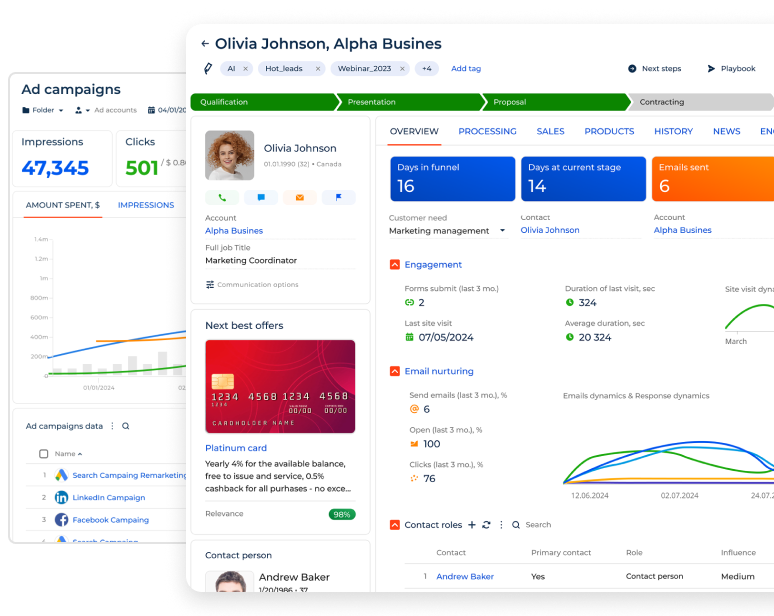
Creatio is an AI-native CRM and workflow platform where people and AI agents work together - with no limits on users, agents, workflows, or scale. It combines ready-to-use products for sales, marketing, and service with advanced no-code tools for building and automating custom workflows and applications. This combination makes Creatio particularly well-suited to organizations that want the flexibility of no-code development without building everything from scratch.
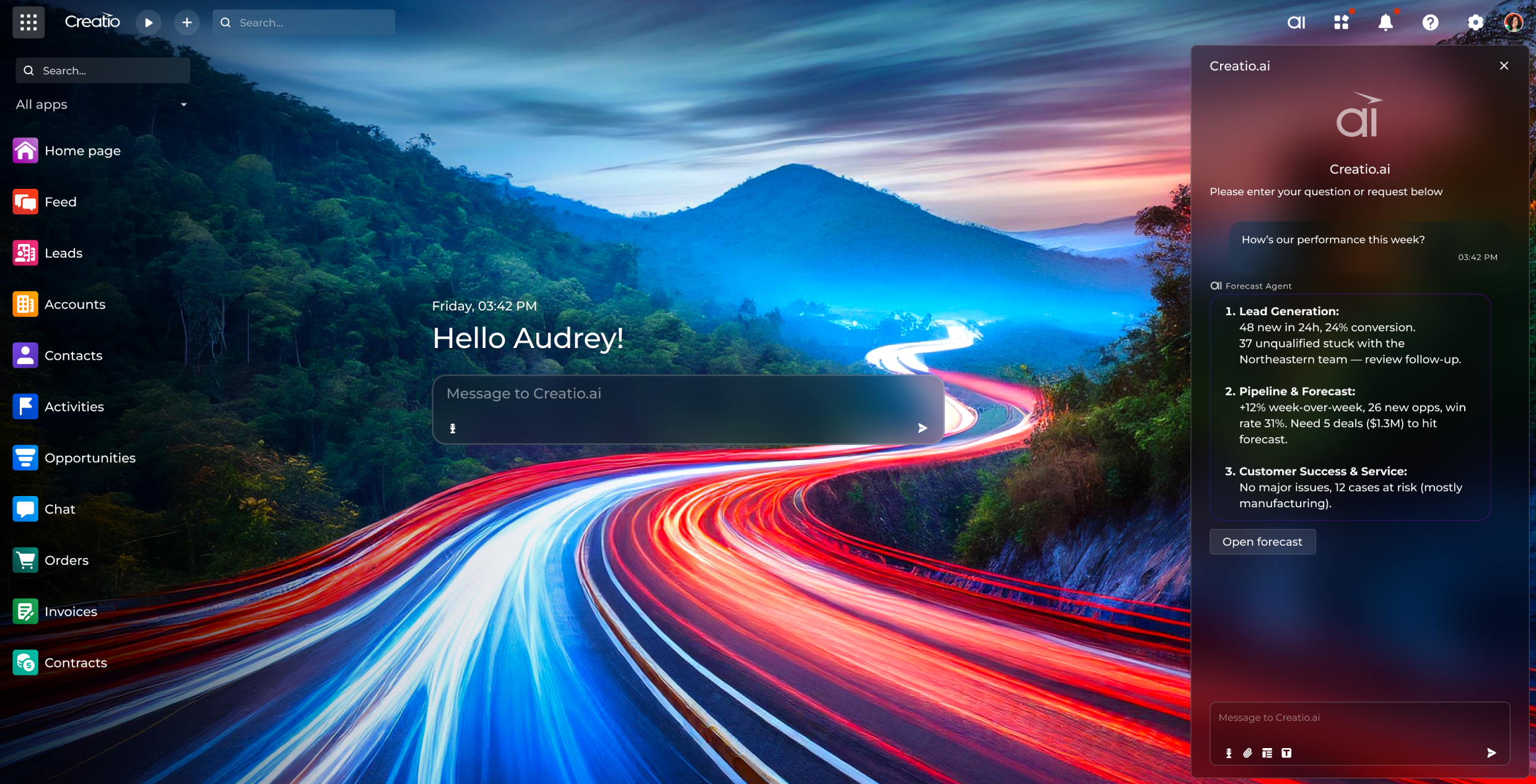
At the core of Creatio’s no-code capabilities is Business Studio, an AI-native platform for building and automating business applications and workflows. It combines visual no-code designers with AI coding agents, enabling both business and technical users to create and customize applications and workflows significantly faster. Users can create applications from natural-language prompts, use AI to assist with UI/UX design, and generate business processes, while composable architecture allows teams to assemble applications from reusable components and extend them through ready-made solutions from the Creatio Marketplace.
Creatio also offers customizable pre-built workflows for customer-facing teams and industry-specific processes for 20 verticals, including banking, credit unions, insurance, manufacturing, pharma, and the public sector.
Creatio Agentic Platform Helps Financial Institutions Deploy Workflows 70% Faster and Cut Tech Costs by 30%
Creatio also natively integrates AI agents into CRM and business workflows, enabling them to work alongside employees across sales, marketing, service, and other processes. Organizations can use ready-to-use agents for common CRM scenarios or create their own with AI Studio, a unified environment for building, deploying, managing, and governing AI agents throughout their lifecycle.
AI Twin makes agent creation accessible to business users through a conversational, natural-language experience, allowing them to turn business requirements into working agents without coding. Together, these capabilities enable organizations to move beyond traditional no-code automation and orchestrate workflows in which people and AI agents collaborate on the same platform.
For large organizations and enterprises looking to scale CRM, no-code, and AI across the business, Creatio offers the Unlimited Enterprise model, which removes traditional per-seat pricing constraints and provides no limits on users, AI agents, workflows, and applications.
Key features:
- Ready-to-use CRM products for sales, marketing, and customer service
- AI coding agents and visual no-code designers
- Powerful AI agents for service, marketing, and sales teams
- Human-led and agentic workflow automation
- Composable architecture with APIs and integration capabilities
- Enterprise-grade security and AI governance
- Industry-specific CRM capabilities and workflows
- Unlimited Enterprise option for organization-wide adoption
Pros:
- Combines comprehensive CRM functionality, AI, workflow automation, and no-code development on one platform
- User-friendly interface and intuitive visual designers
- Supports both straightforward CRM processes and complex enterprise workflows
- Extensive no-code customization without requiring businesses to build core CRM functionality from scratch
- Native AI agents embedded across CRM and business workflows
- AI Studio and AI Twin make it easier to build, deploy, manage, and govern custom AI agents
- Ready-to-use industry-specific CRM workflows for industries such as financial services, insurance, manufacturing, and the public sector
Cons:
- May pose a learning curve for users new to advanced no-code platforms
Pricing:
Creatio offers composable pricing, with Business Studio plans starting at $40 per user/month and CRM products for Sales, Marketing, and Service starting at $15 per user/month each. The Unlimited plan uses custom pricing and provides the full platform, all CRM products, and AI without per-user limits.
2. monday CRM
Best for: Small and growing sales teams that prioritize ease of use and visual pipeline management.
monday CRM is a flexible CRM for sales teams built on monday.com's work management platform. Its board-based interface allows teams to configure pipelines, contact records, dashboards, and sales processes with relatively little technical expertise. This makes it particularly approachable for organizations moving from spreadsheets or looking for a straightforward, visually customizable sales environment.
The platform also provides no-code automations for repetitive sales activities and integrations with other tools. Its offering incorporates monday AI and AI agents, including tools for lead generation, sourcing, qualification, meeting preparation, and other sales tasks.
Key features:
- Customizable deal status and contact management boards
- Visual sales pipelines and dashboards
- No-code automations
- Email synchronization and sequences
- AI sales capabilities and agents
- Customizable columns and structures
- Integrations with external applications
Pros:
- Intuitive and visual interface
- Easy to configure for straightforward sales processes
- Strong work management capabilities alongside CRM
- Growing selection of AI features
Cons:
- Primarily oriented toward sales rather than providing the same depth across sales, marketing, and service
- Automation, contact, dashboard, and customization limits vary considerably by plan
- Complex enterprise CRM processes may require a more specialized platform
Pricing:
monday CRM starts at $17 per seat/month for the Standard package, and at $28 per seat/month for the Pro plan. Enterprise pricing is available on request.
3. Zoho CRM
Best for: SMBs looking for a customizable CRM within a broad business software ecosystem.

Zoho no-code CRM provides a wide range of customization and process automation capabilities. Its Canvas functionality allows users to customize CRM interfaces with built-in drag-and-drop tools, while Creator, an AI-powered no-code app builder, lets users create CRM platforms from scratch using plain text.
Zoho also provides Zia, its AI functionality, as well as APIs, SDKs, custom functions, and widgets for organizations that need to extend the CRM beyond its visual configuration tools.
Key features:
- Zoho Canvas visual interface customization
- Zoho Creator AI-powered app builder
- Custom modules, fields, layouts, and dashboards
- Zia AI
- Integrations across the Zoho ecosystem
- APIs and developer tools
Pros:
- Broad customization options
- Strong integration with other Zoho applications
- Suitable for a wide range of SMB use cases
Cons:
- Some advanced features and AI functionality require higher-tier plans
- The breadth of Zoho's ecosystem and configuration options can make setup more complex
- Some deeper extensions move beyond pure no-code into low-code/developer tooling
Pricing:
Zoho CRM plans start at $40 per user/month for the Professional package, which enables workflow automation.
4. Pipedrive
Best for: Small and midsize sales teams that want simple, visual pipeline management with lightweight automation.
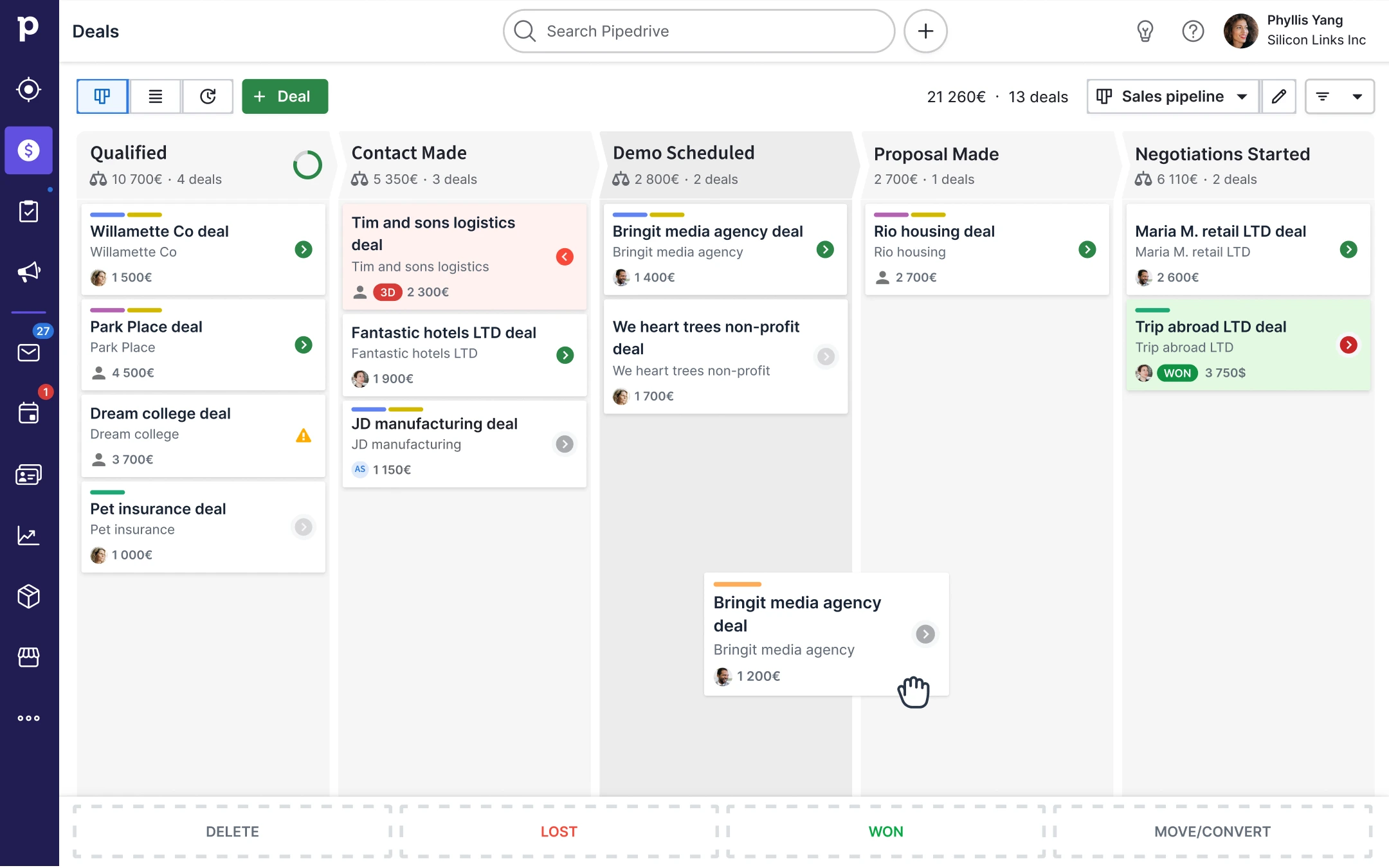
Pipedrive is a sales-focused CRM known for its visual deal pipelines and straightforward user experience. Teams can customize pipelines, fields, activities, and deal stages to reflect their processes and use workflow automation to reduce repetitive work.
Its strength lies in simplicity rather than in extensive no-code application development. For organizations primarily looking to customize and automate the sales cycle, that can be enough, but enterprises and companies seeking to build complex cross-functional applications or deeply customize their CRM architecture will find it unsuitable for their needs.
Key features:
- Visual pipelines
- Custom fields and pipeline stages
- Workflow automation and sequences
- Lead management and routing
- AI-powered reporting and email tools
- 500+ integrations
- Reporting and forecasting
Pros:
- Easy to learn and use
- Strong visual pipeline experience
- Large integration ecosystem
Cons:
- Less extensive no-code application development than dedicated platforms
- Focused primarily on sales rather than full customer lifecycle management
- Not suitable for more complex automation, customization, and security needs
Pricing:
Pipedrive pricing starts at $45 per seat/month for the Growth plan, $59 per seat/month for the Premium plan, and $79 per seat/month for the Ultimate plan.
5. HubSpot CRM
Best for: Growing businesses that want an easy-to-adopt CRM connected to a broad marketing, sales, and service ecosystem.
.webp?width=3840&height=2160&name=contact-record-wide@2x%20(1).webp)
HubSpot provides a widely used CRM platform spanning marketing, sales, service, content, and other customer-facing functions. Users can configure properties, pipelines, dashboards, forms, and other CRM elements with drag and drop tools, while higher-tier plans provide more advanced features for workflow automation.
HubSpot has also expanded its AI features with AI-powered tools and agents across its customer platform. Its main trade-off for organizations specifically evaluating no-code CRM is that more advanced automation and customization capabilities can require Professional or Enterprise subscriptions.
Key features:
- Contact, company, lead, and deal management
- Custom properties and pipelines
- Forms and landing pages
- Sales and marketing automation
- AI-powered tools and agents
- Large integration ecosystem
Pros:
- Easy to get started
- Strong marketing, sales, and service ecosystem
- Large marketplace of integrations
- Free tiers for basic needs
Cons:
- Advanced workflow automation is concentrated in higher-priced tiers
- Costs can rise substantially as organizations add advanced Hubs, seats, and functionality
- Less focused on deep no-code application development
Pricing:
HubSpot pricing starts at at $90 per user/month for Sales and Service Hubs, and $800 for 3 users/month for the Marketing Hub.
6. Airtable
Best for: Teams that want to build highly flexible, data-centric CRM applications rather than deploy a traditional, ready-made CRM.

Airtable takes a different approach from conventional CRM software. It is a no-code application platform that organizations can use to create their own CRM around a flexible relational data structure. Its conversational AI builder, Omni, can generate applications, including tables, interfaces, and automation, from natural-language instructions, while users can continue refining the resulting application visually. Airtable also supports AI agents that can operate across records and workflows.
Key features:
- Flexible relational database
- Custom interfaces and views
- No-code automations
- Omni conversational AI app builder
- AI agents for workflow automation
- Pre-built templates for sales and marketing
- Integrations and APIs
- Enterprise governance capabilities
Pros:
- Highly flexible
- Familiar spreadsheet-like experience
- Strong no-code and AI application-building capabilities
- Useful for CRM processes that don't fit traditional software
Cons:
- Not a purpose-built CRM, so teams may need to create functionality that comes out of the box elsewhere
- Longer time-to-market and ROI timelines
- Steep learning curve
- Building and maintaining a sophisticated CRM requires thoughtful application design
- Per-seat pricing and usage limits can become an issue as adoption grows
Pricing: A free tier is available for individuals and very small teams. Pricing for organizations starts at $20 per user/month for the Team package, $45 per user/month for the Business package, and custom pricing is available for the Enterprise Scale plan.
7. Softr
Best for: Small teams that want to quickly build a custom CRM, client portal, or internal application on top of existing data.

Softr is an AI-powered no-code application builder rather than a traditional packaged CRM. Users can create a CRM from scratch, use a template, or describe their requirements to Softr's AI Co-Builder, which can generate the application's interface, database, and workflows. Teams can then modify the application visually.
It can also connect to external data sources, including Airtable, Google Sheets, HubSpot, monday.com, SQL databases, and others, making it useful for businesses that already store customer data elsewhere.
Key features:
- Softr's AI app builder
- Drag-and-drop interface builder
- Pre-built components, including lists, grids, charts, calendars, and forms
- Custom roles and permissions
- External data connections
- CRM templates
Pros:
- Fast to build and launch
- Accessible to non-technical users
- Flexible interfaces and portals
- Can build around existing data sources
Cons:
- Not a full-featured CRM out of the box
- Customization limited to pre-built blocks
- Teams are responsible for designing more of their own CRM structure and processes
- Usage, user, database, AI, and workflow limits depend on the plan
- Costs can rise quickly as businesses add more users, workflows, and AI features
Pricing:
Softr offers a free tier. Paid plans for organizations start at $99/month for 5 users with Pro and $329/month for 10 users with Business.
8. Glide
Best for: Teams that want to rapidly turn spreadsheets or existing business data into a custom, mobile-friendly CRM application.
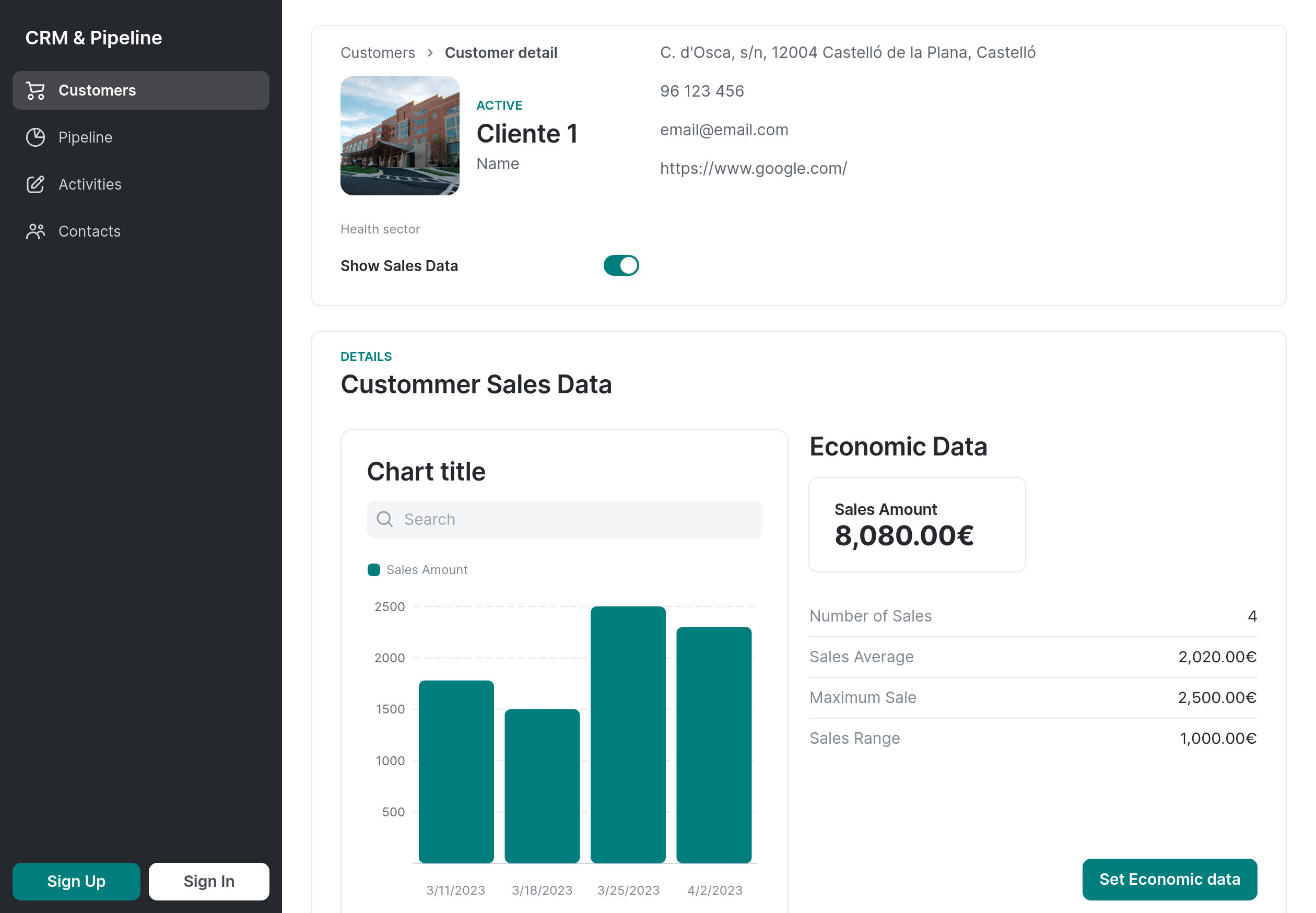
Glide is a no-code application builder that enables businesses to create CRM systems without programming. Sales teams can connect customer and sales data from spreadsheets, Airtable, SQL databases, and other sources to build responsive applications.
Glide provides prebuilt UI components, workflows, integrations, APIs, and AI features. Its CRM offering can support deal tracking, pipeline management, automated follow-ups, and customer information management, while Glide AI can assist with lead scoring, content generation, and data processing.
Key features:
- No-code visual application builder
- Spreadsheet and database connections
- Custom workflows
- Glide AI and AI agents
- Responsive and mobile-friendly applications
- Roles and access controls
- APIs and third-party integrations
Pros:
- Fast application development
- Strong mobile experience
- Seamlessly connects data across teams and departments
- Easy to learn and use
- Useful for creating focused CRM applications around existing data
Cons:
- Requires organizations to build much of the CRM functionality themselves
- Less comprehensive out-of-the-box CRM functionality than dedicated CRM platforms
- Limited customization
- Insufficient for complex processes and workflows
- Costs rise quickly as applications scale
Pricing:
Glide offers a free tier, while its Business plan starts at $199/month for 30 users. Enterprise pricing is customized.
9. Insightly
Best for: SMBs that want CRM and project management capabilities in the same environment.
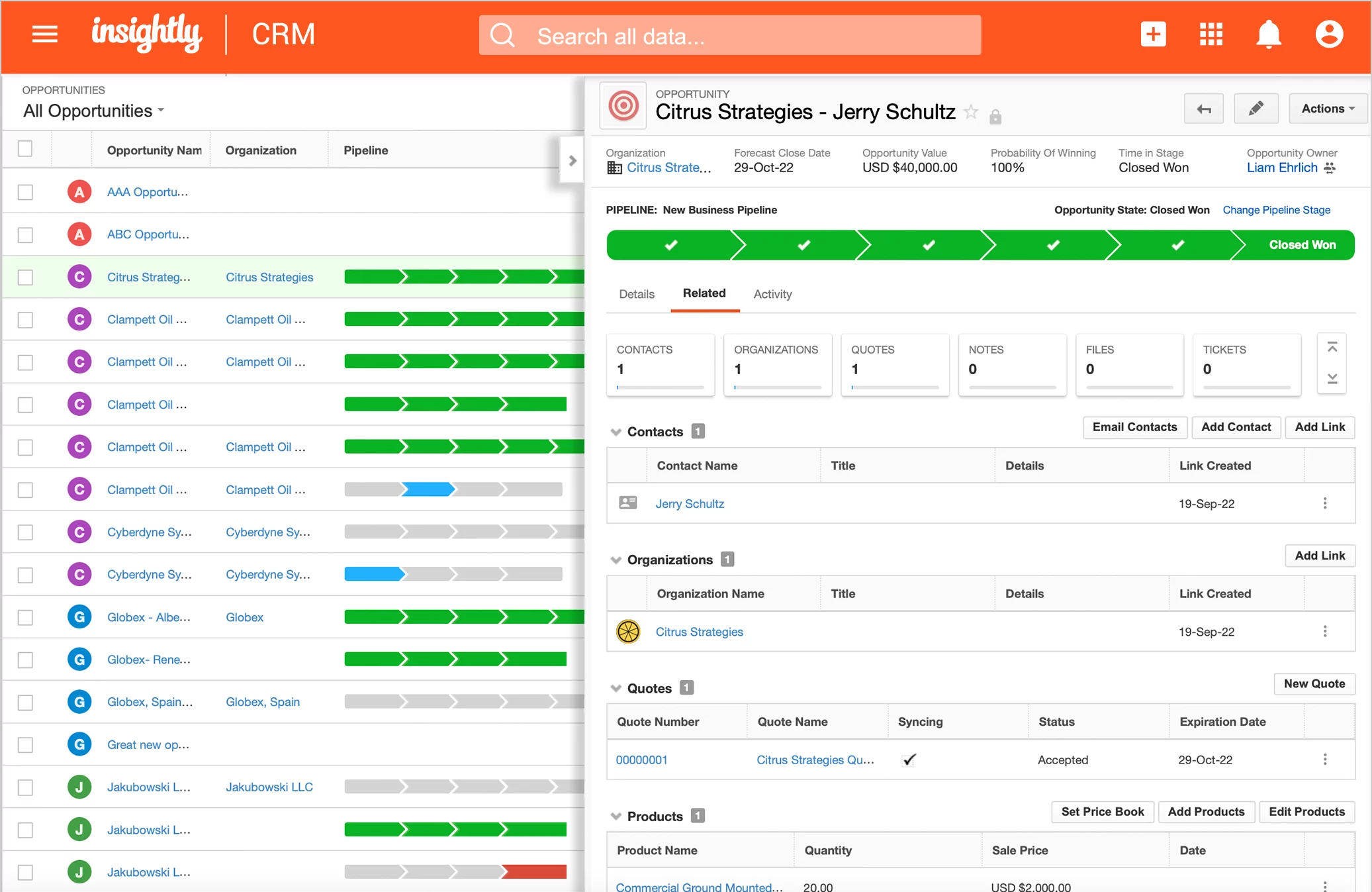
Insightly combines CRM functionality with project management, making it particularly useful for businesses that need to manage the transition from a closed sale into customer delivery. Users can customize objects, fields, dashboards, and processes, while workflow automation helps handle lead assignment, routing, and other recurring activities.
Insightly also offers AppConnect, its no-code integration engine, to connect the CRM with other applications, and its Professional and Enterprise CRM plans now include AI Copilot to support everyday tasks.
Key features:
- Lead, opportunity, pipeline, and customer relationship management
- Validation rules & advanced permissions
- Project & task management
- AI Copilot
- AppConnect no-code integrations
- Performance dashboards & reporting
Pros:
- Easy to use and customize
- Useful for businesses managing post-sale projects
- No-code integration capabilities
- Relatively straightforward CRM experience
Cons:
- Time-consuming setup
- Limited customization capabilities
- Less extensive no-code application development than specialized platforms
- Advanced features are reserved for higher tiers
Pricing:
Insightly CRM starts at $49 per user/month for the Professional plan with AI Copilot, and $99 per user/month for the Enterprise package with advanced customization, security, and integrations.
10. Quickbase
Best for: Mid-market and enterprise organizations that need to build CRM and operational applications around complex processes.
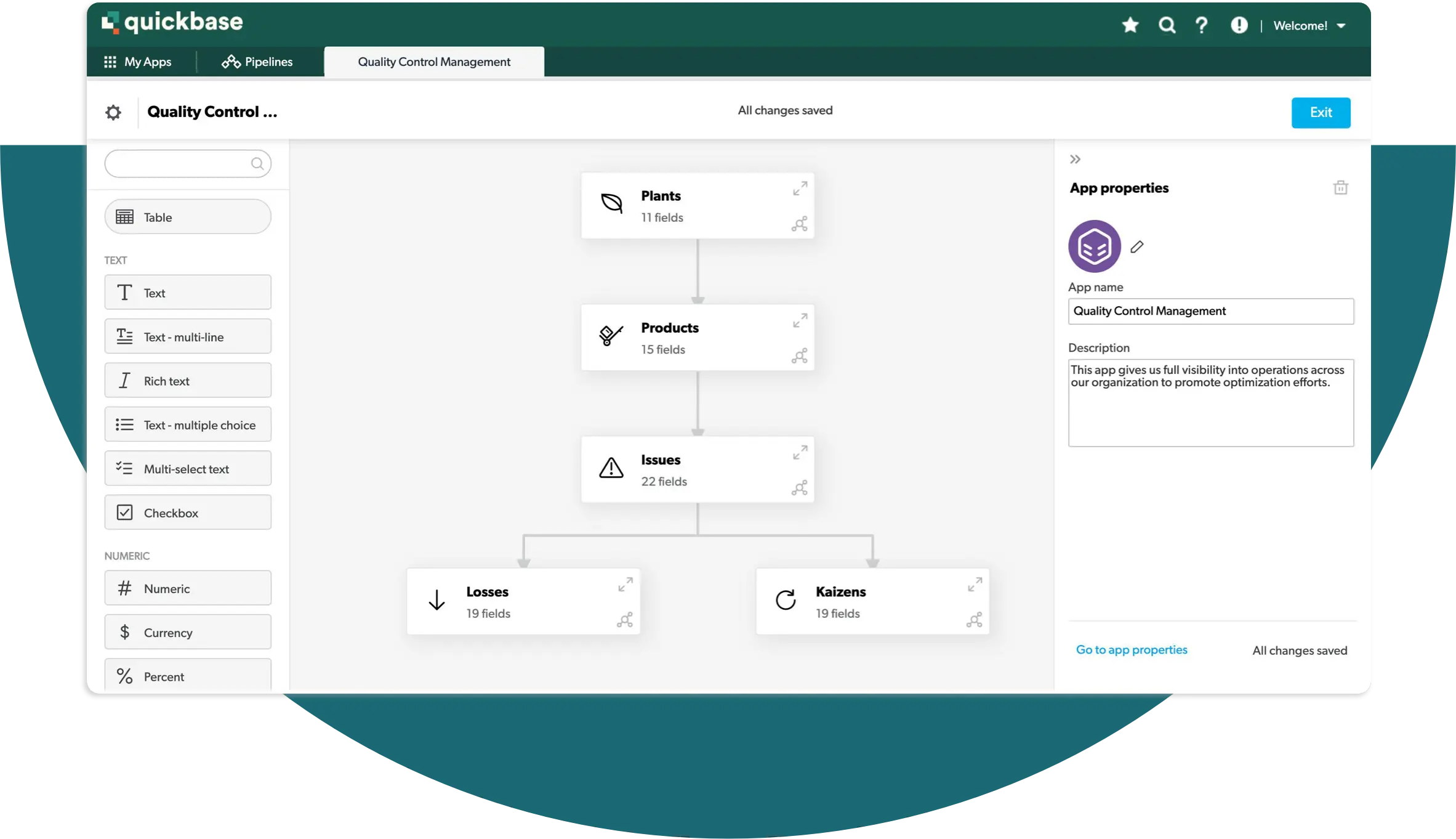
Quickbase is a no-code application development platform that can be used to create highly customized CRM solutions. Rather than providing a conventional packaged CRM experience, it allows organizations to build applications around their own customer, sales, project, and operational processes.
Teams can create dashboards, automate workflows, establish granular permissions, and integrate CRM data with ERP, project management, and other enterprise systems. Quickbase's Pipelines capabilities help automate and connect processes across existing applications.
Key features:
- No-code application development
- Custom CRM applications
- Workflow automation
- Custom dashboards and reports
- Pipelines integrations
- Role-based permissions and audit logs
- APIs and prebuilt connectors
- Enterprise security and governance
Pros:
- Strong customization for complex processes
- Enterprise-grade security and governance
- Can connect CRM with operational and project workflows
- Designed to scale custom applications across teams
Cons:
- Not a ready-to-use CRM in the same sense as Creatio, HubSpot, or Pipedrive
- Can be more complex and expensive than lightweight no-code tools
- Learning curve for non-technical users
- Lack of AI capabilities
Pricing:
Quickbase Team starts at $35 per user/month, while Business starts at $55 per user/month.
How to Choose the Right No-Code CRM
The right no-code CRM depends on your organization’s size, processes, technical resources, and plans for future growth. A small team looking for a simple way to manage accounts and deals will have very different requirements from an enterprise that needs to automate complex, cross-functional workflows.
When comparing the top no-code CRM software options, consider the following factors:
Ease of use and no-code capabilities
Start by assessing how much users can actually accomplish without writing code. Some CRM platforms use the term "no-code" to refer to relatively basic configuration, while more advanced platforms allow users to visually modify interfaces, data models, workflows, business rules, and entire applications.
Consider who will be customizing the CRM and whether the tools are intuitive enough for those users. At the same time, look for optional low-code or developer capabilities if your organization may eventually need more sophisticated extensions. The strongest platforms make common customization accessible to business users without limiting technical teams when more advanced development is required.
AI features and automation capabilities
Evaluate both the depth of workflow automation and how AI is incorporated into the platform. A strong no-code CRM should allow users to visually create multi-step workflows, business rules, approvals, and automations rather than simply automate isolated tasks.
It is also worth considering whether the CRM offers AI-assisted configuration and development capabilities, as well as AI agents that can execute tasks within workflows. Look at how easily these capabilities can be configured and governed rather than focusing only on the number of AI features advertised.
Scalability
A no-code CRM should be able to grow with the organization rather than work only for simple use cases. The CRM platform needs to support increasing numbers of users, records, workflows, integrations, and applications while maintaining performance.
Scalability also means having the flexibility to handle more sophisticated processes as business requirements become more complex. For example, Creatio Unlimited removes traditional per-seat pricing constraints, offering no limits on users, AI agents, or scale, giving enterprises the flexibility to expand CRM adoption and automation across the organization without costs increasing with every additional user or agent.
CRM functionality and industry fit
Consider whether you need to build a CRM using no-code tools or customize an established CRM platform. General no-code application builders can provide significant flexibility but may require you to create pipelines, customer data structures, sales processes, and other functionality yourself, which can significantly impact your time to value.
If you need comprehensive CRM capabilities from the start, look for platforms with ready-to-use functionality for sales, marketing, and customer service, which can then be customized using no-code tools. Organizations in highly specialized or regulated sectors should also evaluate industry-specific workflows, integrations, and compliance capabilities.
Total cost of ownership
Finally, compare more than the advertised subscription price. Consider implementation, customization, integrations, administration, maintenance, additional modules, AI consumption, and the cost of scaling to more users.
One of the main benefits of no-code CRM is reducing the costs of ownership by removing dependence on custom development, but licensing or usage restrictions can offset those savings. Make sure pricing is transparent and predictable, with no hidden costs that could make the platform significantly more expensive over time.
Summary
No-code CRM software gives organizations a more flexible alternative to rigid, developer-dependent CRM systems. By combining visual customization and workflow automation with increasingly advanced AI capabilities, these platforms allow teams to adapt their CRM faster as customer expectations and business processes change.
However, no-code CRM solutions vary considerably. Some offer the flexibility to build custom CRM applications from scratch, but this approach can require more time and effort to design and maintain functionality that purpose-built CRM platforms provide out of the box. The right choice depends on the complexity of your processes, required integrations, AI and automation needs, governance requirements, scalability, and budget.
For organizations looking for a comprehensive CRM without sacrificing the flexibility of no-code development, Creatio is a particularly strong option. It brings together best-in-class CRM, Business Studio for no-code application and workflow development, and AI capabilities on one platform. For enterprises looking to expand adoption broadly, Creatio Unlimited removes traditional constraints on users, AI agents, and scale, enabling organizations to extend CRM, automation, and AI across the business without traditional per-seat limitations.
Ultimately, the best no-code CRM should not only meet your needs today. It should give your teams the freedom to continuously evolve customer workflows, introduce new automation and AI use cases, and scale without having to rebuild the technology supporting them.
