






































































Creatio vs. Microsoft Dynamics 365: Platform Comparison for 2026

Make Your Next Move with Creatio

Creatio and Microsoft Dynamics 365 compete in enterprise CRM, but their ambitions extend well beyond customer management. Creatio positions itself as an AI-native CRM and workflow platform where businesses can build applications, automate workflows, and coordinate people and AI agents without extensive coding. Microsoft Dynamics 365 takes a broader business applications approach, connecting CRM and ERP with Power Platform, Copilot, and Azure.
For enterprises, the choice hinges on business flexibility, AI adoption, and whether to extend their Microsoft environment or adopt a unified alternative. In this article, we’ll compare the practical advantages, costs, and trade-offs of Creatio vs Dynamics 365 solutions.
Key Takeaways
- For enterprises prioritizing complex workflow automation, no-code flexibility, and AI adoption, Creatio offers a stronger fit. Dynamics 365 is better suited to organizations seeking integrated CRM and ERP capabilities within the Microsoft ecosystem.
- No-code customization helps business teams shorten development cycles and adapt workflows with less IT involvement in Creatio, while Dynamics 365 offers extensive low-code and developer-led customization through Power Platform.
- AI agents are embedded across Creatio's sales, marketing, and service products, with a unified AI Credits model. Microsoft's AI capabilities span Dynamics 365, Copilot Studio, and other services, offering broader development options but potentially more complex licensing.
- Dynamics 365 leads in native Microsoft ecosystem integration, although Creatio also supports Outlook, Teams, and other Microsoft applications, allowing both platforms to coexist.
- Enterprise-wide adoption can be more cost-effective under Creatio's Unlimited plan, which removes per-user licensing limits. Dynamics 365 primarily uses application-specific licensing, with costs increasing as additional users and products are added.
- An independent Nucleus Research study reported 37% lower technology costs and 70% shorter implementation timelines among Creatio customers, indicating potential for faster deployment and lower costs compared to traditional CRM systems like Dynamics 365 and Salesforce.
Creatio vs. Microsoft Dynamics 365: At a Glance
The table below provides a side-by-side snapshot of Creatio and Microsoft Dynamics 365, highlighting the major differences to consider when evaluating both platforms for your organization.
Evaluation criteria | Creatio | Microsoft Dynamics 365 |
| Value offering | AI-native CRM and workflow platform where people and AI agents work together | Integrated suite of CRM and ERP business applications |
| Best for | Enterprises prioritizing complex process automation, no-code customization, and AI adoption | Organizations invested in Microsoft's CRM, ERP, and cloud ecosystem |
| Core architecture | Unified platform with a shared data model | Modular applications built on Dataverse and extended through Power Platform |
| Customization | No-code and AI-assisted development, with coding available for advanced requirements | Power Apps low-code tools and professional development options |
| AI approach | Embedded predictive, generative, and agentic AI, ready-to-use agents and AI Studio for custom agent development and oversight | Embedded Copilot, specialized agents, and development through Copilot Studio and Microsoft Foundry |
| Deployment | Cloud, on-premises, and hybrid | Primarily cloud-based, with on-premises system connectivity |
| Licensing model | Per-user plans or organization-wide Unlimited pricing with no per-user limits | Primarily per-user and application-based licensing |
What Is Creatio?
Creatio is an AI CRM and workflow automation platform that helps organizations to manage customer relationships, automate end-to-end business processes, and build custom AI-powered applications, workflows, and agents using AI coding agents and no-code visual tools.
Designed for mid-sized businesses and large enterprises, Creatio combines AI-powered CRM, agentic automation, and no-code development in a unified platform. It helps organizations streamline sales, marketing, and service operations, orchestrate complex workflows across departments, and customize business applications without extensive coding or reliance on specialized development resources.
With its Unlimited Enterprise model, Creatio enables organizations to scale execution across people, AI agents, workflows, and applications while reducing the limitations associated with traditional enterprise software licensing.

Creatio's core products include:
- Creatio Business Studio: Build and customize business applications, workflows, and AI agents faster using AI coding agents and no-code visual designers.
- Creatio AI Studio: Create, deploy, and manage AI agents to automate business tasks and workflows.
- Creatio AI CRM: Unify sales, marketing, and customer service operations to streamline workflows and improve customer experiences.
- Creatio Sales: Automate the end-to-end sales cycle, improve pipeline visibility, and help sales teams close deals faster.
- Creatio Marketing: Orchestrate personalized campaigns, automate lead nurturing, and accelerate the lead-to-revenue cycle.
- Creatio Service: Streamline case management, automate service workflows, and deliver faster, more personalized customer support.
- Creatio Bank.AI: Automate banking workflows and customer engagement across retail banks, commercial banks, and credit unions.
Creatio also offers industry-specific solutions for more than 20 sectors, including financial services, insurance, manufacturing, and public services. Its flexible, composable architecture brings CRM, AI agents, and no-code automation together on one platform, helping organizations streamline operations, adapt to changing needs, and scale automation. Creatio AI agents also integrate with Microsoft Outlook and Teams, allowing employees to work with CRM data and automate tasks without switching applications.
What Is Microsoft Dynamics 365?
Microsoft Dynamics 365 is a suite of cloud-based CRM and ERP applications that helps organizations manage customer relationships, automate business processes, and streamline operations across departments.
Designed for businesses of different sizes, including large enterprises, Dynamics 365 connects sales, marketing, customer service, finance, and supply chain operations. It integrates easily with Microsoft 365, Power Platform, and Copilot to support AI-powered productivity, workflow automation, and application customization.
Core CRM applications include:
- Dynamics 365 Sales: Manage sales pipelines, track customer relationships, improve forecasting, and support sales teams with AI-powered insights.
- Dynamics 365 Customer Insights – Journeys: Create personalized customer journeys, automate marketing campaigns, and nurture leads.
- Dynamics 365 Customer Insights – Data: Unify customer data from multiple sources to build comprehensive customer profiles and improve targeting.
- Dynamics 365 Customer Service: Manage support cases, automate service processes, and deliver customer support across multiple channels.
- Dynamics 365 Field Service: Schedule technicians, manage work orders, and coordinate on-site service operations.
ERP applications:
- Dynamics 365 Finance: Supports financial management, budgeting, reporting, and compliance.
- Dynamics 365 Business Central: An ERP solution for small and midsize businesses covering finance, sales, inventory, and operations.
- Dynamics 365 Supply Chain Management: Helps manage procurement, inventory, manufacturing, and logistics.
- Dynamics 365 Project Operations: Connects project planning, resource management, and financial tracking.
- Dynamics 365 Commerce: Unifies retail, e-commerce, and back-office operations.
Dynamics 365 integrates with Microsoft Power Platform, Copilot, and AI agents to support low-code development, workflow automation, and AI-powered operations. Its broad application portfolio and close integration with the Microsoft ecosystem help organizations streamline cross-functional processes and build on their existing technology investments.
Creatio and Dynamics 365: Key Capabilities Compared
The real difference between Creatio and Dynamics 365 emerges when enterprises move beyond standard CRM functionality. How easily can they adapt processes, introduce AI agents, and expand operations without adding complexity or cost? Here's where each platform has the advantage.
1. Platform Architecture and Product Ecosystem
Creatio brings CRM, workflow automation, no-code development, and AI together on a unified platform with a shared data model. Its composable architecture allows organizations to adopt Sales, Marketing, and Service applications separately or together, while using built-in tools to create custom applications and automate processes across departments. This is particularly valuable for enterprises with complex or frequently changing requirements, as business teams can extend their CRM platform and design workflows using no-code tools without relying heavily on developers or additional software.

Creatio CRM and Workflow Platform
Microsoft Dynamics 365 follows a modular approach, with Sales, Customer Service, and Customer Insights offered as separately licensed applications built on Microsoft Dataverse. Organizations can extend these applications through Power Apps for low-code development, Power Automate for workflow automation, and other Microsoft services for more advanced needs. While this offers a broad range of capabilities, enterprise implementations may involve different licensing arrangements and administrative tools for managing CRM, automation, and AI.

Microsoft Dynamics 365
For enterprises, the trade-off becomes clearer as business needs grow. Creatio provides a common environment for expanding applications and workflows, helping reduce the complexity of managing multiple tools. Dynamics 365 offers the flexibility of Microsoft's broader ecosystem, but organizations may need to coordinate more products, licenses, and governance processes as implementations scale.
2. CRM Functionality and Shared Customer Context
A complete view of the customer can make a significant difference in how sales, marketing, and service teams work together. Creatio enables teams to share customer records and interactions across the entire lifecycle, from initial engagement to ongoing support. A sales rep can review previous service requests before approaching a customer, while a service agent can access relevant purchase history and sales activities when resolving an issue. This helps businesses effectively coordinate customer interactions and reduce information gaps between departments. For example, automotive dealer group Americar consolidated lead management, sales, marketing, and service processes on Creatio, achieving 96.5% faster service case resolution.
Microsoft Dynamics 365 also connects sales and service data through Dataverse, its common data foundation. However, building a richer customer profile that includes marketing engagement, behavioral insights, and audience segments involves the additional application – Dynamics 365 Customer Insights. Although this gives enterprises advanced capabilities for customer data unification and personalization, making those insights available across CRM applications may require additional setup and configuration.
So, if you’re prioritizing cross-functional customer visibility, Creatio could offer a more integrated approach to everyday CRM operations. Dynamics 365 offers greater flexibility for building sophisticated customer intelligence capabilities, particularly when businesses need to combine data from multiple systems.
3. Customization and Development
No-code customization is a clear strength of Creatio, especially for enterprises that need to adapt CRM applications and workflows frequently. Its drag-and-drop interface and visual process designer allow business users to customize interfaces, configure data models, and automate workflows without relying on developers for every change. For more complex customization, developers can use AI coding agents to generate and modify custom code, or write code directly when business requirements go beyond what no-code tools can handle.

Creatio’s No-Code Visual Designers
This makes Creatio particularly well-suited to enterprises seeking faster customization and implementation with less dependence on IT resources. According to Nucleus Research, organizations can achieve by 70% faster deployment than traditional CRM systems like Microsoft or Salesforce.
This approach has delivered measurable results: according to Nucleus Research, Creatio customers reported a 50% reduction in customization turnaround time.
On the other side, Microsoft Dynamics 365 provides extensive customization options through Power Apps, including model-driven apps for data-centric processes and canvas apps for tailored interfaces. However, more complex requirements may call for C#, JavaScript, or custom plugins, increasing the need for specialized development expertise. Dynamics 365 is a strong fit for enterprises with established Microsoft development teams, while Creatio has the advantage when the priority is empowering business users to customize CRM quickly and independently.

Customizing interfaces in MS Dynamics 365
4. Workflow and Process Automation
Creatio combines BPMN workflow design, dynamic case management, and built-in AI agents within the same platform. Business users can configure approvals, parallel tasks, and conditional workflows without coding, and assign specific steps to AI agents. For example, an agent can analyze an incoming service request, classify it, and prepare a response before routing the case to an employee for approval. The entire process can be designed and modified in one environment, without a separate automation product.
Microsoft Dynamics 365 uses business process flows to guide employees through defined stages and Power Automate to automate tasks across applications. AI agents built in Copilot Studio can be connected to these workflows, but coordinating CRM processes, automated actions, and agent activities may require configuration across multiple tools.
While Creatio allows teams to incorporate AI agents directly into existing business processes, Dynamics 365 typically combines Dynamics applications, Power Automate, and Copilot Studio to support similar workflows, potentially requiring additional licenses and costs.
5. Usability and User Adoption
For employees moving between sales, marketing, service, and automation tasks, a consistent interface can make CRM adoption easier. Creatio offers role-based workspaces, visual no-code tools, and AI assistance within a common user experience, while Creatio Academy provides training resources for users and administrators. Microsoft Dynamics 365 integrates closely with familiar tools such as Outlook and Teams, but users and administrators may need to navigate different interfaces across Dynamics applications, Power Platform, and Microsoft 365.
User ratings offer another point of comparison. In the G2 scores provided for September 25, 2026, Creatio leads Dynamics 365 Sales across ease of use (9.1 vs 7.4), setup (8.4 vs 7.2), and administration (8.6 vs 7.6).
6. Industry Coverage
Microsoft Dynamics 365 has an advantage for organizations seeking ready-made industry capabilities. Microsoft Industry Clouds cover financial services, healthcare, retail, manufacturing, and other sectors. However, these are not independent applications: they build on existing Microsoft technologies, including Dynamics 365, Power Platform, and Azure. Organizations may need to license, configure, and manage multiple underlying products to use the industry-specific capabilities they require.
Creatio offers industry-specific solutions and workflows for 20+ sectors, including financial services, manufacturing, insurance, mortgage, and the public sector. For banks and credit unions, Creatio Bank.AI provides a dedicated AI CRM and workflow platform tailored to their needs. Creatio's key advantage, however, is adaptability: enterprises can tailor applications and industry workflows using built-in no-code tools and natural-language instructions through AI Twin, without necessarily purchasing a separate industry solution.
7. Microsoft 365 Integration and Ecosystem
Microsoft Dynamics 365 has a clear advantage in native Microsoft integration, with deep connections to Outlook, Teams, Excel, SharePoint, Power BI, and Entra ID, backed by an extensive partner network and AppSource marketplace. However, choosing Creatio doesn't mean giving up familiar Microsoft tools. Creatio integrates with Microsoft 365, including Outlook and Teams, where employees can work with Creatio AI agents. It also supports SharePoint, Power BI, and Entra ID, alongside 700+ Marketplace OOTB processes, templates and apps for connecting other enterprise systems.
8. Governance, Security, and Deployment Options
Microsoft Dynamics 365 uses Entra ID for identity management, Purview for data governance, and Power Platform administration tools for access and environment controls. AI agent oversight may involve additional Microsoft services and administration tools. Dynamics 365 CRM is cloud-only, although it can connect to on-premises data sources.
Creatio supports cloud, on-premises, and hybrid deployment, giving organizations greater control over where their CRM and customer data are hosted. Its AI governance capabilities include workflow-level controls over agent autonomy, PII masking, audit logs, and human approval checkpoints. Creatio also supports GDPR compliance requirements and maintains ISO 27001 and SOC 2 certifications and attestations.
9. Pricing and Total Cost of Ownership
The pricing difference between Creatio and Microsoft Dynamics 365 becomes more apparent as enterprises expand CRM, automation, and AI across departments. Creatio combines core platform capabilities under a common subscription, while Dynamics 365 relies on application-specific licensing and additional entitlements for certain advanced capabilities.
Cost Factor | Creatio | Microsoft Dynamics 365 |
| CRM licensing | Core platform starts at $40 user/month, plus $15/user/month per each CRM product (Creatio Sales, Creatio Marketing and Creatio Service) | Sales: from $65/user/month; Customer Service: from $50/user/month; Customer Insights: from $1,700/tenant/month |
| No-code development and customization | App development, visual workflow design, BPMN automation, and dynamic case management included in platform tiers | Power Apps and Power Automate capabilities included for qualifying Dynamics 365 scenarios; broader use may require Power Apps Premium ($20/user/month) or Power Automate Premium ($15/user/month) |
| AI & Agentic capabilities | Unified AI Credits consumption model | Copilot Credits and other service-specific charges, depending on usage |
| Enterprise-wide scaling | Unlimited plan with custom organization-wide pricing, without per-user limits | Primarily per-user licensing, with applicable discounts and capacity charges |
The difference extends beyond subscription fees. According to Nucleus Research, organizations adopting Creatio achieved 37% lower total cost of ownership compared with legacy CRM systems studied. Creatio's Unlimited plan takes this advantage further by replacing per-user licensing with organization-wide pricing based on company scale. It includes the full platform and all Creatio CRM products, with unlimited users, custom AI agents, applications, workflows, and API calls. Unlike traditional seat-based licensing, this allows enterprises to expand CRM adoption and deploy new AI agents across departments without purchasing additional user licenses, making large-scale transformation easier to plan and budget for.
Core AI Capabilities of Creatio vs Dynamics 365
Both Creatio and Microsoft Dynamics bring predictive, generative, and agentic AI into CRM, but differ in how these capabilities are delivered. Creatio provides ready-to-use AI agents across sales, marketing, and service, with AI Twin for natural-language interaction and AI Studio for customizing agents or building new ones without code. Microsoft Dynamics 365 combines embedded Copilot features and specialized agents with additional development capabilities through Copilot Studio and the broader Microsoft ecosystem.
AI in Sales
In sales, AI is most valuable when it helps representatives decide which opportunities deserve attention and what to do next. Creatio Sales provides built-in AI agents for key activities throughout the entire sales cycle, including:
- Lead Scoring Agent
- Account Research Agent
- Next Best Step Agent
- Quote Generation Agent
- Forecasting Agent
- Order Fulfillment
- CRM Data Update Agent and more
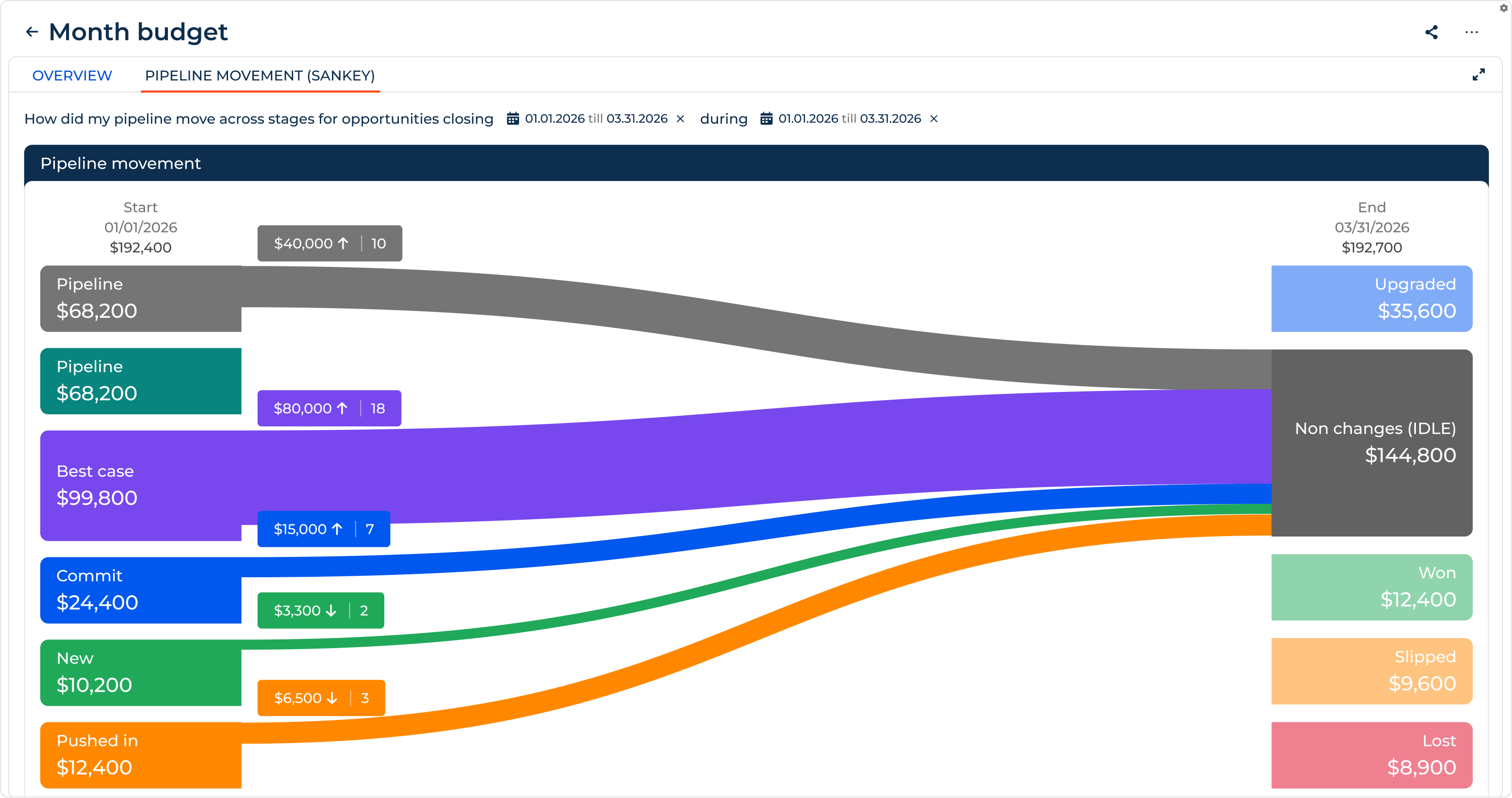
Creatio Forecasting & Revenue Intelligence
Microsoft Dynamics 365 offers predictive lead and opportunity scoring, Sales Accelerator for guided sales activities, and specialized agents for qualification, opportunity management, research, and data enrichment. Sales capabilities also extend into Outlook and Teams through Microsoft 365 Copilot. Organizations can tailor more advanced agent behavior through Copilot Studio, although agent availability and configuration requirements vary.

Dynamics 365 Forecasting
AI in Marketing
In marketing, AI can significantly improve marketing automation, supporting everything from audience segmentation and content creation to campaign execution and optimization. To accelerate the lead-to-sales cycle, Creatio Marketing offers a range of marketing agents, such as:
- Segmentation Agent
- Email Generation Agent
- Landing Page Generation Agents
- Campaign Agent
- Analytics Agent and more
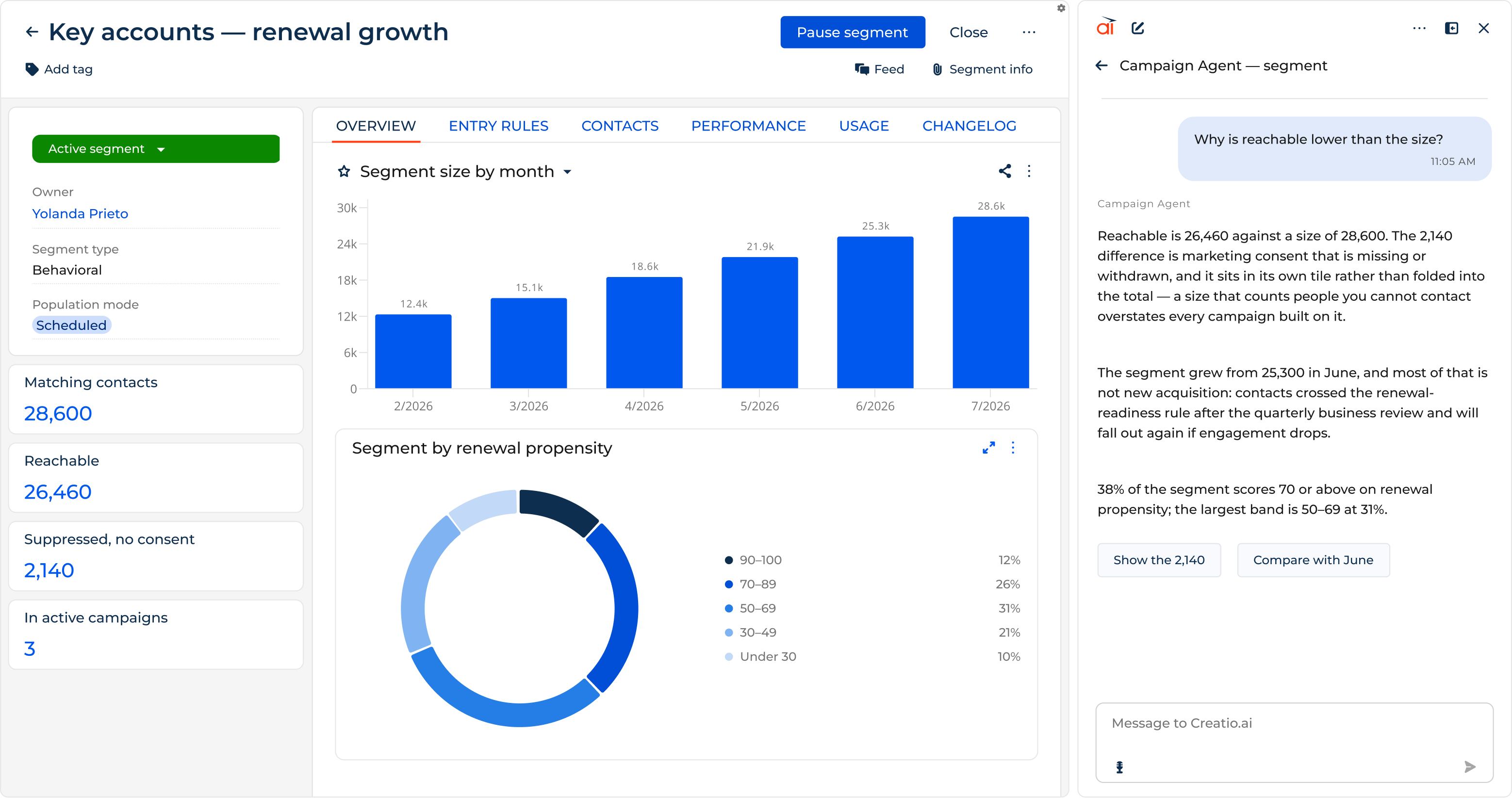
Creatio Marketing: Segmentation Agent
Microsoft Dynamics 365 Customer Insights – Journeys uses Copilot to create audience segments from natural-language prompts, generate email content, and support journey creation. More advanced customer scoring and profile unification are available through Customer Insights – Data application. Microsoft is also developing specialized agents for journey creation and outreach optimization, with availability depending on release status. Although Dynamics 365 provides strong segmentation and personalization capabilities, particularly for organizations combining customer data from multiple sources, some scenarios involve separate Customer Insights applications or additional configuration.

Dynamics 365 Customer Insights - Journeys
AI in Service
Delivering excellent customer service takes more than quick replies. AI helps service teams resolve complex issues faster, capture and reuse knowledge, and identify recurring problems before they affect more customers. Creatio Service supports these through the following AI agents:
- Case Classification Agent
- Case Resolution Agent
- Knowledge Base Agent
- Analytics Agent and more
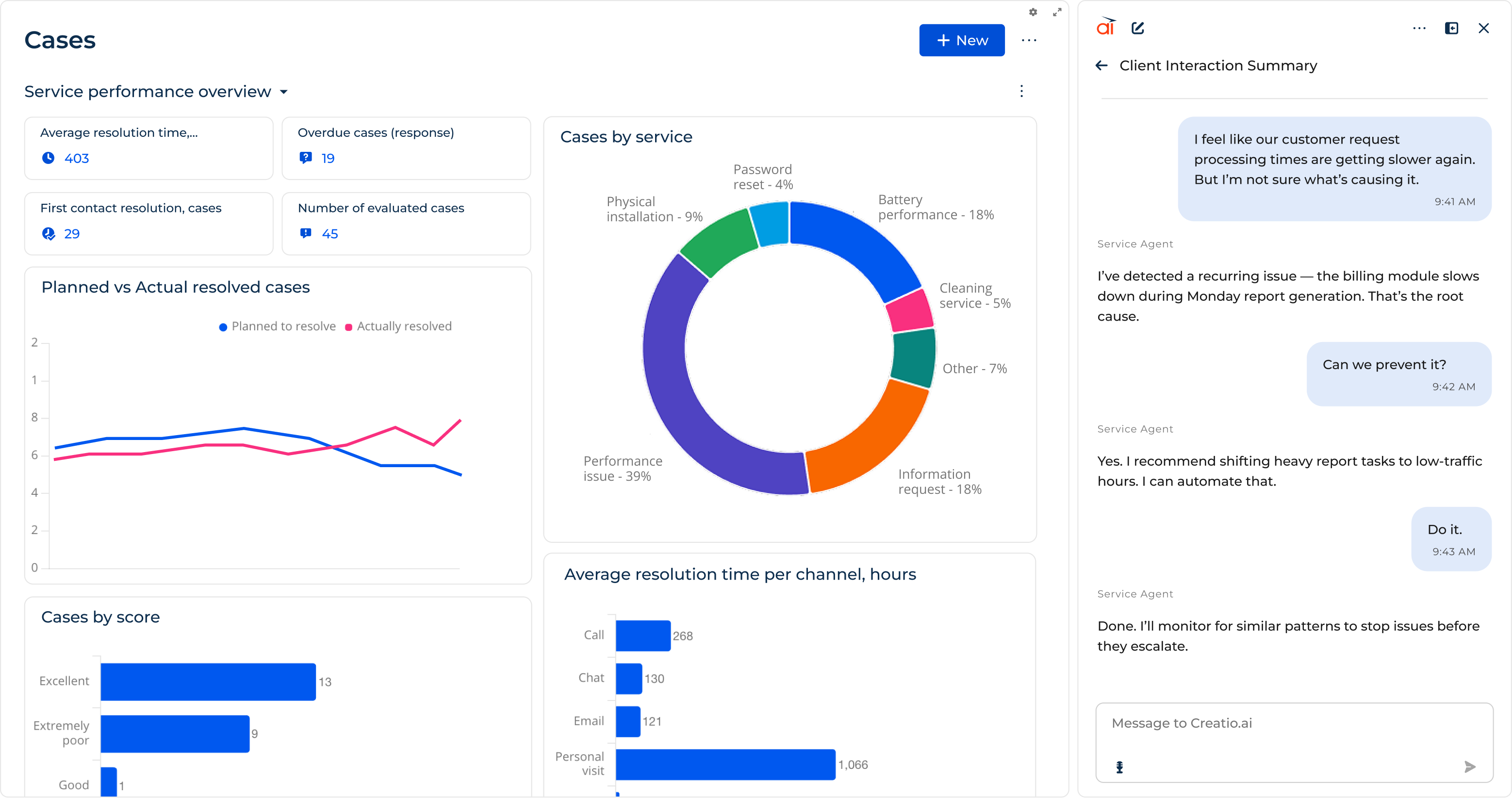
Creatio Problem Management
Microsoft Dynamics 365 Customer Service provides Copilot-assisted case and conversation summaries, suggested responses, and knowledge assistance. Specialized agents extend these capabilities to case management, customer intent identification, knowledge creation, and quality management. Some advanced agent scenarios require additional setup, licensing, or capacity configuration.

Copilot Service Workspace
AI for Operations
Beyond sales, marketing, and service, both platforms use AI to automate business operations across departments. The key difference is how AI agents are integrated into business workflows.
Creatio embeds AI agents directly into its workflow engine, allowing them to process documents, validate data, and execute tasks alongside employees. Its built-in BPMN and dynamic case management tools coordinate these activities within a single platform.
On the contrary, Microsoft Dynamics 365 uses Power Automate and Copilot Studio to incorporate AI agents into business processes, automate tasks, and connect enterprise systems. This provides broad integration capabilities but may require configuration across multiple products.
Creatio AI Studio vs. Microsoft Copilot Studio
Built-in AI agents address common business needs, but enterprises often need to go further: create agents for company-specific processes, connect them to ERP systems and internal data, coordinate multiple agents, and maintain control over their actions. Organizations expect to scale AI across the business without adding unnecessary development effort, integration complexity, or governance overhead.
Both Creatio and Microsoft Dynamics 365 support custom AI agent development through Creatio AI Studio and Microsoft Copilot Studio, respectively. Creatio integrates agent development and orchestration within its unified CRM and workflow platform, while Microsoft offers a broader development ecosystem, with Copilot Studio complemented by Power Platform and Microsoft Foundry.
Here's how the two platforms compare across key agent development and management capabilities.
Capability | Creatio AI Studio | Microsoft Copilot Studio |
| Agent creation | AI Twin supports agent creation through natural-language instructions. For more advanced customization, AI Studio offers no-code Prompt Agent and Workflow Agent designers, plus a Code Agent Designer that supports modern AI coding tools such as Claude Code, Codex, and Cursor. | Supports natural-language and low-code agent creation. Microsoft also offers Agent Builder in Microsoft 365 Copilot for simpler agents and Foundry for developer-led scenarios, giving organizations several development paths across its ecosystem. |
| Models and integrations | Supports multiple LLM providers, custom model connections, MCP, APIs, and webhooks. Agents can access CRM data, external knowledge sources, and enterprise systems. | Supports multiple AI models, MCP, and pre-built or custom connectors for accessing Microsoft and third-party data, tools, and applications. |
| Governance and monitoring | Centralizes agent monitoring, execution logs, permissions, policy controls, and human approvals within AI Studio, alongside the business processes agents execute. | Provides native agent analytics, evaluations, and administration in Copilot Studio. Organizations using additional Microsoft agent development tools may also need to manage governance across Power Platform and other Microsoft services. |
| Multi-agent orchestration | Integrates AI agents with Creatio's BPMN workflows and dynamic case management, allowing people and agents to execute coordinated tasks within existing business processes. | Supports multi-agent coordination and agent flows within Copilot Studio. Power Automate and other Microsoft services extend automation across applications, offering broad connectivity beyond Dynamics 365. |
| AI pricing | Uses a unified AI Credits consumption model, with no-code development and workflow automation included in Creatio platform tiers. This can simplify cost planning when expanding AI across CRM and operational processes. | Uses Copilot Credits for agent consumption, with prepaid and pay-as-you-go options. Additional Microsoft licenses or service charges may apply depending on the development tools, integrations, and agent capabilities used. |
Creatio AI Studio is a strong fit for enterprises that want business teams to create and customize AI agents without relying heavily on developers, while keeping agent execution, workflow automation, and governance within a unified platform. This integrated approach can simplify deployment and help organizations scale AI across departments without introducing additional development environments.

Creatio AI Studio
On the contrary, Microsoft Copilot Studio offers greater flexibility for organizations developing specialized agents across Microsoft and third-party systems, particularly those already invested in Microsoft 365, Power Platform, and Azure. Its broader ecosystem provides extensive integration and development options, although more complex implementations may involve additional tools, administration, and licensing.

Microsoft Copilot
G2 Scores: Creatio vs. Dynamics 365
User reviews offer a valuable perspective on how CRM platforms perform in practice, but ratings are most meaningful when comparing products that address similar business needs. While Creatio and Microsoft Dynamics 365 differ in their broader offerings, their CRM capabilities overlap significantly.
To provide a relevant comparison, we use G2's ratings for Creatio and Dynamics 365 Sales, focusing on usability, implementation, customization, and support.
G2 Score Highlights | Creatio | Dynamics 365 Sales |
| Overall G2 Rating (out of 5) | 4.6 | 3.8 |
| Ease of Use | 9.1 | 7.4 |
| Ease of Setup | 8.4 | 7.2 |
| Ease of Admin | 8.6 | 7.6 |
| Quality of Support | 9.1 | 7.5 |
| Workflow Capability | 9.0 | 8.1 |
| Customization | 8.8 | 8.1 |
| Mobile User Support | 8.5 | 7.4 |
Source: G2, Creatio vs. Dynamics 365 Sales. Category scores are out of 10; overall ratings are out of 5. G2 lists Creatio as a broader platform, while Dynamics 365 Sales is a specific CRM product. Scores reflect the previously retrieved G2 snapshot and may change as new reviews are submitted.
Creatio also leads in overall user ratings across major software review platforms. As of September 2026, Creatio scored Gartner Peer Insights (4.8 vs. 4.4), Capterra (4.7 vs. 4.4), and TrustRadius (9.3 vs. 8.0).
Where Creatio Wins
Creatio is the stronger choice for enterprises looking to simplify CRM operations, accelerate innovation, and scale AI without unnecessary complexity.
- A unified CRM and workflow platform: Sales, marketing, service, process automation, and AI operate within one system, reducing the need to manage multiple applications and integrations.
- Faster adaptation to business needs: No-code tools and AI Twin allow business teams to modify workflows, build applications, and create AI agents with less reliance on developers.
- AI adoption across departments: Ready-to-use AI agents for sales, marketing, and service provide a starting point, while AI Studio supports custom agents for more specific business requirements.
- Lower costs at scale: Consolidated capabilities can reduce implementation and maintenance costs, while the Unlimited plan offers an alternative to per-user licensing for larger deployments.
- Flexible deployment: Cloud, on-premises, and hybrid options accommodate different infrastructure, data residency, and regulatory requirements.
Where Dynamics 365 Wins
Microsoft Dynamics 365 is particularly well suited to enterprises with substantial Microsoft investments and established technical teams.
- Deep Microsoft integration: Native connections with Microsoft 365, Teams, Outlook, and Power BI make it a natural fit for Microsoft-centric enterprises.
- CRM and ERP in one ecosystem: Dynamics 365 connects customer-facing operations with finance, supply chain, and other business functions.
- Existing Microsoft investments: Enterprise agreements, established infrastructure, and licensing arrangements can make Dynamics 365 a cost-effective choice.
- Extensive partner ecosystem: A large network of implementation partners and certified professionals supports complex enterprise projects.
- Advanced development capabilities: Power Platform, Microsoft Foundry, and Azure offer extensive options for organizations with established development teams and complex AI or integration needs.
Why Companies Switch from Dynamics 365 to Creatio
Companies considering a move from software vendors like Microsoft Dynamics 365 to Creatio are typically reassessing three things: the cost of maintaining their CRM, the time required to implement changes, and how effectively the platform supports operations across departments. The decision becomes particularly relevant when expanding CRM capabilities requires additional licenses, integrations, or development resources.
Research from Nucleus Research provides evidence of the business value organizations have achieved with Creatio:
- Lower costs: 20–40% lower total cost of ownership, with an earlier study reporting 37% lower technology costs, demonstrating the financial benefits of a more consolidated technology environment.
- Faster implementation and customization: 70% shorter implementation timelines and 68% less application development time, allowing organizations to introduce new capabilities and respond to changing requirements faster.
- Less administrative work: Up to 74% less sales administrative effort and 45% less manual data coordination, reducing routine work and freeing teams to focus on customers.
Disclaimer: These findings come from separate studies of Creatio customers and are not direct measurements of migrations from Dynamics 365.
Everwise Credit Union provides a practical example of how these considerations influence platform selection. After evaluating Microsoft and Salesforce, Everwise selected Creatio to connect operations across 27 departments and give employees a consistent view of member relationships and service requests. The credit union reported a 40% reduction in process inefficiency, with some requests that previously took days completed in minutes or hours.
For organizations evaluating a CRM replacement, the central question is whether the existing platform can support future business requirements at an acceptable cost and pace of change. Creatio becomes a compelling alternative when the priority is to reduce ongoing customization effort, improve coordination across departments, and scale automation without continually expanding the technology stack.
Which Vendor Should You Choose: Creatio or Dynamics 365?
The right approach depends on your business priorities, existing technology investments, and plans for AI adoption. Creatio and Dynamics 365 are not mutually exclusive: organizations can replace, consolidate, or integrate existing Microsoft solutions with Creatio based on their needs.

Creatio AI Agent for Outlook
Choose Creatio if:
- Your processes are complex and frequently changing, and business teams need to adapt workflows and applications without relying heavily on IT.
- You want to scale AI across the enterprise, starting with ready-to-use agents for sales, marketing, and service and expanding into custom use cases.
- You plan to extend the platform across broader departments and internal teams, making per-user licensing a potential barrier to growth.
- You want to modernize CRM while retaining Microsoft investments, including collaboration tools like Outlook, Teams, and other applications.
Choose Microsoft Dynamics 365 if:
- Your existing Microsoft environment meets your business needs, and replacing established customizations or integrations would add unnecessary cost and disruption.
- Your Microsoft enterprise agreements offer favorable terms, making Dynamics 365 a cost-effective option within your current technology stack.
- Your operations rely on Microsoft-specific applications and development expertise, making it practical to extend existing solutions.
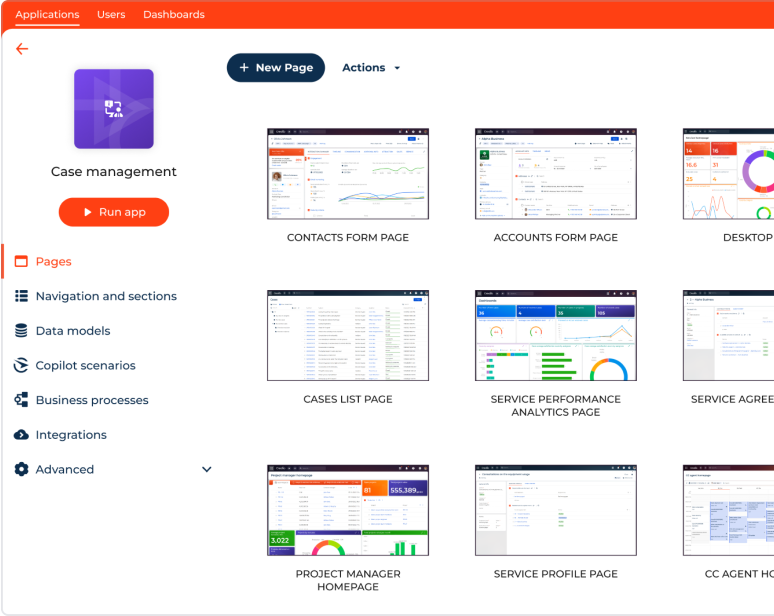
You don't necessarily have to choose one over the other. Creatio can also complement Dynamics 365 products by automating workflows, supporting new AI use cases, or extending CRM capabilities while retaining Microsoft systems where they deliver value.
Summary
Adopting Creatio doesn't mean leaving Microsoft behind. Enterprises can replace Dynamics 365, consolidate fragmented workflows, or introduce Creatio alongside existing Microsoft applications, depending on their business needs.
Creatio offers a unified AI-native platform that combines agentic CRM and workflow automation, helping organizations manage complex processes, reduce development effort, and scale AI across departments. Its flexible deployment and licensing options also support broader adoption while helping control long-term costs. While Dynamics 365 remains a strong fit for organizations invested in the Microsoft ecosystem, Creatio offers a more flexible approach to CRM modernization without requiring businesses to abandon existing technology investments.
Request a personalized Creatio demo to explore how Creatio can support your existing systems, business processes, and AI transformation goals.
FAQ
Is Creatio better than Microsoft Dynamics 365?
Creatio is a strong choice for enterprises looking to automate complex business processes, build custom apps with fewer technical resources, and scale AI across departments. Microsoft Dynamics 365 may be a better fit for organizations with significant Microsoft investments, particularly those prioritizing ERP integration and connectivity across business applications.
How much does Creatio cost compared to Dynamics 365?
Creatio pricing starts at $40 per user/month for the Growth platform plan, with CRM products available from $15 per user/month. For enterprises, Creatio offers a custom-priced Unlimited plan covering the platform and CRM products without per-user licensing limits, making it easier to scale adoption. Dynamics 365 Sales starts at $65 per user/month, with other applications licensed separately. Total costs depend on implementation costs, integrations, and AI usage.
Can Creatio replace Dynamics 365?
Yes. Creatio can replace Dynamics 365 in areas where organizations need greater flexibility in workflow automation, no-code application development, AI adoption, and customer-facing operations. It can also complement Dynamics 365, allowing businesses to modernize selected processes while retaining Microsoft applications and investments.
Does Creatio integrate with Microsoft 365, Outlook and Teams?
Yes. Creatio supports integration with Microsoft 365 tools, including Outlook and Teams, allowing organizations to retain familiar collaboration tools while introducing Creatio for workflow automation and customer management. Available functionality and configuration requirements depend on the integration.
What is the main difference between Creatio and Dynamics 365?
Creatio combines AI-powered CRM, no-code workflow automation, and AI agents on a unified platform, making it easier to automate complex processes, adapt to changing business needs, and scale AI adoption. Dynamics 365 offers a broad CRM and ERP ecosystem with deep Microsoft integrations, making it a strong fit for organizations invested in Microsoft technologies.
How long does Creatio implementation take compared to Dynamics 365?
Implementation timelines depend on process complexity, integrations, customization, and data migration requirements. A 2025 Nucleus Research study reported 70% shorter implementation timelines among Creatio customers, compared to traditional CRM software like Salesforce and Dynamics 365.
