



































































What is Cloud CRM? Key Features, Benefits & Top Cloud CRM Systems for 2026

Experience a New Era of Agentic CRM With Creatio

CRM systems have become the backbone of managing customer relationships. As people move across social, mobile, and digital channels, companies need a unified way to track interactions, personalize experiences, and automate workflows at scale. Traditional on-premise CRM systems often made this difficult - they required heavy maintenance, slow upgrades, and ongoing IT support.
Cloud-based CRMs take a different approach. By running the system online rather than on local servers, teams can get started quickly, access real-time data from anywhere, and adopt new features as soon as they’re released. This flexibility helps organizations grow faster, respond to customers more effectively, and adapt as their needs change.
In this article, we’ll break down what cloud CRM is, the advantages it brings to growing organizations, and the top systems to consider in 2026 as you evaluate the best fit for your business.
Key Takeaways:
- Cloud CRM software is hosted online by a CRM provider, giving users real-time access to customer data from any location and reducing the internal effort needed for system maintenance and updates.
- Key benefits of cloud CRM are faster implementation, lower upfront costs, easier scalability, improved team collaboration, and automatic delivery of new features and enhancements.
- Essential features of a cloud CRM include centralized customer data, workflow automation, AI-powered insights, robust reporting, mobile access, strong security, and integrations that connect sales, marketing, and service processes.
- The best cloud CRM providers are Creatio CRM, HubSpot CRM, Pipedrive, Zoho CRM and Monday.com, offering scalable and flexible cloud-based solutions for growing organizations.
What is Cloud CRM?
A cloud CRM is customer relationship management software hosted online by a third-party provider, allowing teams to access and manage customer data from any location and on any device with an internet connection. In cloud-based CRMs, the provider handles system updates, security, and general maintenance, reducing the amount of IT support and upkeep required from your organization and ensuring the system stays reliable and always up-to-date.
Like any CRM, a cloud-based system centralizes customer interactions, streamlines communication, and automates routine tasks to boost productivity. By working from the same real-time information, teams can collaborate more easily and eliminate data silos.
While traditional on-premise systems rely on local servers, cloud CRMs operate as flexible, scalable, and cost-effective Software-as-a-Service (SaaS) solutions. Businesses don’t need to purchase hardware, maintain servers, or manage software upgrades. Instead, the new features and improvements are delivered automatically, helping organizations stay productive, secure, and ready to scale without additional operational overhead.
How Does Cloud CRM Work?
Cloud CRM runs on remote servers managed by a CRM provider and is accessed through a web browser or application. In other words, the entire CRM infrastructure, including data storage, processing, and updates, operates within the provider’s cloud environment, which allows your teams to use the system from virtually anywhere.
Here are the key aspects that explain how cloud CRM systems operate:
- System Architecture
The CRM platform runs in the provider’s data centers, and users connect to it via the internet. Customer data, sales activities, marketing assets, and service records are stored centrally in the cloud, so every authorized user sees the same up-to-date information. - Application Delivery (SaaS Model)
Cloud CRMs are delivered as Software-as-a-Service. This means the vendor manages software updates, performance improvements, and new features automatically. Users always work with the latest version without manual installation or downtime planning. - Real-Time Data Access
Because all information is stored in a unified cloud database, teams across departments can work simultaneously with real-time records. Sales can track pipelines, marketing can run campaigns, and service teams can access complete customer histories — all from one shared system. - Integrations and Connectivity
Cloud CRMs use APIs and built-in connectors to integrate with email tools, ERP systems, marketing platforms, AI services, and other business applications. This allows data to sync automatically across tools. - Security and Reliability
Providers invest in encryption, access controls, backup systems, and global data centers. This typically results in higher reliability, better uptime, and stronger disaster recovery than most organizations can achieve on-premise.
Benefits of Cloud-Based CRM Software
Cloud CRM software offers several advantages that stem from its cloud architecture and vendor-managed infrastructure. Below are the key benefits that make cloud CRMs the best choice for growing organizations.
#1. Lower operational and IT costs
Cloud-based CRM software require significantly less involvement for in-house hardware, server maintenance, and dedicated IT resources. The provider manages updates, security patches, and system performance on its own servers, allowing organizations to redirect IT time toward more strategic initiatives.
#2. Fast deployment and easy updates
Because of the cloud-based infrastructure of the CRM system, its setup process is much faster and does not require complex installations. New features and improvements are rolled out automatically by the provider, so users always have access to the most current version of the software.
#3. Flexible scalability
Cloud CRM platforms can scale up or down quickly as business needs evolve. Organizations can adjust user seats, storage, and functionality without investing in new equipment or long deployment cycles. This helps teams not only scale smoothly, but also use resources more efficiently.
#4. Access from anywhere
With cloud-based CRM solutions, teams can access the system from any location and on any device with an internet connection. This ensures that data stays up to date, supports remote and field teams, and helps larger organizations keep distributed teams aligned without additional infrastructure.
#5. Improved reliability and uptime
Cloud providers operate modern data centers with high availability, redundancy, and built-in failover systems. This typically results in fewer disruptions and more consistent performance compared to systems maintained on local servers.
#6. Strong vendor-managed security
Leading cloud CRM vendors implement advanced security practices such as encryption, access controls, continuous monitoring, and automated backups. As a result, companies can reduce the security workload for their internal teams and keep customer data always secure.
#7. Built-in continuity and recovery options
Cloud CRM solutions benefit from provider-managed backups and geographically distributed data centers, which help organizations maintain operations during local outages or unexpected technical issues.
#8. Easier integrations with other systems
Cloud CRMs integrate smoothly with other cloud applications through APIs and prebuilt connectors. This simplifies the process of connecting sales, marketing, service, and back-office tools into a unified ecosystem, which is not always supported by the on-premise solutions.
#9. Real-time collaboration and data access
Since all the data is stored centrally and updated instantly in cloud-based CRM systems, business teams access and work with the most recent information. This improves visibility, eliminates version conflicts, and supports more coordinated teamwork.
Key Features of Cloud CRM
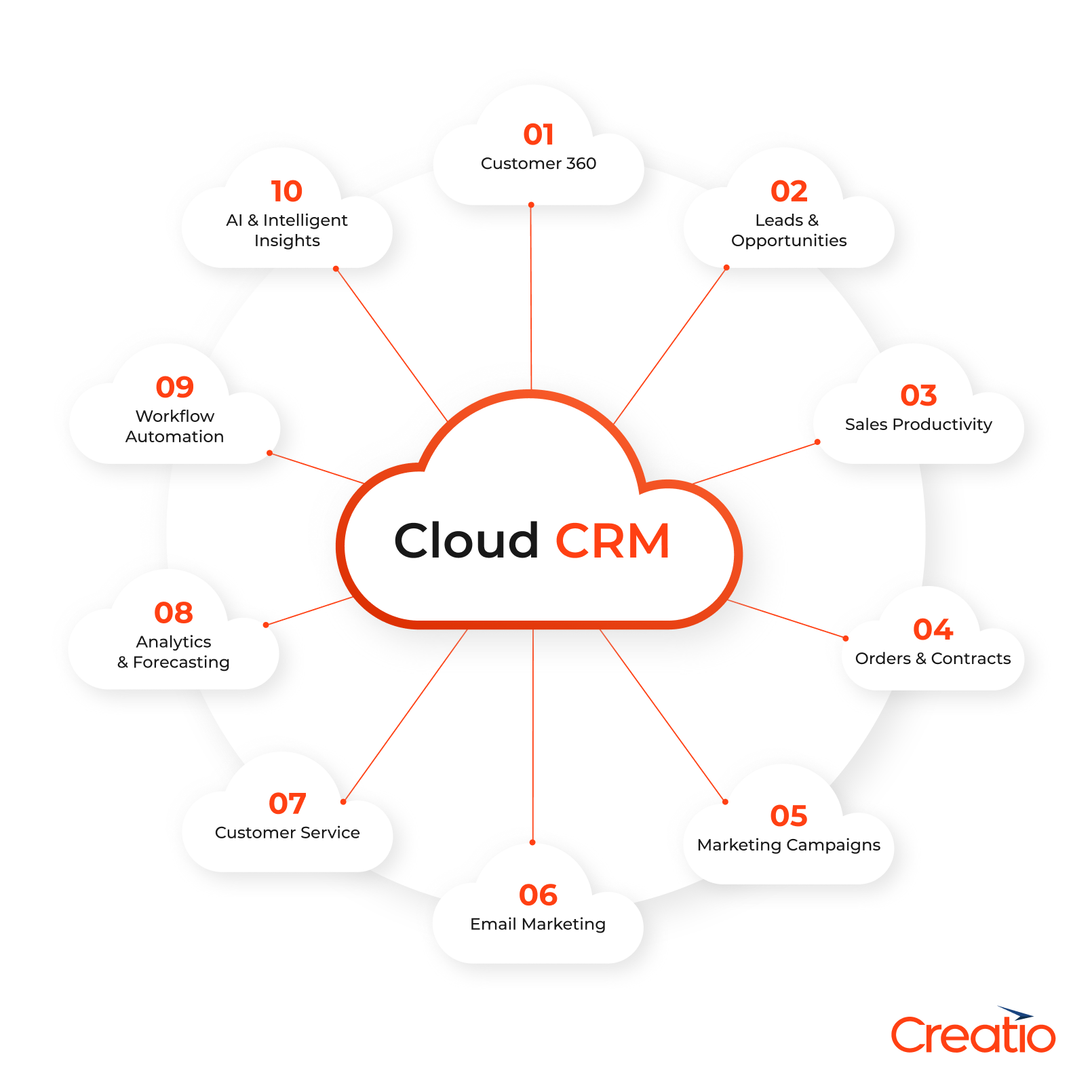
Lead, Contact, and Customer 360 Data Management
Cloud CRM systems store all customer and prospect information in a centralized database that can be accessed in real time. This includes contact details, communication history, preferences, and previous interactions across sales, marketing, and service. A complete Customer 360 view helps teams understand the full relationship with each prospective lead or customer without switching between multiple tools or data sources.
Pipeline and Opportunity Management
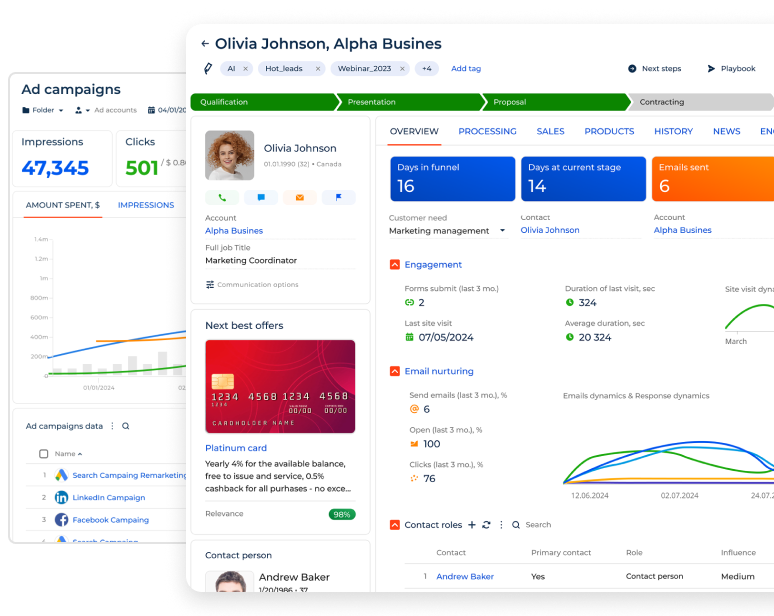
Cloud CRM platforms provide visual pipelines that show the status of every opportunity, from initial engagement to closed deals. Sales teams can track next steps, forecast revenue, identify bottlenecks, analyze win/loss ratios and performance trends. Real-time updates make it easy for managers and reps to stay aligned on the opportunities and respond quickly as deals progress.
Sales Automation Tools
Sales automation features help reps streamline routine tasks such as follow-up reminders, task assignments, email sequences, and data entry. These tools keep sales teams organized, reduce manual work, and support consistent, timely outreach. Many cloud CRMs also offer capabilities like predictive scoring and automated recommendations, which help sales reps prioritize opportunities and guide the customer through each stage of the journey more effectively.
Marketing Automation Capabilities
Many cloud CRMs offer integrated tools for email marketing, campaign management, lead nurturing, segmentation, and tracking campaign performance. This allows marketing teams design journeys, send targeted communications, and measure engagement in one integrated platform.
Customer Service and Case Management
Cloud CRMs support service operations with ticketing, case tracking, knowledge base management, and automated routing. Support teams can access complete customer histories, prioritize urgent issues, and ensure timely responses through service-level rules and escalation paths.
AI Capabilities & Autonomous Agents
Built-in AI is one of the most powerful capabilities of cloud-based CRMs, that support everyday decision-making and automate complex tasks. These systems leverage AI analyze pipeline activity, score leads, surface opportunity insights, recommend content, and assist with drafting customer communications.
The leading cloud CRM platforms also introduce AI agents that act as digital teammates, helping business teams move faster by generating quotes, identifying cross-sell and upsell opportunities, preparing documentation, and guiding users with next-best-action suggestions based on historical data and real-time signals. Together, these capabilities help teams work more efficiently and maintain consistent, data-driven processes across the entire customer journey.
Customizable No-Code Configuration Options
Cloud CRMs typically offer a high degree of configurability to enable businesses to tailor fields, layouts, workflows, and dashboards to their specific processes and needs. Many cloud-based CRM platforms like Creatio combine no-code tools and AI-capabilities that empower non-technical users build custom apps, automate unique workflows, and adapt the CRM functionality without coding complexity.
Workflow Automation and Productivity Tools
Cloud CRM platforms provide tools that help teams automate routine steps and maintain efficient, consistent processes. For example, they often enable users to design or customize workflows that trigger specific actions based on predefined conditions, such as updating customer records, assigning tasks, or sending notifications. By reducing manual effort and streamlining everyday activities, business units can achieve better productivity and ensure that key tasks are completed accurately and on time.
Integration and API Ecosystem
Cloud CRM software needs to integrate with a wide range of business applications, including marketing tools, ERP systems, e-commerce platforms, accounting solutions, and productivity apps. By using prebuilt connectors and open APIs, organizations can create unified workflows and ensure data flows smoothly between systems.
Reporting and Analytics
Cloud CRM platforms should provide powerful reporting and analytics tools that turn real-time data into actionable insights. Teams can use built-in dashboards and customizable reports to evaluate sales performance, understand customer behavior, monitor marketing effectiveness, and track service KPIs. With immediate access to business and customer data, managers can identify trends earlier, forecast with greater confidence, and uncover opportunities to optimize processes and drive growth.
Mobile App and Cross-Device Accessibility
A key advantage of cloud CRM systems is the ability to access the platform from any device — whether a laptop, tablet, or smartphone — with a secure internet connection. So, cloud CRMs should provide dedicated mobile apps that mirror essential desktop functionality, allowing users to view and update records, manage tasks, and track customer interactions on the go. This cross-device accessibility ensures that teams stay connected and productive whether they are in the office, traveling, or working in the field.
11 Best Cloud CRM Software Solutions for 2026
Once you’ve explored the benefits and features of cloud-based customer relationship management systems, it’s the right time to learn about the most popular platforms that match best for your business.
Cloud CRM Vendor | Key Strengths | G2 Rating |
|---|---|---|
| Creatio | An agentic no-code platform with strong CRM and workflow automation and specialized solutions for 20+ industry sectors | 4.7 / 5 |
| Salesforce | Advanced CRM features, robust automation and integration options for large enterprises | 4.4 / 5 |
| HubSpot | User-friendly platform with strong marketing automation, scalable plans, and a free CRM tier | 4.4 / 5 |
| Pipedrive | Highly intuitive pipeline management and sales-focused platform for fast-moving teams | 4.3 / 5 |
| Zoho CRM | An extensive feature set with flexible pricing, strong customization, and a large ecosystem of connected apps | 4.1 / 5 |
| Microsoft Dynamics 365 Sales | Deep integration with Microsoft products, robust automation and powerful sales intelligence features | 3.8 / 5 |
| Freshworks | Modern interface with omnichannel engagement, AI-assisted insights, and straightforward setup | 4.5 / 5 |
| Insightly | CRM with built-in project management, simple workflow automation, and ease of use for growing teams | 4.2 / 5 |
| Copper CRM | Optimized for Google Workspace users with streamlined setup and lightweight, intuitive workflows | 4.5 / 5 |
| Monday.com | Highly customizable boards, flexible automations, and strong collaboration features for cross-team work | 4.6 / 5 |
| BIGContacts | All-in-one CRM for contacts, email marketing, and deals, with built-in AI for growing businesses | 4.5 / 5 |
1. Creatio
Best for: Mid-size and Enterprise companies looking for a customizable cloud CRM solution to cater to their specific processes.
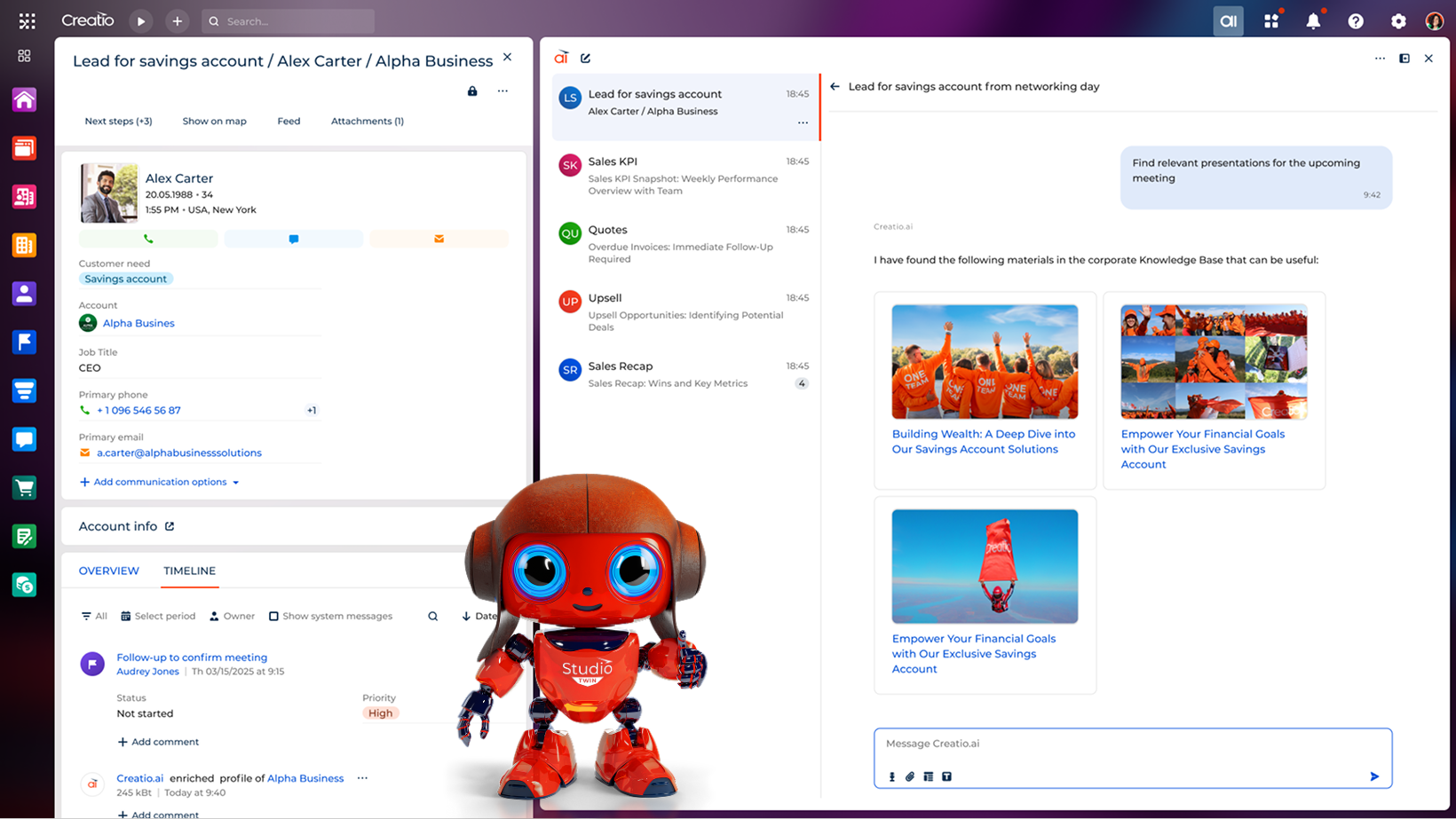
Creatio is a new era cloud CRM platform that empowers organizations manage end-to-end customer journeys and operational workflows with AI and no-code at its core. It offers a unified suite of agentic applications for sales, marketing, service, and operations, along with industry-specific solutions for more than 20 sectors to support smarter, more efficient processes for every business unit.

Creatio CRM includes three core products — Creatio Marketing, Creatio Sales, and Creatio Service — each enhanced with embedded AI that can analyze data, assists with content creation, recommends next steps and many more. For instance, marketing teams use Creatio to accelerate campaigns, improve engagement and maximize marketing ROI. Sales teams use it to shorten deal cycles, effectively manage pipelines and uncover new opportunities. Service teams rely on Creatio’s cloud CRM platform to speed up case resolution and deliver consistent customer experiences across every touchpoint.
Creatio’s AI-native no-code platform also allows users to build and modify CRM applications, automations, and role-based AI agents without writing code. This enables business teams to adapt the system to their needs quickly and scale improvements across the organization. The flexibility and intuitive interface of this cloud platform supports faster customization and contributes to lower overall ownership costs compared to traditional CRM systems, which has been confirmed by Nucleus Research.
Creatio is recognized by leading industry analysts, including Forrester and Gartner, which further reflects the platform’s extensive capabilities and ongoing innovation.
Advantages:
- Ready-to-use CRM products for sales, marketing and service automation
- Built-in predictive, generative, and agentic AI capabilities for end-to-end workflows
- Composable architecture and no-code tools to customize apps and AI skills
- Pre-built vertical solutions for 20+ industries including financial services, manufacturing, and insurance
- Extensive integration capabilities with 400+ applications on the Creatio Marketplace
- Comprehensive analytics powered by customizable dashboards and fast insights from Creatio.ai
- Accelerated implementation timelines
- Reduced reliance on additional IT resources
- Powerful mobile platform with full access to CRM data and workflows
- AI is embedded into the platform, not sold as an add-on
- Strong enterprise-grade security and compliance features
Drawbacks:
- May present a learning curve for users who require advanced customization and are new to no-code development.
Pricing:
Creatio CRM offers a composable pricing model that allows businesses to pay only for the products they choose to use. All plans include built-in AI capabilities, enabling organizations to run human-led and agentic workflows to enhance productivity and deliver better customer experiences.
The core Creatio platform is available in three plans — Growth, Enterprise, and Unlimited — starting at $40 per user/month, giving organizations the flexibility to select the option that best aligns with their current needs and long-term goals. The Unlimited plan is available at custom pricing and provides access to the full platform, all CRM products, and AI capabilities, with no limits on users or AI agents.
Each of Creatio’s CRM products — Creatio Sales, Creatio Marketing, and Creatio Service — is priced at $15 per user per month and can be purchased individually or as part of a unified CRM suite.
2. Salesforce
Best for: Large enterprises with complex sales processes and dedicated CRM administrators and IT staff.
The established and traditional cloud CRM, offering comprehensive sales automation, customer service, and marketing tools.

Advantages:
- Comprehensive feature set and customization options
- Extensive third-party app marketplace
- Predictive AI capabilities with Einstein Analytics
- Agentic AI capabilities with Agentforce
- Robust reporting and analytics
- Strong mobile platform
Drawbacks:
- Steep learning curve and complexity
- Customization requires professional developers
- High cost and complex pricing model
- Requires significant training and onboarding
- Can be overwhelming for simple CRM needs
Pricing:
Starting at $25/user/month (Essentials), Professional at $100/user/month, Enterprise at $165/user/month
See also: Salesforce Alternatives & Competitors and Salesforce Marketing Cloud Alternatives & Competitors
3. HubSpot CRM
Best for: Small to medium businesses, startups, and companies prioritizing marketing automation.
A user-friendly, inbound marketing-focused CRM that offers a free tier and integrates seamlessly with HubSpot's marketing and service tools.

Advantages:
- Free tier with robust functionality
- Excellent user interface and ease of use
- Strong inbound marketing integration
- Good reporting and dashboard capabilities
Drawbacks:
- Limited customization compared to enterprise solutions
- Advanced features such as AI automation and lead management require paid upgrades
- Can become expensive as you add premium features
Pricing:
Free plan available, Starter at $20/month, Professional at $1,600/month, Enterprise at $5,000/month
See also: Top 10 HubSpot Alternatives & Competitors
4. Pipedrive
Best for: Small to medium-sized sales teams and businesses that are looking for easy-to-use sales process management.
A sales-focused CRM designed around visual pipeline management, emphasizing simplicity and ease of use for sales teams.

Advantages:
- Intuitive visual pipeline interface
- Powerful mobile app
- Strong sales automation features
- Good value for money
- Easy setup and onboarding
- Close integration with Google Workspace
Drawbacks:
- Limited marketing and service automation features
- Basic reporting capabilities
- Fewer integrations compared to larger platforms
- Limited customization options
Pricing:
Essential at $24/user/month, Advanced at $49/user/month, Professional at $69/user/month, Power at $79/user/month
5. Zoho CRM
Best for: Small to medium businesses already using Zoho products or those seeking cost-effective CRM solutions.
Part of the comprehensive Zoho suite, offering good functionality at competitive prices with strong integration across Zoho applications.

Advantages:
- Very competitive pricing
- Good integration with other Zoho products
- Multi-channel communication support
- AI-powered sales assistant (Zia) (is included in Enterprise plan only)
Drawbacks:
- Interface can feel dated compared to competitors
- Limited third-party integrations outside Zoho ecosystem
- Limited customization options
Pricing:
Standard at $20/user/month, Professional at $35/user/month, Enterprise at $50/user/month, Ultimate at $65/user/month
See also: Top 10 Zoho CRM Alternatives and Competitors
6. Microsoft Dynamics 365 Sales
Best for: Medium to large enterprises already invested in the Microsoft ecosystem.
Microsoft's cloud CRM solution that integrates deeply with Office 365 and other Microsoft products, offering enterprise-grade functionality.

Advantages:
- Comprehensive features for sales automation
- Seamless integration with Microsoft Office suite
- Familiar interface for Microsoft users
- Advanced AI and analytics features
Drawbacks:
- Can be complex to set up and configure
- Requires Microsoft ecosystem for best value
- Higher learning curve for non-Microsoft users
- Pricing can escalate quickly with add-ons
Pricing:
Professional at $65/user/month, Enterprise at $105/user/month, Premium at $150/user/month
7. Freshworks CRM
Best for: Small to medium businesses looking for a balance between functionality and ease of use.
A comprehensive CRM solution that combines sales, marketing, and customer service capabilities in an intuitive platform.

Advantages:
- Clean, modern user interface
- Good balance of the depth of features and ease-of-use
- Reasonable pricing for the feature set offered
Drawbacks:
- Limited customization options
- Fewer third-party integrations than market leaders
- Reporting capabilities could be more robust
Pricing:
Free plan available, Growth at $11/user/month, Pro at $47/user/month, Enterprise at $71/user/month
8. Insightly
Best for: Small to medium service-based businesses and agencies that need both CRM and project management capabilities.
A CRM that combines traditional customer relationship management with project management capabilities, ideal for service-based businesses.
 Advantages:
- Integrated project management features
- Reasonable pricing for small teams
- Decent mobile app
Drawbacks:
- Interface can feel cluttered
- Limited advanced sales automation
- Fewer integrations than competitors
Pricing:
Plus at $29/user/month, Professional at $49/user/month, Enterprise at $99/user/month
9. Copper CRM
Best for: Small to medium businesses heavily invested in Google Workspace.
A CRM designed specifically for Google Workspace users, offering seamless integration with Gmail, Google Calendar, and other Google tools.

Advantages:
- Excellent Google Workspace integration
- Clean, intuitive interface
- Automatic data capture from Gmail
- Good mobile experience
- No setup complexity for Google users
Drawbacks:
- Limited functionality outside Google ecosystem
- Fewer advanced features than enterprise solutions
- Basic reporting capabilities
Pricing:
Starter at $12/user/month, Basic at $29/user/month, Professional at $69/user/month, Business at $134/user/month
10. Monday.com CRM
Best for: Small to medium businesses and teams that need flexibility and are already familiar with monday.com's work management approach.
A work management platform that includes CRM capabilities, known for its visual project boards and customizable workflows.

Advantages:
- Highly visual and customizable interface
- Streamlined collaboration enabled by project management tools
- Flexible workflow automation
Drawbacks:
- Not purpose-built for CRM (more general work management)
- Limited traditional CRM features compared to dedicated solutions
- Fewer industry-specific CRM functionalities
Pricing:
Basic at $15/user/month, Standard at $20/user/month, Pro at $33/user/month, Enterprise pricing available
11. BIGContacts
Best for: Small and growing businesses that want an easy, all-in-one CRM for managing contacts, email campaigns, and deals without a complex setup.
A straightforward, contact-centric CRM built for growing teams that want a single view of every customer relationship without a steep learning curve or a big implementation project.

Advantages:
- Contact management, email marketing, and deal/pipeline tracking bundled in one platform
- AI campaign designer that builds full email campaigns (newsletters, welcome emails, promos) from a short description of goal and audience
- AI email writing assistant that sharpens tone and messaging on drafts before send
- AI-powered lead scoring and dashboard that flags inactive contacts, stalled deals, and which lead types convert fastest
- AI pipeline tracking that monitors deal stages and surfaces opportunities at risk of slipping away
- Automated follow-ups and reminders so no conversation goes cold without manual effort
Drawbacks:
- No downloadable or on-premise version, it's cloud-only
- Dark mode interface option not currently available
- No dedicated account manager on the free plan, that's reserved for paid tiers
Pricing:
Free plan available (100 contacts, forever free); Annual plan starts at $9.99/month per 1,000 contacts (2,000-contact minimum), $119.88 billed annually — a limited-time rate, discounted from the standard $19.99/month.
How to Choose a Cloud CRM Solution?
Define your business goals
Determine what functionality you need to meet your business targets and choose the system that meets you requirements.
Understand integration requirements
Check if the system has all the required tools to manage the basic needs, as for example tools to manage communications via email, phone and chat. There is no doubt that it’s much more convenient to have access to all important tools from a single interface, not switching between multiple applications.
Research vendor strength and reputation
Check the reviews of vendor’s customers and the recent reports of the most reputable analysts. In the reviews, you will be able to see what was expected, and what customers got eventually, how this influenced their business in terms of sales volume and productivity. Analysts’ reports will provide you insights to compare the top vendors and check if the vendor is able to meet the exact requirements of your business.
Summary
Cloud CRM platforms have become the go-to choice for organizations that want to manage customer relationships efficiently and run CRM workflows with greater flexibility. By operating in the cloud, these systems reduce infrastructure and maintenance demands, support remote access across devices, and deliver automatic updates that keep teams more productive and always aligned.
Creatio is a leading cloud CRM option for companies seeking both flexibility and end-to-end customer relationship management. Its agentic, no-code platform enables business teams to customize workflows, build applications, and deploy digital agents without heavy IT involvement. Combined with its CRM products for sales, marketing, and service, Creatio helps organizations accelerate deal cycles, enhance customer experiences, and drive sustainable revenue growth.
