





































































What Are Creatio AI Agents? Definition, Types, And How They Work

See Creatio AI Agents in Action

AI agents are rapidly becoming a core part of enterprise operations, with 78% of organizations already scaling AI agents or planning to do so within the next 12 months. Creatio helps businesses accelerate this shift by bringing assistive and autonomous AI agents into CRM and industry-specific workflows, enabling people and AI agents to work as one team on a unified platform.
In this guide, we’ll explore what Creatio AI agents are, how they work, the different types available, and how organizations can build, deploy, and manage them within the Creatio ecosystem.
Key Takeaways
- Creatio AI agents go beyond traditional automation, using AI reasoning, business data, and connected tools to make decisions and execute tasks within Creatio's AI-native CRM and workflow platform.
- Creatio supports both assistive and autonomous AI agents, allowing organizations to choose between AI that supports employees and agents that independently execute multi-step processes.
- Pre-built CRM AI agents are embedded in Creatio Sales, Marketing, and Service, helping teams reduce manual work, uncover customer insights, and improve everyday operations.
- Creatio AI Twin makes AI agent development accessible to business users, enabling them to create and customize agents through natural-language conversations without coding.
- Creatio Bank.AI brings agentic AI to banking operations, combining AI assistance for relationship managers and service teams with autonomous agents for onboarding, renewals, referrals, and retention.
- Creatio AI Studio puts organizations in control of their agents, with tools to manage access, protect sensitive data, enforce approval requirements, and monitor agent activity.
- Creatio Unlimited Enterprise is a commercial model with unlimited users, custom agents, applications, and workflows, paired with an AI Package for AI usage.
What Are Creatio AI Agents?
Creatio AI agents are software agents, built on an AI-native CRM and workflow platform, that use large language models, business data, and connected tools to assist employees or carry out multi-step tasks within configured permissions and approvals ce. They can understand requests in natural language, find and analyze relevant information, determine what needs to be done, and take action using connected business systems.
Built into Creatio's AI-native CRM and workflow platform, these agents combine large language models (LLMs), business knowledge, instructions, and tools to perform work that would otherwise require manual effort. For example, an AI agent can analyze a sales opportunity, prepare a customer briefing, update CRM records, or coordinate multiple steps in a customer service process.

Creatio offers pre-built AI agents for CRM and industry-specific workflows, as well as custom agents that organizations can create and manage using Creatio AI Studio. Depending on their purpose and configuration, agents can work alongside employees or carry out tasks autonomously within defined permissions and business rules.
AI Agents vs. Traditional Automation
Traditional automation follows predefined rules and sequences of actions. It works well for predictable, repetitive processes, such as routing a lead to a sales representative when specific conditions are met or sending a notification when a support case changes status.
Creatio AI agents go beyond rule-based automations by interpreting requests, evaluating available information, and determining which actions to take to achieve a goal. Rather than requiring every step to be explicitly programmed, agents can use AI reasoning to select appropriate tools, respond to changing information, and handle tasks that involve unstructured data or variable conditions.
For example, traditional automation can assign an incoming support case based on predefined categories. An AI agent can analyze the customer's message, identify the issue, consult relevant knowledge sources, and suggest or perform the next action based on its instructions and available tools.
Here’s how the two technologies differ:
Capability | Creatio AI Agents | Traditional Automation |
|---|---|---|
| How it works | Interprets goals and selects actions based on data and context | Executes predefined rules and workflows |
| Input | Natural-language requests, business data, documents, and events | Structured data, events, and predefined conditions |
| Decision-making | Uses AI reasoning within configured instructions and permissions | Follows explicitly defined logic |
| Flexibility | Can handle variations without defining every possible sequence | Requires changes to rules when processes change |
| Human involvement | Can assist employees or execute permitted tasks autonomously | Typically needed for exceptions and decisions outside predefined rules |
| Best suited for | Tasks requiring interpretation, analysis, and flexible execution | Predictable, repetitive processes |
Note: AI agents do not replace traditional automation in every scenario. In Creatio, the two can work together: AI agents handle tasks that require interpretation and judgment, while predefined workflows provide consistent execution for structured business processes.
How Do Creatio AI Agents Work?
Creatio AI agents combine AI reasoning with business information and tools that allow them to perform actions. Each agent has a defined purpose, instructions that guide its behavior, and access to resources needed to complete its tasks.
When an agent receives a request or is activated by a configured trigger, it uses its language model and available resources to determine how to respond. Depending on its configuration, it can answer questions, generate content, retrieve business information, or execute actions across connected systems.
Core Components of Creatio AI Agents
What an AI agent can do depends on how it's configured. In Creatio AI Studio, organizations can choose the AI model, define the agent's instructions, connect relevant knowledge sources and tools, and determine how the agent is activated and accessed.
An important distinction is between knowledge sources, skills, and tools. Knowledge sources give agents information to work with, skills guide them through specific procedures, and tools allow them to interact with business systems and perform actions. For example, a banking agent could use internal lending policies as a knowledge source, follow a loan assessment procedure through a skill, and retrieve application details from a connected system using a tool.
This allows organizations to tailor Creatio AI agents to specific roles and processes without building every capability from scratch.
Agent Autonomy and Human Oversight
Creatio AI agents can operate with different levels of autonomy, depending on their purpose and configuration.
Assistive agents primarily support employees by answering questions, preparing content, analyzing information, and recommending actions. Employees remain responsible for reviewing results and making decisions where needed.
Autonomous agents can initiate and execute tasks without requiring an employee to guide every step. For example, an agent activated by a business event can retrieve information, follow a defined procedure, and update connected systems using its available tools.
Autonomy does not mean unrestricted access or control. Agent instructions, available tools, system permissions, and configured approval requirements can limit what an agent is allowed to do. Organizations can use these controls to determine which tasks agents perform independently and which require human involvement.
Example: How a Creatio AI Agent Can Support Account Research
Consider a sales representative who wants to better understand a customer's interests before reaching out. Instead of manually reviewing website activity and customer records, they can ask a Creatio AI agent: "What was Alexander Wilson interested in when he last visited our website?"
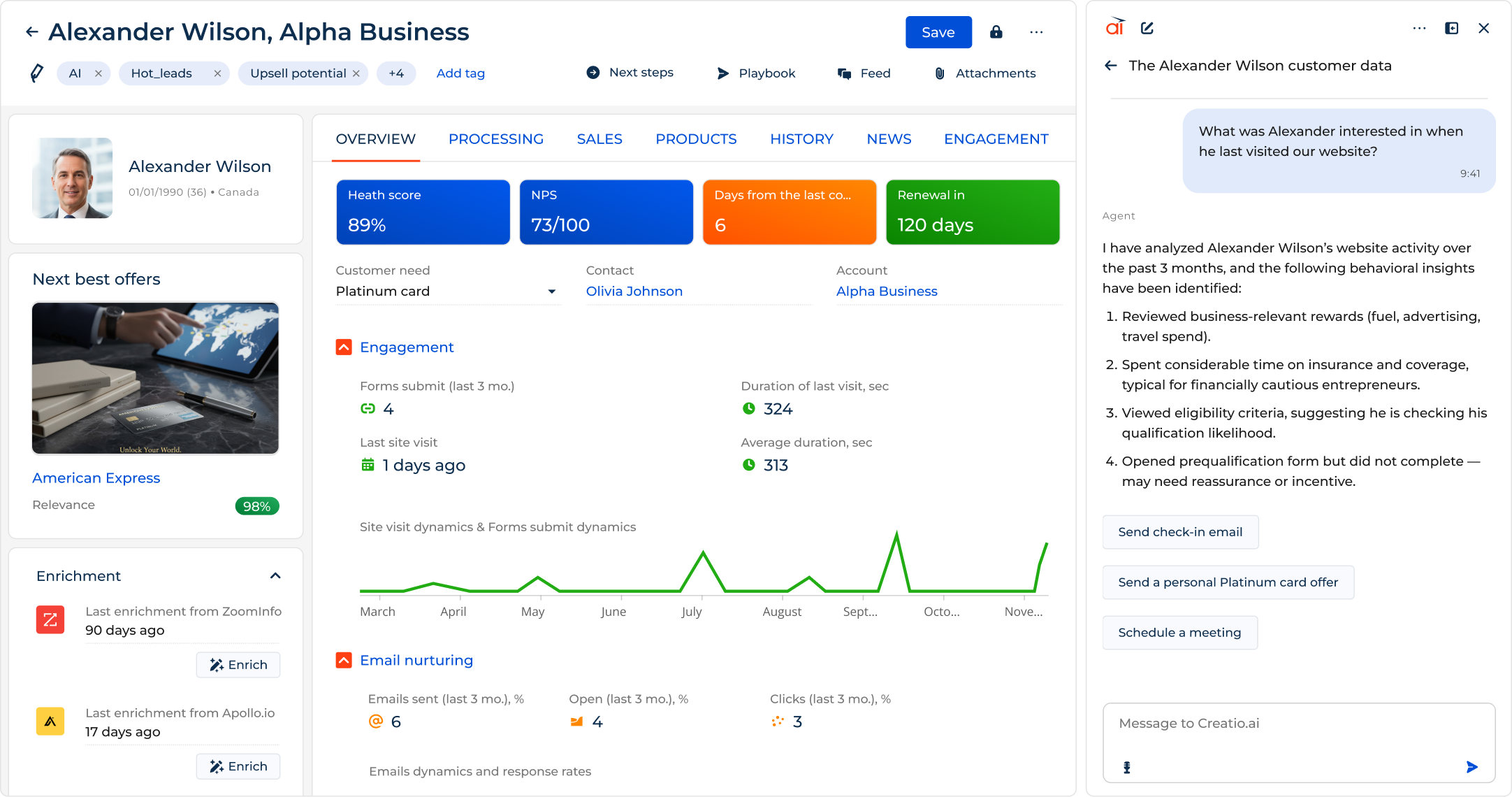
Here's how the agent handles the request:
- Understand the request: Identify the customer and determine which website interactions need to be analyzed.
- Retrieve customer activity: Access the customer's recent website behavior, including pages visited and topics explored.
- Analyze customer interests: Identify patterns in the customer's activity, such as interest in travel-related rewards, insurance coverage, and eligibility for a Platinum card.
- Identify potential opportunities: Highlight that the customer reviewed eligibility criteria but did not complete the application, suggesting they may need additional information or an incentive.
- Recommend next steps: Suggest relevant follow-up actions, such as sending a check-in email, sharing a personalized Platinum card offer, or scheduling a meeting.
This example illustrates how Creatio AI agents turn customer data into actionable insights, reducing manual analysis and helping sales teams engage customers faster with relevant, personalized recommendations.
Types of Creatio AI Agents
Creatio offers pre-built AI agents for sales, marketing, customer service, and industry-specific operations, including banking and credit unions. These agents can assist employees with daily tasks or independently handle complex, multi-step processes.
All Creatio AI agents can be customized to fit specific business needs. Organizations can adapt existing agents or build their own to support unique workflows and requirements.
Pre-built CRM Agents (Assistive AI Agents)
Creatio offers ready-to-use AI agents within its Creatio Sales, Creatio Marketing, and Creatio Service products, each with agents tailored to its specific functions. Organizations can access agents across all three products through the Creatio AI CRM products or Unlimited plan.
Creatio AI Agents for Sales
Creatio Sales offers pre-built AI agents that help sales professionals research customers, prepare for meetings, manage opportunities, and improve sales forecasts. Available within the Creatio Sales application, these agents reduce manual research and administrative work so sales teams can focus on building relationships and closing deals.

Example: Territory Management agent at Creatio Sales
Creatio Sales AI agents include:
- Account Research Agent – Researches prospects and existing customers, providing account insights that help sales representatives personalize their outreach.
- Data Enrichment Agent – Finds and adds relevant information to CRM records, helping sales teams maintain more complete and accurate customer profiles.
- Meeting Preparation Agent – Summarizes customer information and previous interactions to help sales representatives prepare for meetings.
- Next Best Offer/Action Agent – Recommends relevant offers and follow-up actions based on customer information and sales context.
- Lead & Opportunity Insights Agent – Analyzes leads and opportunities to highlight important insights, potential risks, and areas that need attention.
- Forecasting Accuracy Agent – Analyzes sales pipeline data to help teams assess forecasts and identify factors that may affect expected results.
- Lead Generation Agent – Helps identify potential customers and generate new leads for sales teams.
- MS Outlook/MS Teams Agent – Helps sales representatives access CRM information and perform supported tasks directly from Microsoft Outlook and Teams.
Let’s briefly review an example of how these agents can be used in practice. When preparing for a meeting with a potential customer, a sales representative can use Creatio’s Account Research Agent to gather company insights and the Lead & Opportunity Insights Agent to identify potential sales opportunities. The Meeting Preparation Agent can then bring these insights together into a focused meeting brief, helping the representative spend less time on research and more time preparing for a productive customer conversation.
Creatio AI Agents for Marketing
Creatio Marketing includes pre-built AI agents that help marketing professionals plan campaigns, create content, manage leads, and analyze campaign performance. Available within the Creatio Marketing application, these agents help marketers launch campaigns faster, personalize communications, and improve marketing effectiveness.

Example: Lead Scoring agent at Creatio Marketing
Creatio Marketing AI agents include:
- Segmentation Agent – Helps marketers group contacts into relevant audiences based on customer data, characteristics, and behavior.
- Email Generation Agent – Creates marketing email content tailored to campaign goals and target audiences.
- Landing Page Content Agent – Generates content for campaign landing pages, including headlines, descriptions, and calls to action.
- Campaign Generation Agent – Helps marketers create campaigns by preparing campaign content and other elements based on marketing objectives.
- Lead Scoring Agent – Evaluates and prioritizes leads based on their characteristics and engagement, helping teams identify promising prospects.
- Lead Distribution Agent – Helps assign leads to the appropriate sales representatives or teams based on defined criteria.
- Email Optimization Agent – Analyzes and suggests improvements to marketing emails to help increase their effectiveness.
- Conversion Analysis Agent – Analyzes campaign conversion data to help marketers understand performance and identify opportunities for improvement.
For example, when organizing an in-person marketing event, a marketing manager can use the Segmentation Agent to identify the right audience, the Campaign Generation Agent to plan the campaign, and the Email Generation Agent to create personalized invitations. Once the campaign is live, AI agents can also help analyze its performance and suggest improvements, reducing manual work throughout the process.
Creatio AI Agents for Service
Creatio Service provides pre-built AI agents that help customer service professionals handle inquiries, resolve cases, and manage support operations. Available within the Creatio Service application, these agents help service teams find answers faster, reduce repetitive work, and deliver more consistent customer support.

Example: Next Best Action agent at Creatio Service
Creatio Service AI agents include:
- Customer Support Agent – Helps answer customer inquiries by finding relevant information and preparing responses.
- Resolution Guidance Agent – Recommends steps for resolving customer issues based on case details and available support information.
- Knowledge Base Agent – Helps service representatives find relevant knowledge articles and troubleshooting instructions.
- Case Understanding Agent – Analyzes incoming cases to identify customer issues, important details, and the context needed for resolution.
- Next Best Action Agent – Suggests appropriate next steps based on the customer's situation and case history.
- Routing Analysis Agent – Analyzes case routing to help service teams identify assignment issues and improve how requests are distributed.
- Virtual Assistance Agent – Provides conversational assistance to help customers find information and resolve common requests.
Here’s a great example use case: when a customer reports an unexpected charge on their bill, a service representative can use the Case Understanding Agent to review the complaint, then use Creatio’s Knowledge Base Agent and Resolution Guidance Agent to find relevant billing policies and identify the next steps. This helps the support reps investigate the problem faster and provide a clear, informed response without manually searching through internal data.
Creatio AI Agents for Banking & Credit Unions
Creatio Bank.AI is Creatio's banking AI CRM and workflow platform for banks and credit unions, offering pre-built AI agents for commercial banks, retail banks, and credit unions. These agents help banking professionals manage customer relationships, identify growth opportunities, handle service requests, and streamline daily operations.
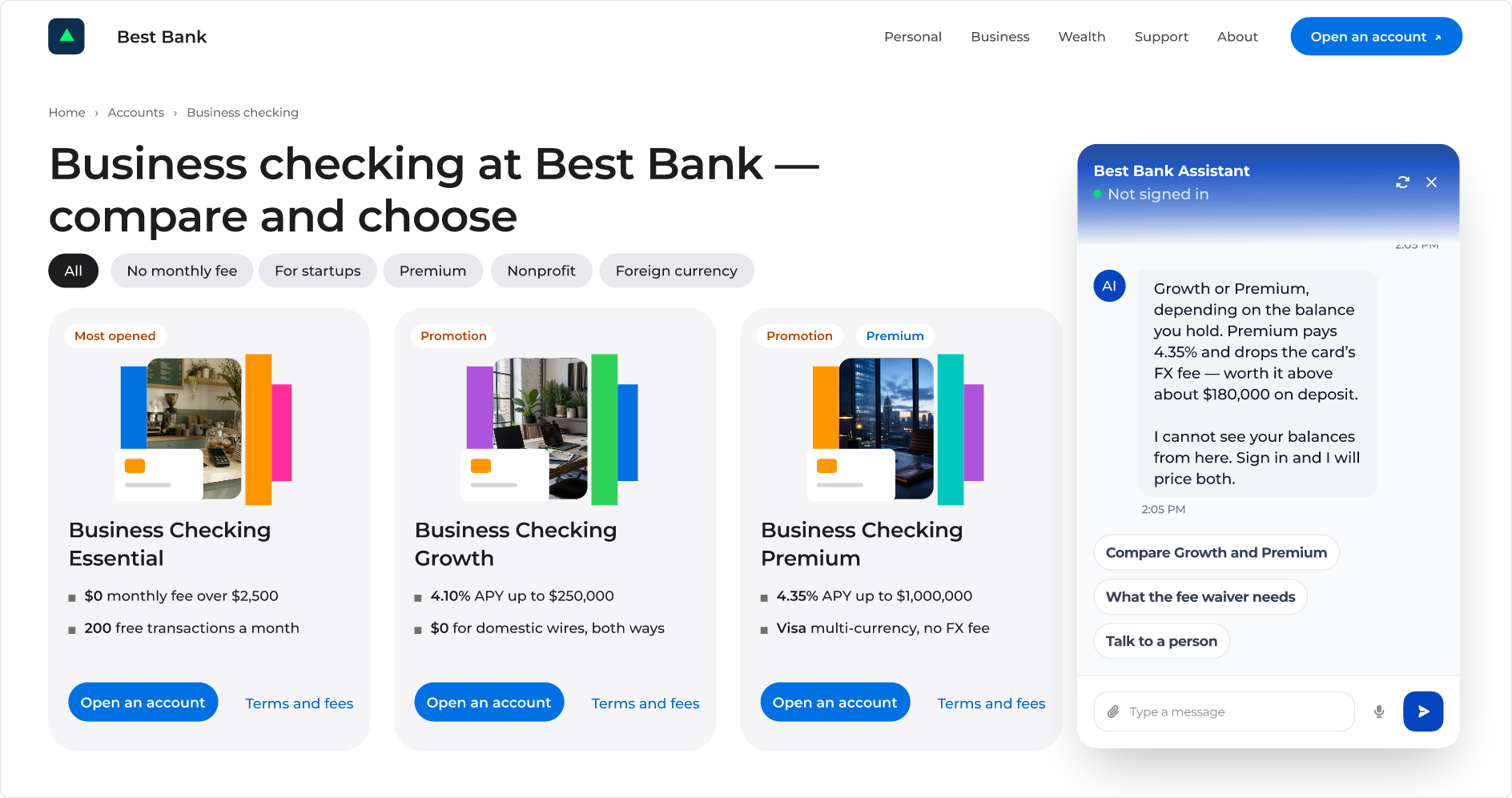
Example: Account Servicing agent at Creatio Bank.AI
Creatio Bank.AI agents include:
- Relationship Manager Agent – Analyzes customer information and account activity to help relationship managers prepare for meetings, identify opportunities, and recommend relevant follow-up actions.
- Prospecting Agent – Helps banking sales teams research potential customers, identify promising prospects, and prepare personalized outreach.
- Next Best Offer Agent – Recommends relevant banking products and services based on customer needs and account information, helping employees identify cross-selling and upselling opportunities.
- Account Servicing Agent – Helps handle routine account requests, such as updating customer information and providing account-related assistance.
- Product Application Intake Agent – Supports the collection and review of customer applications, helping employees check information and identify missing documents.
- Dispute Resolution Agent – Helps banking service teams review customer disputes, gather relevant information, and determine appropriate resolution steps.
- Card Servicing Agent – Supports card-related requests, including card activation, replacement, and account updates.
- Document Processing Agent – Extracts and organizes information from banking documents, reducing manual data entry and supporting document verification.
For example, before a customer meeting, a relationship manager can use the Relationship Manager Agent to review recent account activity and the Next Best Offer Agent to identify relevant banking products. This helps the manager prepare personalized recommendations and identify opportunities to grow the customer relationship.

Autonomous Industry Agents
Creatio offers pre-built autonomous AI agents that can independently handle multi-step business processes across the customer lifecycle. Each agent can be deployed on its own, integrated with an existing CRM, or connected with other agents to automate more complex workflows. This allows organizations to start with a specific use case and gradually expand AI automation across their operations.
Specifically, Creatio Bank.AI offers autonomous agents for banking processes, including customer onboarding, referrals, renewals, and retention.
Customer Onboarding Agent (available at Creatio Bank.AI)
The Creatio Customer Onboarding Agent automates the steps between approving a customer's application and making their new account ready to use.
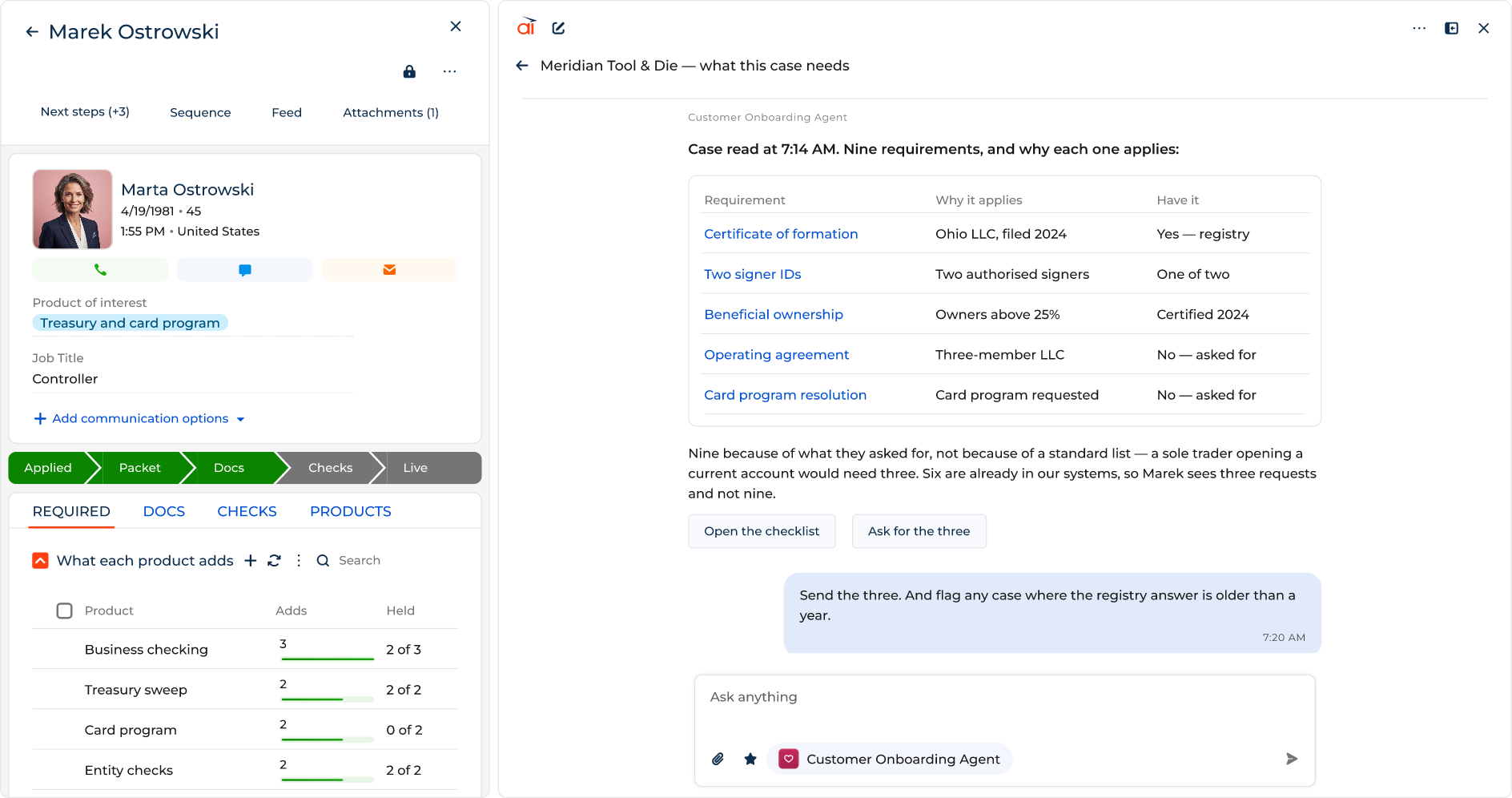
Customer Onboarding Agent Workflow
The agent identifies which documents are required, collects and validates them, performs identity and compliance checks, and coordinates the remaining onboarding steps. It can also follow up on missing information and move applications forward automatically, involving bank employees only when exceptions or approvals require their attention.
For example, when a customer opens a new bank account, the agent can collect identification documents, verify their completeness, coordinate required checks, and track progress across channels. This reduces manual follow-ups and helps banks onboard customers faster while maintaining oversight of sensitive decisions.
Referral Agent (available at Creatio Bank.AI)
The Creatio Referral Agent helps banks generate new business through referrals from existing customers and employees.
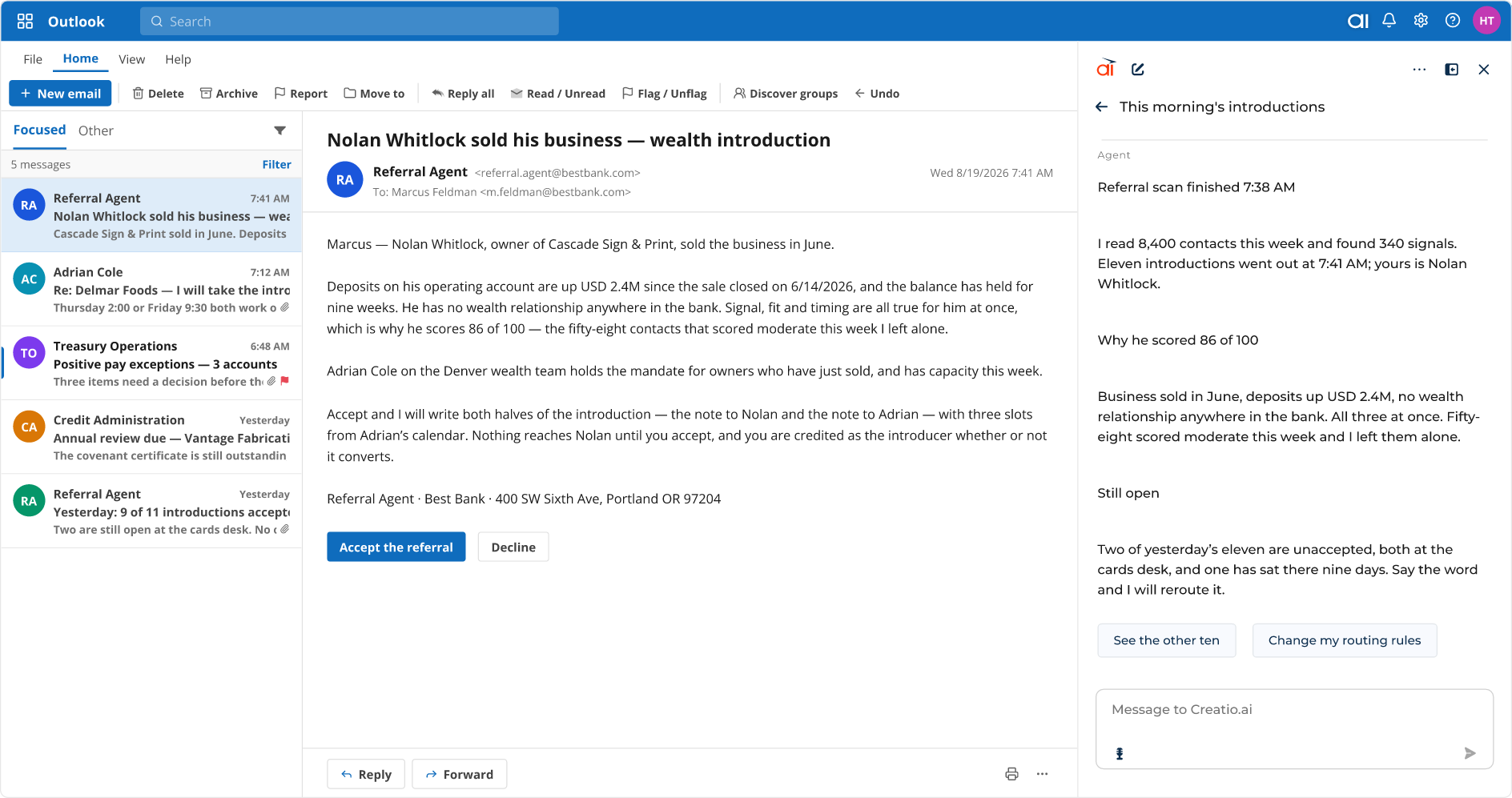
Referral AI Agent Workflow within MS Outlook
The agent analyzes customer relationships, engagement, and other relevant signals to identify promising referral opportunities. It can then initiate outreach, encourage customers or employees to make introductions, follow up on pending referrals, and track their progress through conversion.
For example, when the agent identifies a satisfied business customer who may be willing to recommend the bank to other companies, it can initiate a personalized referral request and coordinate the next steps. This helps banks grow their customer base without relying entirely on employees to identify and follow up on referral opportunities.
Renewal Agent (available at Creatio Bank.AI)
The Creatio Renewal Agent automates the renewal process for banking products, including term deposits and loans.
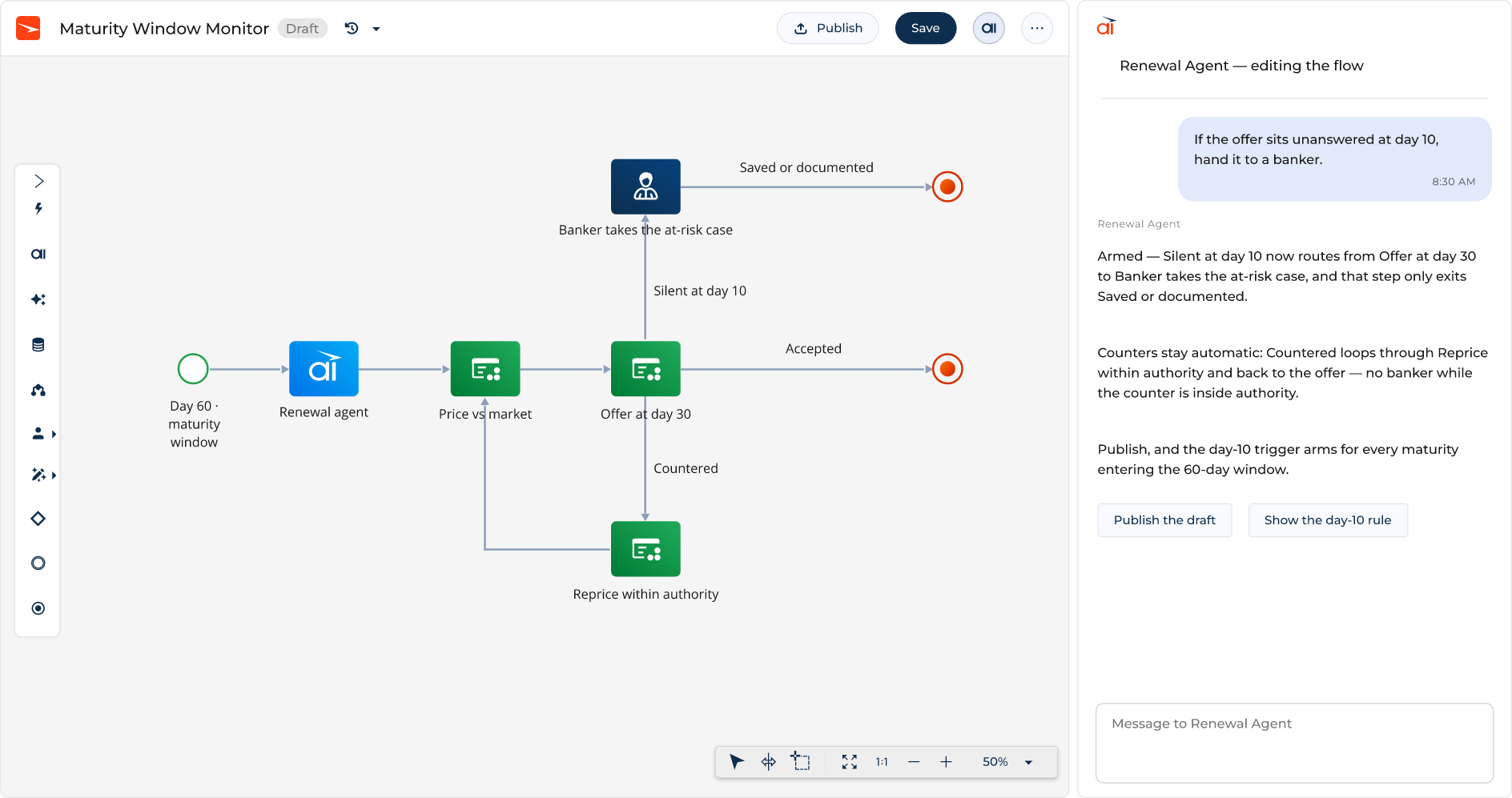
Renewal AI Agent Workflow
The agent monitors upcoming expiration dates, analyzes customer relationships and pricing preferences, and prepares personalized renewal offers. It can contact customers, guide them through the renewal process, and complete straightforward renewals automatically, while referring complex or high-value cases to relationship managers.
For example, when a customer's term deposit approaches maturity, the agent can review their account history, prepare a suitable renewal offer, and contact them before the deposit expires. This helps banks avoid missed renewals, reduce administrative work, and retain customer relationships.
Retention Agent (available at Creatio Bank.AI)
The Creatio Retention Agent helps banks identify customers at risk of leaving and take action before they switch to another financial institution.
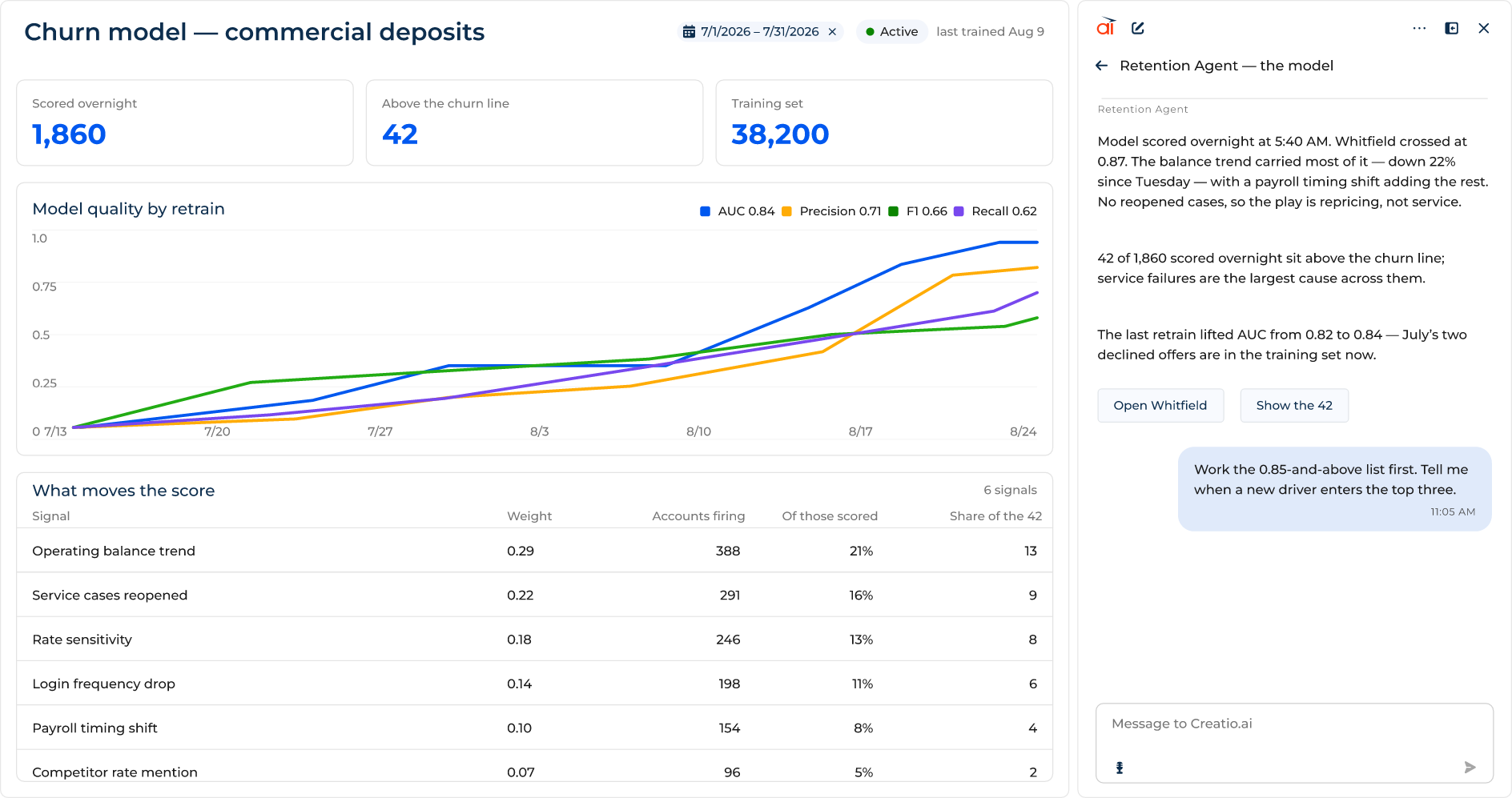
Retention AI Agent Workflow
The agent monitors customer behavior, financial activity, and service interactions to detect early signs of dissatisfaction or disengagement. It then analyzes the reasons behind the risk and can initiate personalized retention actions, such as targeted offers or proactive outreach. High-value or sensitive cases are referred to relationship managers for review.
For example, if a long-term customer starts reducing account activity and has recently reported unresolved service issues, the agent can flag the relationship as at risk and initiate an appropriate follow-up. This helps banks address potential problems earlier and protect valuable customer relationships.
Creatio AI Twin
Creatio AI Twin lets every employee build personal AI agents in minutes, just by describing what they need in plain language. The Twin builds the agent, the user tests and refines it in conversation, and it runs within the user's own permissions, with every action logged. It also works as a personal AI assistant within Creatio AI Studio that helps employees complete everyday tasks, work with business data, and build other AI agents through natural-language conversations. Unlike traditional AI assistants, AI Twin is itself an AI agent equipped with tools to create, customize, and manage other agents.
Creatio AI Twin supports three core areas:
- AI agent creation and management. Users can describe the agent they need in natural language, and AI Twin generates its initial configuration, including instructions and relevant skills or tools. They can then refine the agent, connect knowledge sources, inspect its configuration, and manage publishing and deployment through conversation, without writing code.
- Working with Creatio data. AI Twin can search, analyze, create, and update CRM records through natural-language requests, provided the necessary connections and permissions are configured. For example, a sales manager can ask AI Twin to review open opportunities, summarize customer interactions, or update account records without navigating multiple CRM screens.
- General assistance and research. AI Twin can conduct web research, analyze documents, draft content, and perform calculations. Employees can use it to summarize reports, extract information from files, prepare business communications, and handle other knowledge-based tasks.
AI Twin also provides access to other available personal and enterprise AI agents through the same conversational interface. Employees can switch between agents while preserving their conversation context, making it easier to use specialized AI capabilities alongside everyday assistance.
Custom AI Agents
Beyond ready-to-use solutions, Creatio enables organizations to create custom AI agents tailored to their specific business needs, from personal assistants for individual employees to enterprise-wide agents that support complex workflows across departments and connected systems.
Creatio supports different levels of agent deployment depending on the scope of the business need:
- Personal AI agents are built with AI Twin for an employees own work. For example, a sales representative can create an agent to research prospects, prepare personalized outreach, or summarize customer information.
- Shared, team-wide, and customer-facing AI agents are built, deployed, and governed in AI Studio. They can support entire teams, departments, or cross-functional operations, such as coordinating approval processes, handling internal service requests, or assisting employees with company-wide procedures.
Both types of agents can be built and customized using Creatio's no-code capabilities, with access to relevant business data, knowledge sources, and integrations. Organizations can develop and manage these agents within Creatio AI Studio, with controls over access, deployment, and ongoing operation.
This flexibility allows businesses to address individual productivity needs and enterprise-wide automation initiatives within a single platform, rather than adopting separate AI tools for every new use case.
How to Build AI Agents in Creatio
Creatio enables organizations to build, test, deploy, and manage AI agents through Creatio AI Studio, a unified AI-native development environment. Depending on the complexity of their requirements and the level of control needed, organizations can choose between two approaches to building AI agents:
With Creatio AI Twin | Using AI Agent Designers |
|---|---|
| Users describe the agent they need in natural language, and AI Twin generates its initial configuration. They can then refine its instructions, connect knowledge sources and tools, and prepare the agent for deployment through conversation, without writing code. | Creatio provides dedicated design environments for different agent development needs:
|
Regardless of the approach, building a Creatio AI agent typically involves five key steps:
- Define the agent's purpose. Identify the tasks it should perform, the expected outcomes, and the business information it needs.
- Configure the agent. Define its instructions, behavior, and capabilities based on the intended use case.
- Connect relevant resources. Where needed, provide access to company knowledge, business data, and tools that enable the agent to complete its tasks.
- Test and refine. Evaluate the agent's responses and actions, identify areas for improvement, and adjust its configuration before deployment.
- Deploy and monitor. Publish the agent, make it available to the intended users, and monitor its performance to support ongoing improvements.
Creatio AI Studio also provides centralized tools for managing agent versions, reviewing configurations, controlling access, and updating deployments. This helps organizations continuously improve their AI agents while maintaining visibility and control as adoption expands across teams and business processes.

AI Governance, Security, And Trust
As AI agents take on more responsibility for business processes, organizations need tools to help govern how agents operate securely and within defined boundaries. Creatio provides controls that allow organizations to define how agents interact with tools and execute actions. Each tool an agent can use is configured at design time to either run autonomously or require approval before execution.
According to Creatio's State of Enterprise AI Adoption research, 71% of organizations with fully established AI governance are very confident about scaling AI, compared with just 17% of those still developing their governance frameworks.
Creatio supports responsible AI agent deployment through built-in governance and security capabilities in Creatio AI Studio, providing organizations with the tools to protect sensitive data, manage permissions, and oversee agent activity.
Key capabilities include:
- Data privacy and protection. Configure policies to detect and protect personally identifiable information (PII), including masking or tokenizing sensitive data before it is shared with AI models.
- Role-based access control. Define who can create, modify, deploy, and use AI agents, and manage permissions for connected resources.
- Human oversight and approvals. Require employee confirmation for sensitive actions, ensuring critical decisions remain subject to human review.
- Governance policies and guardrails. Apply centralized policies that define acceptable agent behavior and enforce organizational requirements.
- Monitoring and auditability. Track agent execution, review policy decisions and approval records, and investigate issues through detailed activity logs.
For example, a bank using Creatio AI agents for account servicing can protect customer information, restrict access to authorized systems, and require employee approval for certain account changes.
Together, these capabilities enable organizations to expand the use of autonomous AI agents across business operations while keeping security, accountability, and the level of human oversight each organization sets for every agent and action.
Business Benefits of Creatio AI Agents
Creatio AI agents can help organizations reduce the time and resources spent on business processes by combining AI reasoning, enterprise knowledge, and workflow execution. Their value extends from supporting individual employees to automating multi-step processes across departments and connected systems.
Automate Complex Business Processes
Creatio AI agents can interpret incoming requests, determine next steps, and execute actions across business systems without relying on predefined rules for every scenario, within the level of autonomy the organization sets for each agent and action. For example, an agent can look up an order on its own but ask before issuing a refund. Combined with Creatio's workflow engine, they can coordinate multi-step processes, handle routine exceptions, and involve employees when approvals are required. This can reduce manual handoffs, processing delays, and the effort needed to manage complex workflows.
Increase Employee Productivity
Creatio AI agents can retrieve customer information, analyze documents, prepare meeting briefs, update CRM records, and recommend next steps directly within employees' daily workflows. By bringing relevant information and actions into Creatio and connected tools such as Outlook and Teams, agents can reduce time spent searching across systems, preparing routine materials, and completing administrative tasks.
Accelerate AI Agent Development
Creatio AI Twin and the no-code tools in Creatio AI Studio allow business users to create and customize agents using natural-language instructions. Teams can adapt pre-built agents, connect enterprise knowledge and tools, and test new use cases without developing every solution from scratch. This can shorten implementation cycles and reduce the development resources needed to introduce new agents.
Expand Agentic Automation Across Departments
Creatio AI agents can access enterprise knowledge, interact with connected applications, and coordinate activities across CRM and operational workflows. For example, an autonomous onboarding agent can collect documents, initiate verification steps, update customer records, and involve employees when exceptions arise. This allows organizations to automate more of an end-to-end process rather than individual tasks in isolation.
Scale AI Autonomy with Human Oversight
Creatio supports different levels of agent autonomy, from suggesting next steps to executing entire workflows independently. Through Creatio AI Studio, organizations can define agent permissions, apply governance policies, require human approval for sensitive actions, and monitor execution. This allows teams to increase agent autonomy as use cases are tested and validated, without giving up control over critical business decisions.
Scaling Creatio AI Agents Across the Enterprise: What Should You Know
Creatio embeds AI capabilities across all its products and licensing plans, allowing organizations to adopt AI agents without investing in a separate AI platform. Businesses can use pre-built AI agents within Creatio Sales, Creatio Marketing, Creatio Service, and industry-specific solutions such as Creatio Bank.AI or create their own agents using Creatio AI Studio (for building, running, and governing AI agents) and Creatio Business Studio (for applications and workflows)
Creatio's licensing model supports different levels of adoption, from deploying AI agents for specific business tasks to expanding their use across departments and enterprise-wide workflows.
Creatio AI Agent Licensing and Consumption
Creatio offers flexible licensing and AI consumption options to accommodate different business needs. Its Growth and Enterprise plans follow a per-user licensing model, while the Unlimited plan removes traditional per-seat restrictions for organizations pursuing broader AI adoption.
Creatio AI Studio and AI Twin are included in the Creatio platform. Plans include an AI credit allowance, while AI Packages can be purchased separately to add more capacity as usage grows. AI consumption depends on the AI model used, the volume of information processed, and the complexity of an agent's tasks. For example, answering a straightforward question may consume fewer credits than analyzing multiple documents and coordinating several actions across business systems.
Importantly, Creatio allows organizations to create and deploy as many custom AI agents as needed, with AI usage managed separately through credit-based packages.
Creatio’s Unlimited Enterprise Model
As AI agents take on more responsibilities across business operations, traditional per-user licensing models can limit their adoption at scale. Enterprises need the flexibility to deploy new agents, integrate them into business workflows, and enable employees and AI agents to work together without additional licensing barriers.
To support this shift, Creatio introduced its Unlimited Enterprise model and a new Unlimited pricing plan. The plan provides access to the full Creatio platform and all CRM products, with:
- Unlimited custom agents — Deploy specialized agents for different roles, departments, and business processes without agent-count restrictions. AI usage is measured separately in AI credits.
- Unlimited users — Extend access to AI agents across the enterprise without additional per-user licensing.
- Unlimited workflows and applications — Integrate AI agents into business processes, from individual tasks to cross-functional operations.
- Unlimited custom objects and API calls — Connect agents with enterprise data and systems to support complex, integrated workflows.
By removing these licensing constraints, Creatio enables organizations to move beyond isolated AI agent deployments and scale their use across business functions. AI consumption remains managed separately through credit-based packages.
Summary
Creatio AI agents range from ready-to-use CRM and industry-specific agents to custom agents that organizations can build using no-code tools. Embedded in Creatio’s AI-native CRM and workflow platform, they help businesses move beyond traditional automation by handling tasks that require analysis, decision-making, and action.
Their value extends beyond individual productivity gains. With access to enterprise data, connected systems, and existing workflows, Creatio AI agents can help organizations automate complex processes, reduce operational costs, and improve efficiency across departments. Creatio AI Studio provides the tools to build, manage, and govern these agents as adoption expands across the enterprise.
Want to see what Creatio AI agents can do for your business? Request a personalized demo to explore relevant use cases and see how agents work in practice.
FAQ
How much autonomy do Creatio AI Agents have?
Creatio supports both assistive agents that work alongside employees and autonomous agents that independently execute multi-step business processes. Organizations can control agent autonomy through instructions, access permissions, governance policies, and human approval requirements configured in Creatio AI Studio.
How do Creatio AI Agents compare to Salesforce Agentforce Agents?
Creatio AI Agents are built into Creatio's unified AI-native CRM and workflow platform. They operate on the same platform as CRM data, business workflows, knowledge, and permissions, giving them access to the organizational context and controls needed to perform business tasks. Creatio also supports integrations with external enterprise systems, enabling agents to work across connected business environments.
How does Creatio AI Studio compare to Microsoft Copilot Studio?
Creatio AI Studio provides a unified environment for building, testing, deploying, and managing AI agents within Creatio's AI-native CRM and workflow platform. Agents can work with the same business data, workflows, knowledge, and permissions used across the platform, connecting agent development directly with CRM and business process automation.
Can Creatio AI agents work with Salesforce, Microsoft Dynamics 365, or other CRMs?
Yes. Creatio autonomous AI agents can be deployed independently and integrated with existing CRMs, including Salesforce and Microsoft Dynamics 365, through supported APIs and integrations, without requiring organizations to replace their current CRM.
Are Creatio AI agents suitable for enterprises?
Yes, Creatio supports enterprise AI agent deployment with centralized governance, role-based access controls, data protection, and human oversight, including industry-specific use cases in banking. Its Unlimited Enterprise model also supports large-scale adoption without per-user or custom-agent count restrictions.
What makes a Creatio AI agent different from a chatbot or traditional workflow automation?
Unlike chatbots that primarily respond to questions or traditional workflows that follow predefined rules, Creatio AI agents can interpret requests, analyze business context, make decisions, and execute actions. They combine AI reasoning with access to business data and tools to handle tasks that require flexibility beyond predefined instructions.
Which agents are available out of the box, and which can organizations build?
Creatio offers pre-built AI agents within its Creatio Sales, Marketing, and Service products, as well as banking-specific and autonomous agents in Creatio Bank.AI. Creatio AI Twin is available across all products and enables organizations to build custom personal and enterprise AI agents tailored to their business needs through a conversational interface and no-code tools.
